System Manifest
Recipe-based multi-agent deployment via YAML manifest files. Deploy entire agent teams with pre-configured permissions, shared folders, schedules, and auto-start.
Concepts
system_view: block. Use system views to monitor and manage agents that belong to the same manifest.How It Works
Create a system manifest YAML file defining agents and their relationships.
Deploy it from the web UI (see below), the deploy_system MCP tool, or the REST API.
All agents are created, configured, and started according to the manifest.
Agents appear on the Dashboard with appropriate tags for grouping.
Installing a System from the UI
Go to Library → Systems (/library?tab=systems). You need the creator role or above, because installing a system creates agents — below that role the tab is not shown at all.
Pick one of three sources:
Pick a system — cards for the manifests bundled with your Trinity instance (config/manifests/). Each card shows how many agents it creates, whether it adds schedules, whether it replaces the global system prompt, and whether it looks already installed.
Upload a file — choose a .yaml/.yml file. It is read in your browser; the file itself is never uploaded.
Paste YAML — paste or hand-edit a manifest directly.
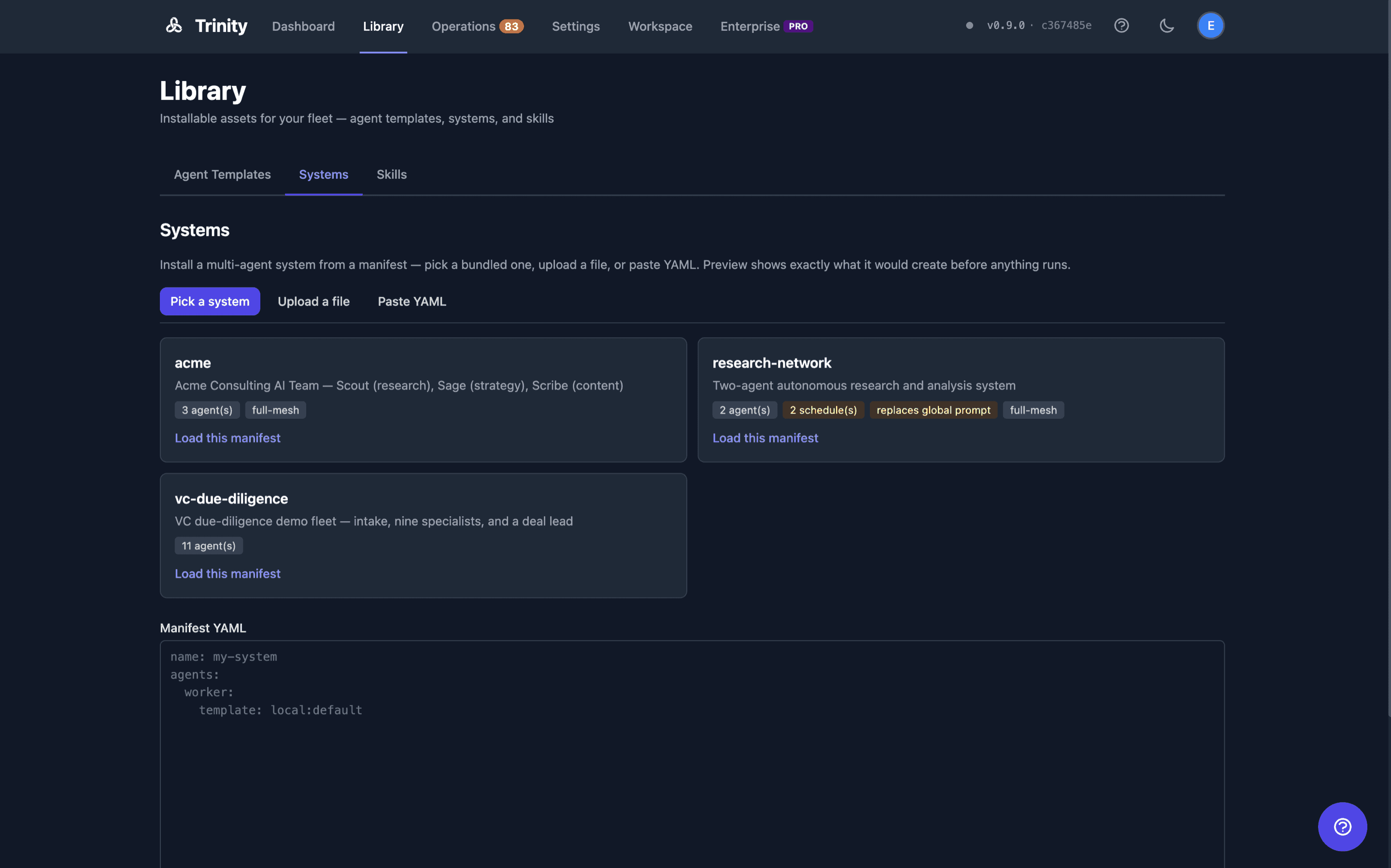
Then:
Click Preview. This validates the manifest without creating anything and shows you the agent names that would be created, which agents would be able to call which, and any schedules that would start. Fix anything listed under Blockers and preview again.
Click Deploy. Deploy stays disabled until you have previewed the current text — if you edit the manifest afterwards, preview again.
Things the Preview Will Make You Confirm
Some manifests do more than create agents, so Deploy is gated on an explicit checkbox when either applies:
It replaces the global system prompt. A top-level prompt: key overwrites the platform-wide instructions for every agent on your instance, not just the ones in the manifest.
It starts recurring schedules. A schedule is enabled unless you write enabled: false, so those agents begin running on a timer as soon as they deploy — consuming API budget without anyone asking them to.
Reading the Result
"All agents created" — everything worked.
"Some agents were created" — the rest are listed with the reason. Note that re-running the same manifest does not retry the missing ones; it creates a second, suffixed copy of the ones that already succeeded. Fix the cause and create the missing agents individually.
"No agents were created" — nothing was deployed, so there is nothing to clean up.
Things needing attention — the header only describes whether agents were created. Shared folders, permissions, schedules, tags and starting the agents are all best-effort, so read this section: a system can report "agents created" while none of its schedules were set up.
"Outcome unknown" — the request timed out or the server errored mid-deploy. The deployment may still be running. Check your agent list before retrying, because deploying twice creates duplicate agents.
Unrecognised keys are reported as warnings rather than silently ignored — at the top level and inside an agent entry alike (credentials:, skills:, and display_label: are the ones people try first; the manifest does not carry them). Preview and deploy resolve the same default resources, so a preview that passes on the fleet default will not fail at deploy because the two disagreed.
Two known limits of the preview, both deliberate:
Templates referenced as github: are only checked when you actually deploy, so a clean preview cannot promise a remote-template manifest will work.
Agent names are provisional. If a name is taken, Trinity appends _2, _3, and so on, and it re-checks at deploy time — so a name can shift if something else is created in between.
What a Manifest Describes
full-mesh (everyone can call everyone), orchestrator-workers (only an agent named orchestrator can call the rest), none (isolated), or explicit (a custom caller-to-target matrix).default_tags — tags applied to every agent in the system (the system name is always applied as a tag too).tags — additional tags applied to a specific agent, on top of default_tags.system_view — an optional block (name, icon, color, shared) that auto-creates a System View filtered to the system's tags, so the fleet shows up as one group in the Dashboard sidebar.Manifest Sketch
name: content-production
default_tags: [production, content-team]
system_view:
  name: Content Production
  icon: "📝"
  color: "#8B5CF6"
  shared: true
agents:
  orchestrator:
    template: github:YourOrg/orchestrator-agent
    resources: { cpu: "2", memory: "4g" }
    folders: { expose: true, consume: true }
    tags: [lead]
    schedules:
      - name: daily-planning
        cron: "0 9 * * *"
        message: "Create today's content plan"
  writer:
    template: local:scribe
    folders: { expose: true, consume: true }
    tags: [worker]
permissions:
  preset: orchestrator-workers
Deploy Result (Best-Effort by Default)
Deploy is best-effort / continue-on-error by default: if one agent fails to create, the rest still deploy. Read the response status field, not just the HTTP code:
| status | Meaning | HTTP |
|---|---|---|
| deployed | All agents created. | 200 |
| partial | Some agents failed; the survivors were still created and configured. | 200 |
| failed | Zero agents created. | 500 (the full report is the response body) |
| valid | Dry-run validation passed (nothing created). | 200 |
A partial deploy returns the survivors plus a failed[] list. Each entry carries {name, short_name, template, reason, status_code} so you can see exactly which agents failed and why. A total failure returns HTTP 500 with the same full report as the body — so always inspect status / failed[] rather than trusting the HTTP status alone.
Two deploy options control this:
dry_run — validate and preview only. Returns status: "valid" with the list of agents that would be created. Nothing is deployed.strict — restore the legacy abort-on-first-failure behavior. The first agent that fails aborts the whole deploy (re-raising with that failure's original status code).Redeploy caveat: re-running a manifest after a partial failure does not yet converge idempotently — it _N-suffixes the already-created agents (e.g. my-system-worker_2) instead of reusing them. Clean up the survivors first, or expect suffixed duplicates.
After Deploy: Reading, Restarting, and Exporting a System
Deploy is a one-shot recipe, but the deployed agents remain addressable as a system:
Membership is by tag, not by name. Deploy tags every member with the system name, and the post-deploy routes resolve membership from that tag. Only agents deployed before tagging existed fall back to the <system>-* name prefix, and even then an agent whose own tag claims a longer prefix is excluded — so restarting acme never touches the agents of a system named acme-extra.
Get (GET /api/systems/{name}) returns the members you can access with their permissions, shared folders, and real schedules.
Restart (POST /api/systems/{name}/restart, restart_system) stops and starts every member. It requires the creator role or above and is human-only: an agent-scoped API key is refused, because the per-agent start/stop routes only let an agent touch agents it spawned and a bulk restart would bypass that.
Export (GET /api/systems/{name}/manifest, get_system_manifest) writes a manifest you can deploy again. Permission edges pointing outside the system are dropped rather than exported as broken names, and the instance-wide platform prompt is never embedded as the manifest's prompt: — deploying the export elsewhere would otherwise overwrite that instance's prompt for every agent.
Default System on First Run
On a fresh install(no non-system agents yet), Trinity auto-seeds a bundled default system from a shipped manifest, so a new instance comes up with a running starter fleet — zero manual steps.
TRINITY_DEFAULT_SYSTEM_MANIFEST to disabled (or none / off / 0 / false).TRINITY_DEFAULT_SYSTEM_MANIFEST at your own manifest file path. Left unset, Trinity uses its bundled manifest.MCP Tools
| Tool | Description |
|---|---|
| deploy_system(manifest, dry_run?, strict?) | Deploy a system from a manifest. dry_run validates and previews without creating; strict restores abort-on-first-failure. Check the response status / failed[]. |
| list_systems() | List all deployed systems |
| restart_system(name) | Restart all agents in a system (creator role, human callers only — refused for an agent key) |
| get_system_manifest(name) | Export the system as a redeployable YAML manifest |
API Endpoints
| Endpoint | Method | Description |
|---|---|---|
| /api/systems/deploy | POST | Deploy a system from a YAML manifest (dry_run, strict in the body); creator role |
| /api/systems/manifests | GET | The bundled manifest catalogue shown under Pick a system (creator role) |
| /api/systems/manifests/{manifest_id} | GET | One bundled manifest's YAML and preview (creator role) |
| /api/systems | GET | List all deployed systems |
| /api/systems/{system_name} | GET | Get one system's agents, permissions, folders, and schedules |
| /api/systems/{system_name}/restart | POST | Restart all agents in the system (creator role, human-only) |
| /api/systems/{system_name}/manifest | GET | Export the system as a YAML manifest |
See the Backend API Docs for full request/response schemas.