Credential Management
Add, edit, and hot-reload credentials on agents without restarting them. Includes direct file injection, encrypted storage, OAuth flows, and subscription token management.
Overview
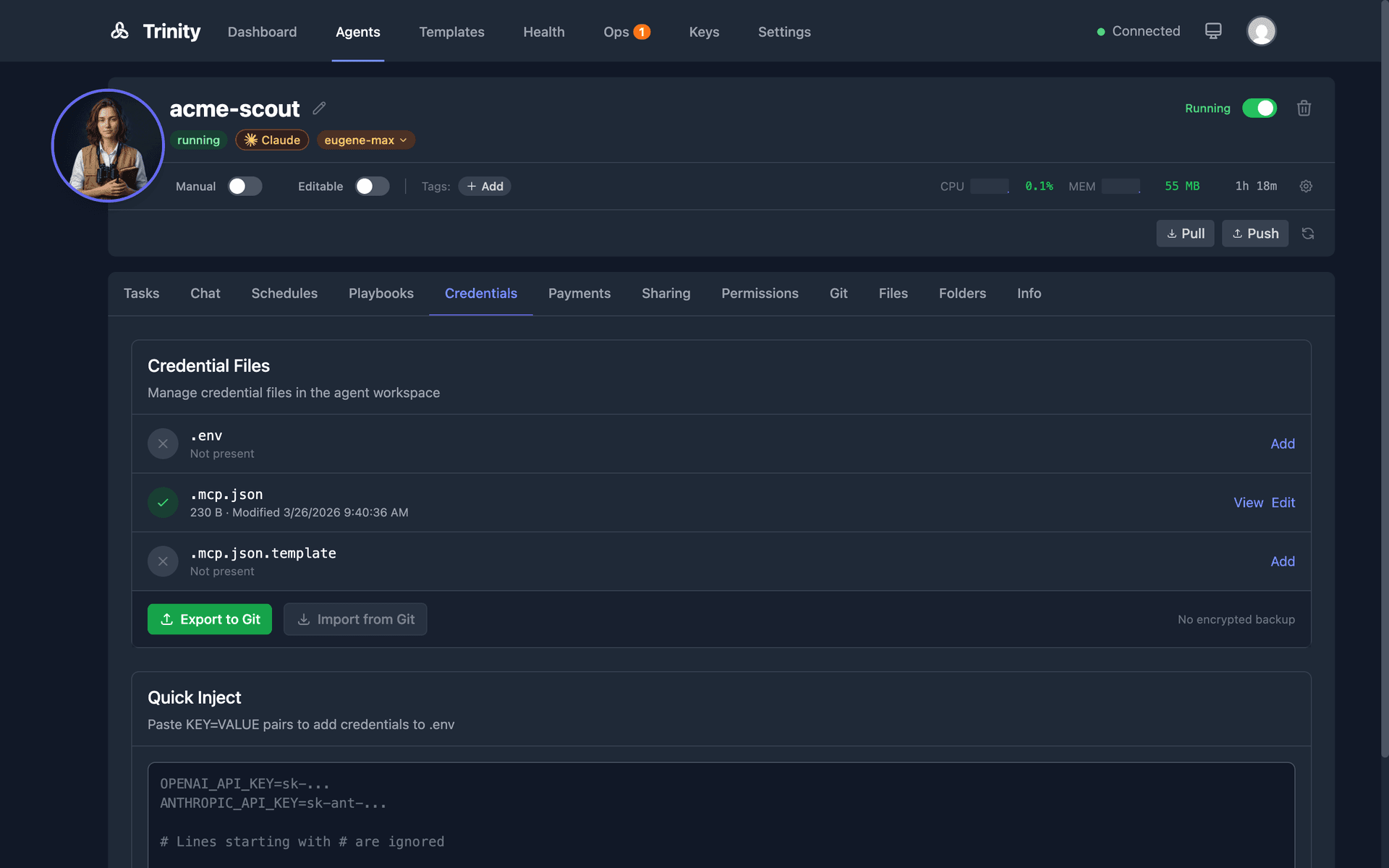
Trinity uses a direct file injection system. Credentials are written as .env (KEY=VALUE) and .mcp.json (generated from template) directly to the agent container.
A template says which credentials its agent needs in template.yaml: credentials: lists the variable names, and the optional sibling credential_setup: describes each one. The Setup Checklist on the Credentials tab is the per-variable view: what this agent needs, which are already set, and where to get the missing ones.
Credentials can be exported to encrypted .credentials.enc files (AES-256-GCM) for backup and import.
The Credential Vault is a platform-level store of named, encrypted credentials that an admin grants to agents, so an agent can fetch a shared secret by name at runtime instead of carrying its own injected copy. Additive to file injection. The vault itself is an enterprise capability; the MCP tools and the transcript scrub described below ship in every build.
The Setup Checklist
Open the agent detail page and click the Credentials tab. The checklist answers three questions per credential:
| Column | Where it comes from |
|---|---|
| What does this agent need? | The declaration in the agent's live workspace template.yaml — so a forked or hand-edited agent reports its actual requirements, not its original template's |
| Is it set? | A bounded probe of the agent's own .env, reporting key names that have a non-empty value. Values are never read or transmitted. |
| Where do I get it? | The template author's setup_url, rendered with a canonical host so the link's label can never disagree with its destination |
Fill in the values you have and submit — the checklist writes through the same owner-gated injection path as everything else on this tab.
The checklist renders even when the agent is stopped: you can see what an agent will need before starting it, with the live-status column honestly reported as unavailable. If the status probe fails, you are told so — a failed probe is never shown as “nothing configured”.
Reading this checklist is owner-only and human-only: it is an operator surface, and agent-scoped API keys are rejected.
Declaring Credentials in a Template
credentials:
  env_file:
    - OPENAI_API_KEY
  mcp_servers:
    slack:
      env_vars:
        - SLACK_BOT_TOKEN

credential_setup:
  - name: OPENAI_API_KEY
    title: OpenAI API key
    description: Lets the agent call OpenAI models directly.
    required: true
    secret: true
    setup_url: https://platform.openai.com/api-keys
credentials: is names-only and will never accept per-variable objects — that is what keeps older Trinity versions able to read a newer template. All the human-facing detail lives in credential_setup:, where each entry may carry title, description, required, secret, format, setup_url, and a non-secret default.
Two rules make the pair safe:
credential_setup: entry must name a variable that credentials: declares. An entry naming anything else is dropped with a named error; its valid siblings survive.secret defaults to true and setup_url must be https with no embedded userinfo, so a credential is masked until an author says otherwise and a setup link cannot impersonate a vendor domain.
The full contract is published at docs/schemas/trinity-agent-credentials.schema.json.
Adding Credentials
Add credentials using one of four methods on the Credentials tab:
• Setup checklist — Per-variable inputs, with descriptions and setup links.
• Quick Inject — Paste .env-style KEY=VALUE pairs; they are merged into the agent's .env.
• Upload Credential File — Upload one file to a destination path (service-account JSON, TLS certs and keys, kubeconfig, SSH keys — see Which Files Can Be Injected).
• Import from Git — Decrypt and inject the .credentials.enc backup in the agent's workspace; Export to Git writes it.
Hot-reload — Paste or edit credentials on a running agent. The .env file is updated and .mcp.json is regenerated immediately. No restart needed.
Credential Pattern
The credential file pattern inside each agent:
.env                    # Source of truth (KEY=VALUE)
.mcp.json.template      # Template with ${VAR} placeholders
.mcp.json               # Generated at runtime from template + .env
Which Files Can Be Injected
Injection accepts a curated set of credential file types, not just .env. Anything outside the allow-list — and anything on the deny-list — is rejected with a 400.
Allowed
| Path | Typical use |
|---|---|
| .env, .credentials.enc, .mcp.json | Core credential files (workspace root only) |
| .config/gcloud/** | Google Cloud SDK credentials / service-account JSON |
| .kube/config | Kubernetes kubeconfig |
| *.pem, *.key, *.crt, *.cert, *.p12, *.pfx | TLS certificates and private keys |
| .ssh/id_* | SSH key pairs (keys only — not authorized_keys or config) |
Always blocked (deny takes precedence): anything executed or sourced at startup — shell startup files (.bashrc, .profile, .zshrc, …), agent instruction files (CLAUDE.md, AGENTS.md, .claude/**), .mcp.json.template, .ssh/authorized_keys / .ssh/config, .git/** and .gitconfig, anything under bin/, plus absolute paths and .. traversal. .mcp.json content is structurally validated before it is written.
Binary credentials (certificates, keystores, service-account bundles) round-trip as base64 via the files_b64 field on the inject endpoint.
Export and Import
Export creates an encrypted .credentials.enc file for backup. It captures the full injected credential set — every allow-listed credential file present in the agent (discovered live), text and binary alike — not just .env and .mcp.json. Import decrypts and injects credentials from an encrypted file; the archive is re-validated against the same path policy on the way in. Auto-import on startup is not currently available. The agent's startup script still tries to import a .credentials.enc it finds without a .env, but the internal route it calls no longer exists, so the attempt is logged as “Could not auto-import credentials” and the agent starts without them. Use Import from the Credentials tab (or the import endpoint) instead.
Credential values are never logged. All operations use structured logging with values masked.
Rotating the Encryption Key
The platform encryption key (CREDENTIAL_ENCRYPTION_KEY) can be rotated online, with zero downtime and no data loss:
Back up the database (scripts/deploy/backup-database.sh).
Generate a new key: python3 -c "import secrets; print(secrets.token_hex(32))".
In .env, set the new key as CREDENTIAL_ENCRYPTION_KEY and move the previous key to CREDENTIAL_ENCRYPTION_KEY_SECONDARY (a decrypt-only fallback).
Restart the backend — existing secrets keep decrypting via the secondary key; all new writes use the new key.
Re-encrypt persisted secrets onto the new key: docker compose exec backend python scripts/deploy/rotate-credential-key.py (dry-run), then re-run with --apply.
Remove CREDENTIAL_ENCRYPTION_KEY_SECONDARY from .env and restart.
The sweep re-encrypts every database-persisted token (subscriptions, channel bot tokens, GitHub PATs, payment credentials). Per-agent .credentials.enc files re-encrypt onto the new key on their next credential operation; they keep opening via the secondary key until then. Full runbook: docs/migrations/CREDENTIAL_KEY_ROTATION.md.
Credential Vault
The vault holds named credentials once, encrypted (AES-256-GCM), and grants them per agent. An agent asks for a granted value by name at runtime; nothing is written into its .env.
As an admin, open Settings → Vault (the tab appears only on an instance where the vault is enabled). Click Add a credential, then open its Grants and Grant it to the agents that may read it; Revoke takes a grant back and Delete removes the entry. Values are never shown again after you save them. After rotating the platform encryption key, the Key-rotation maintenance disclosure re-encrypts every entry; entries encrypted under a key the instance no longer has are counted so you can restore the previous key as CREDENTIAL_ENCRYPTION_KEY_SECONDARYand re-encrypt. Managing entries and grants requires an administrator signed in interactively — an API key of any scope is refused.
From inside an agent, two MCP tools exist in every build:
list_available_credentials() — the names, descriptions, and kinds this agent has been granted. Never a value. An empty list means nothing has been granted.fetch_credential(name, execution_id?) — the plaintext value of one granted credential. Deny-by-default: an ungranted or unknown name returns not_granted: true, and there is no way to discover names you were not granted.Where the vault is not available — an instance without the entitlement, or a call made without an agent-scoped key — the tools do not error. list_available_credentials returns enabled: false with a reason, and fetch_credential returns success: false with a flag that distinguishes not granted, needs an agent key, and not available on this platform.
What happens to the value. The credential reaches the agent live, as a plain tool result, because that is what the agent needs to do its work. Trinity then scrubs that value out of everything it persists from the turn — the transcript, the execution log, the response and error columns, notifications, channel completion reports, and the cached response replayed to duplicate requests — replacing every occurrence (raw, JSON-escaped, and base64) with ***REDACTED***. The scrub runs alongside the existing pattern-based sanitizer, not instead of it. Two honest limits: it covers what the platform stores, not the agent's own in-container session files, and it applies to values fetched within the last 24 hours.
Platform-Level Credentials
The credentials the platform itself holds — the Anthropic API key, platform GitHub PAT, Resend email key and Gemini key (Settings → Integrations → API Keys; see Platform Keys), and the Slack app token, client secret, and signing secret (Settings → Integrations → Slack Integration) — are stored AES-256-GCM encrypted at rest, never in cleartext. An install upgraded from an older release re-encrypts a leftover cleartext row the first time it is read and deletes the cleartext copy, so a restored old backup or a direct database write cannot leave a plaintext value behind for long.
The generic settings route refuses to store a secret in the clear: PUT /api/settings/{key} for any of those keys, or for any credential-shaped key (*_api_key, *_token, *_secret, *_pat, *_password, *_credentials), answers 422 and names the dedicated route to use. The Slack client IDis a reviewed exemption — it is a public OAuth identifier that appears verbatim in the authorize URL.
Encryption protects the database going forward only. Backups taken before the upgrade still hold the plaintext values, so an upgrading install should rotate those tokens — runbook: SECRET_SETTINGS_ENCRYPTION_2026-08.md.
Credential API
| Endpoint | Method | Description |
|---|---|---|
| /api/agents/{name}/credential-requirements | GET | Per-variable checklist: declaration joined against live set/missing status. Owner-only and human-only; rate-limited. Returns a degraded body (not an error) for a stopped agent. |
| /api/agents/{name}/credentials/status | GET | Check credential files |
| /api/agents/{name}/credentials/inject | POST | Inject files directly |
| /api/agents/{name}/credentials/export | POST | Export to .credentials.enc |
| /api/agents/{name}/credentials/import | POST | Import from encrypted file |
| /api/agents/{name}/credentials/env-drift | GET | Per-variable drift between the agent's .env and the environment its running process actually has (variable names only). Owner-only and human-only; a stopped agent returns agent_not_running rather than an error. |
| /api/credentials/encryption-key | GET | The platform encryption key, for decrypting an exported .credentials.enc elsewhere. Admin-only |
The inject, export, import, checklist, and drift routes are owner-only and human-only— an agent-scoped API key is rejected, so a prompt-injected agent cannot read or rewrite its own credential set.
MCP Tools
get_credential_status(name) — Check credential file status.inject_credentials(name, credentials) — Inject credentials into the agent.export_credentials(name) — Export credentials to encrypted file.import_credentials(name) — Import credentials from encrypted file.get_credential_encryption_key() — Retrieve the encryption key.list_available_credentials() / fetch_credential(name) — Read a granted vault credential at runtime (see Credential Vault above).OAuth Credentials
Trinity exposes a small OAuth2 helper API for four providers — Google, Slack, GitHub, and Notion — that builds a provider authorization URL from client credentials configured on the backend. It does not complete the OAuth exchange for you: Trinity currently ships no handler for the callback and no OAuth button on an agent's Credentials tab. The practical way to give an agent a provider token today is to obtain it yourself and add it through the Credentials tab as KEY=VALUE in .env, where the agent's .mcp.json.template picks it up through ${VAR} placeholders.
Platform-level Slack installation is a separate, complete OAuth flow (Install to Workspace in the Slack Integration settings section). Full details, endpoints, and scopes: OAuth Credentials.
Subscription Credentials
Share Claude Max/Pro subscription tokens across multiple agents, with automatic assignment, live usage and headroom readings, early warnings before a weekly limit, and automatic switching when a subscription is rate-limited — so a turn completes on another subscription instead of failing.
Key Concepts
claude setup-token, prefix sk-ant-oat01-) registered with Trinity. Stored encrypted (AES-256-GCM).Registering a Subscription
Run claude setup-token on your own machine to get a long-lived token (about a year).
In Trinity, open Settings → Integrations → Claude Subscriptions.
Under Add Subscription, enter a Name, choose a Type, and paste the Token.
Click Register Subscription. Click a subscription row to expand it and assign or remove agents.
Encryption Requirement
CREDENTIAL_ENCRYPTION_KEY must be set in .env. This is auto-generated by start.sh on fresh deployments. If missing, an Encryption not configured banner appears in the Claude Subscriptions section, the Register button is disabled, and the API returns 503.
Usage and headroom readings, weekly-limit alerts, the full switching sequence, the settings reference, and the complete API are on Subscription Credentials.
Security Best Practices
.env or .mcp.jsonto git — only commit templates and encrypted filesCREDENTIAL_ENCRYPTION_KEY separately from encrypted credential files