Authentication
Trinity supports three authentication methods: admin password login, email verification login, and MCP API keys. All authenticated API calls require a Bearer token in the Authorization header.
Concepts
- JWT Token -- All authenticated API calls require a Bearer token in the
Authorizationheader. Tokens use HS256 signing, are valid for 7 days, and are invalidated when the backend restarts. Logging out revokes the token immediately (a server-side blacklist holds it until its natural expiry) — an exfiltrated token dies with the session instead of living out its 7 days. - MCP API Key -- Keys prefixed with
trinity_mcp_also work as Bearer tokens. Used for MCP server authentication, agent-to-agent communication, and machine integrations. Every key has a scope that bounds what it can reach — see MCP key scopes. - Agent-Scoped Key -- An MCP API key restricted to a specific agent, used for agent-to-agent calls.
Admin Login
/api/token
Admin login using form-encoded POST (not JSON). Returns a JWT bearer token. The username field accepts admin or the admin's registered email address.
curl -s -X POST http://localhost:8000/api/token \
  -d 'username=admin&password=your-password'

# Response
{"access_token": "eyJ...", "token_type": "bearer"}
Email Login (2-step)
/api/auth/email/request
Step 1: Request a verification code sent to the user's email.
curl -X POST http://localhost:8000/api/auth/email/request \
  -H "Content-Type: application/json" \
-d '{"email": "user@example.com"}'/api/auth/email/verify
Step 2: Verify the code and receive a JWT token on success.
curl -X POST http://localhost:8000/api/auth/email/verify \
  -H "Content-Type: application/json" \
  -d '{"email": "user@example.com", "code": "123456"}'

# Response
{"access_token": "eyJ...", "token_type": "bearer"}
The verify step re-checks the email allow-list before redeeming a code. An address that is not allow-listed gets the same 401 as a wrong code, whatever channel minted the code.
The same email code can sign you in from inside an MCP client without any key — see MCP Integration → Signing in with an email code.
Second Factor Pending
If the account requires two-factor authentication, a correct password returns HTTP 403 — the login is not complete, so no session is issued:
{"detail": "mfa_required", "mfa_required": true, "mfa_enrolled": true,
 "enrollment_required": false, "challenge_token": "eyJ..."}
There is no access_token and no token_type. Finish the login at /api/enterprise/2fa/login/verify (or /login/enroll/start + /login/enroll/confirm if the account has not enrolled yet) using the challenge_token — that is what returns the real token.
Three outcomes, three status codes:
| Status | Meaning |
|---|---|
| 200 | Session issued — access_token present |
| 403 | Credentials correct, second factor required — no session |
| 401 | Credentials rejected — no session, no challenge |
The email route (/api/auth/email/verify) is not an OAuth2 grant and keeps its 200 for the same case, simply omitting access_token.
Scripts and unattended clients: check the status, and check for the token.
resp=$(curl -s -w '\n%{http_code}' -X POST http://localhost:8000/api/token \
  -d 'username=admin&password=your-password')
code=$(echo "$resp" | tail -1)
body=$(echo "$resp" | sed '$d')

if [ "$code" = "403" ]; then
  # Don't echo $body — a challenge carries a short-lived challenge_token,
  # and script stderr often ends up in CI logs.
  echo "login needs a second factor this script cannot complete" >&2
  echo "use an MCP API key (Settings -> MCP Keys) instead" >&2
  exit 1
fi

token=$(echo "$body" | jq -r '.access_token // empty')
[ -n "$token" ] || { echo "login issued no session" >&2; exit 1; }
Two-factor authentication applies as soon as the account enrols or an administrator enables the role policy — including before anyone has enrolled — so an unattended credential can start receiving 403s without its own configuration changing. For automation, prefer an MCP API key (trinity_mcp_*), which is not subject to the second-factor flow.
Using Tokens
Include the token in the Authorization header for all authenticated requests. MCP API keys (trinity_mcp_*) can be used in the same way as JWT tokens.
curl -H "Authorization: Bearer <token>" \
  http://localhost:8000/api/agents
MCP key scopes
Every MCP key carries a scope. The scope is fixed at creation and decides what the key can reach:
| Scope | What it can reach | How it is created |
|---|---|---|
| user | The owner's full role, including admin. Every write, every MCP tool. Never expires. | Any user, for themselves — Settings → MCP Keys → Create API Key (the default; admins see it as the Standard choice under Key scope) |
| agent | Its own agent (heartbeats, reports, result callbacks) plus whatever its owner has shared with it; agent-to-agent calls are governed by the permissions matrix. Never satisfies an admin gate. | Minted automatically when an agent is created and injected into the container |
| system | The platform's own system agent; bypasses agent permission checks | Minted for trinity-system only |
| connector | Consumption-only, bound to one agent: its playbooks and chat, nothing else | Minted from the agent's Expose via MCP panel (POST /api/agents/{name}/connector/key, owner only); the secret is shown once |
| portal_delegate | Exactly one route — exchanging an end-user email for a Workspace session, so a trusted backend can act as that person. Every other path is refused. | Admin, human-only — the Portal delegate choice on the create-key form; the exchange endpoint requires an entitlement |
| ops | Read-only, route-fenced: GET /api/version, fleet status/health/schedules/alerts/costs/auth-report under /api/ops/, GET /api/monitoring/status, host and container telemetry, the agent roster, execution stats and slots, execution history and the live log stream, subscription usage. Every write and every other endpoint is refused; it gets no MCP tools and cannot open the event stream. | Admin, from an interactive browser session only — the Ops (read-only) choice on the create-key form. No key of any scope can mint one |
The keys page badges non-standard scopes (Agent, Ops (read-only), System, Portal Delegate) so a bounded key is never mistaken for a personal one. Requesting any other scope on POST /api/mcp/keys is a 400.
A key is a narrowing of its owner, never a decoupling. An ops key is the bounded machine credential for a monitoring dashboard that must keep working under enforced two-factor authentication (key validation never passes through the second-factor flow). It still requires its owner to hold the admin role at call time: demoting or suspending the owner stops the key. Mint ops keys under a dedicated service admin account, and revoke-and-re-mint any ops key held by a departing admin.
Every key-authenticated call is attributed to the key. The audit log records the key id, key name, and scope beside the owner, and GET /api/audit-log filters on mcp_key_id and mcp_scope — see Audit Trail.
What a Key Is Not
An MCP key resolves to the user who owns it, carrying that user's role. On a default installation where the admin owns the agents, an agent's injected key would otherwise satisfy a plain "admin only" check.
Two gates stop that:
- Admin gates are an allowlist over scopes. Only a browser session, a
userkey, and thesystemkey can pass an admin-only endpoint;agent,connector,portal_delegate,opsand any scope invented later are refused. An individual read endpoint may opt theopsscope in — the ops routes above do — but the owner's admin role is still checked afterwards. - Endpoints whose blast radius is operator-scale require a human caller in addition to an admin role — API keys are rejected there regardless of the owner's role.
The human-only gate applies to:
- Approving an oversized data-retention deletion
- Turning usage sharing on or off, or dismissing its consent ask
- Restarting or reinitializing the system agent
- Registering, editing, or syncing a skill source
- Reading an agent's credential checklist
- Reading, verifying, or rotating an agent's own MCP key (these additionally require an interactive browser session)
- Minting an
opskey (interactive browser session) or aportal_delegatekey - Binding an agent to a GitHub repository
- Writing an agent evaluation
- Adding or removing organizational (
dept-*/reports-to-*) tags
If you hit a 403 on one of these from an automation, that is the gate working as intended — perform the action from the UI or with a user session.
WebSocket Authentication
Two real-time endpoints, two credentials:
| Endpoint | Credential | Who sees what |
|---|---|---|
| /ws?ticket=<ticket> | A single-use, 30-second ticket from POST /api/ws/ticket (JWT in Authorization). The browser uses this; an MCP client never opens /ws. | Scoped to the agents the ticket's user can access: an event naming agents is delivered only when every agent it names is one you may access. Admins see everything. Both live delivery and the reconnect replay are filtered. An unknown or suspended account is closed with code 4001. |
| /ws/events?token=trinity_mcp_… | An MCP key in the query string (Trinity Connect and external listeners) | Events for the agents the key's owner can access. Only user, agent (non-ephemeral agents only) and system keys may open it; ops, connector and portal_delegate keys are closed with code 4003. |
API Endpoints
| Endpoint | Method | Auth | Description |
|---|---|---|---|
| /api/token | POST | None | Admin login (form-encoded) |
| /api/auth/email/request | POST | None | Request email verification code |
| /api/auth/email/verify | POST | None | Verify email code, returns token |
| /api/auth/mode | GET | None | Get auth mode configuration |
| /api/auth/logout | POST | JWT | Revoke the current token immediately (idempotent; no-op for MCP keys) |
| /api/auth/validate | GET | JWT | Validate current token (rejects revoked tokens) |
| /api/users/me | GET | JWT | Get current user info |
| /api/setup/status | GET | None | First-time setup status |
| /api/setup/admin-password | POST | None | First-run admin creation — provisions the first admin only; 403 whenever a usable admin account already exists, whatever the setup flag says |
| /health | GET | None | Health check (503 while schema migrations are incomplete) |
| /api/access/request | POST | None | Public self-signup — adds the submitted email to the login allow-list. Disabled by default (403) until an admin enables public access requests |
| /api/mcp/keys | POST | JWT | Create MCP API key — body {name, description?, scope?}; scope defaults to user, admins may request portal_delegate or ops |
| /api/mcp/keys | GET | JWT | List MCP API keys |
| /api/mcp/keys/{id}/revoke | POST | JWT | Revoke (deactivate) an MCP API key |
| /api/mcp/keys/{id} | DELETE | JWT | Permanently delete an MCP API key |
| /api/ws/ticket | POST | JWT | Mint a single-use 30-second ticket for /ws (503 when Redis is unavailable) |
MCP API Keys
/api/mcp/keys
Create a new MCP API key. Keys are prefixed with trinity_mcp_. Body: {name, description?, scope?}; scope defaults to user; admins may request portal_delegate or ops (any other scope is a 400). See MCP key scopes.
curl -X POST -H "Authorization: Bearer <token>" \
  -H "Content-Type: application/json" \
  -d '{"name": "my-key", "description": "CI integration"}' \
  http://localhost:8000/api/mcp/keys

# Response
{
  "id": "key_abc123",
  "name": "my-key",
  "key": "trinity_mcp_...",
  "created_at": "2026-03-26T12:00:00Z"
}/api/mcp/keys
List all MCP API keys. Key values are redacted in list responses.
/api/mcp/keys/:id/revoke
Revoke (deactivate) an MCP API key. The key immediately stops working for authentication but stays listed.
/api/mcp/keys/:id
Permanently delete an MCP API key.
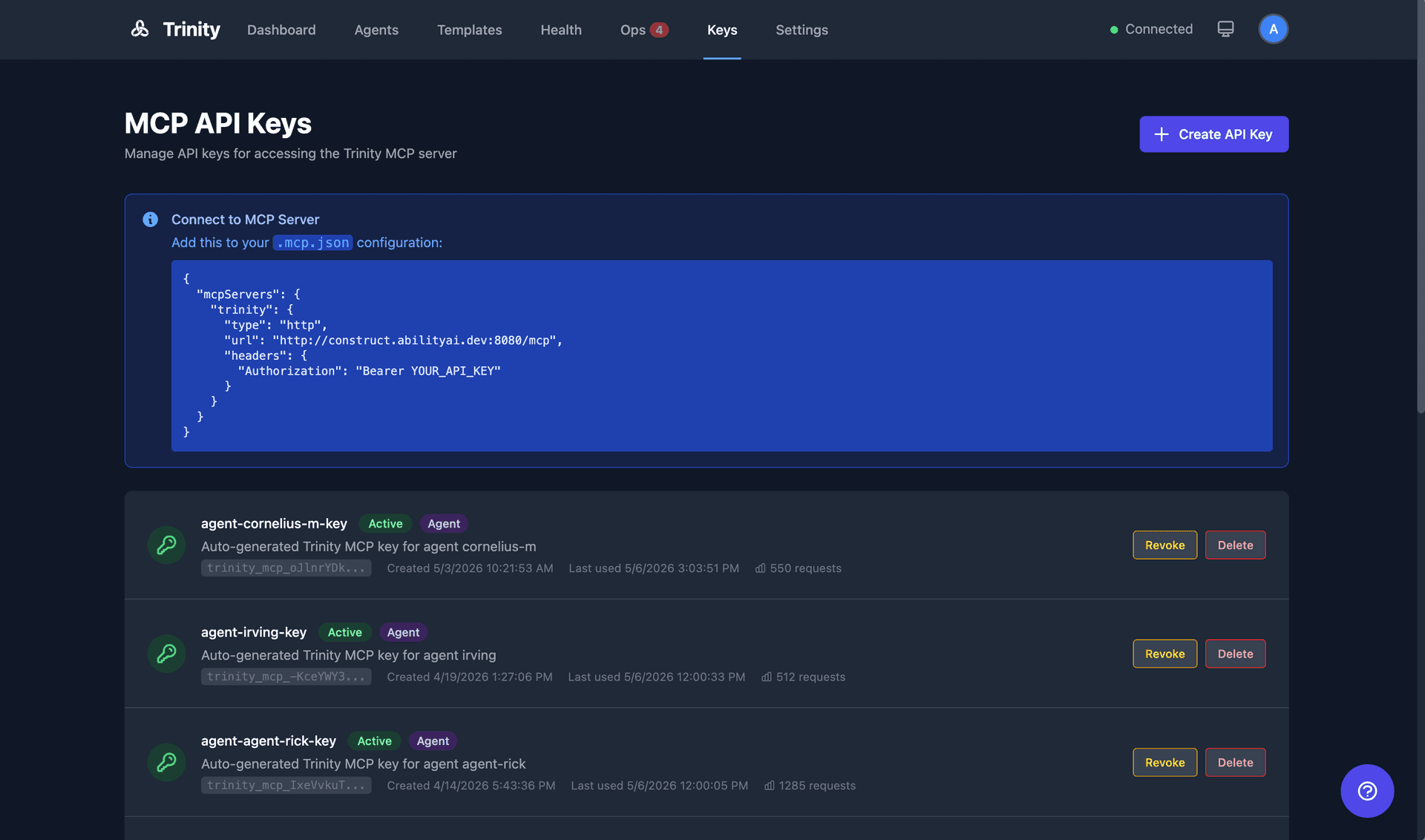
MCP API keys management in the Trinity dashboard
Unauthenticated Endpoints
The following endpoints do not require a Bearer token:
/api/auth/mode/api/auth/email/request/api/auth/email/verify/api/access/request/api/setup/status/api/setup/admin-password/api/token/healthFull interactive API docs are available at http://localhost:8000/docs when running locally (Swagger UI). See also the MCP Integration guide for MCP API key usage and agent-to-agent auth, Roles and Permissions for what each role may do, and the Audit Trail for where key-attributed actions are recorded.