MCP Integration
Trinity's MCP server exposes 129 tools across 33 modules for agent orchestration via the Model Context Protocol, enabling programmatic control from Claude Code, other MCP clients, or agent-to-agent communication. 124 of them are the operator tool set; three consumption-only tools are visible only to connector keys, and two sign-in tools are registered only when inline email auth is enabled. A few operator tools are enterprise-gated and return "disabled" (or a not available result) where not entitled.
From Zero to Deployed AI Agent — MCP setup
Apr 2026
Overview
The Model Context Protocol (MCP) is an open standard for tool-based AI integrations. Trinity implements an MCP server using FastMCP with Streamable HTTP transport on port 8080. API keys authenticate access: they are generated under Settings → MCP Keys and sent via the Authorization: Bearer header.
Agent-scoped keys are keys Trinity mints for each agent automatically (its Trinity access key, visible on the agent's Settings tab) so the agent can call the platform as itself. You do not create these by hand; the keys you create yourself are user-scoped, ops, or portal_delegate — see Authentication.
Authentication
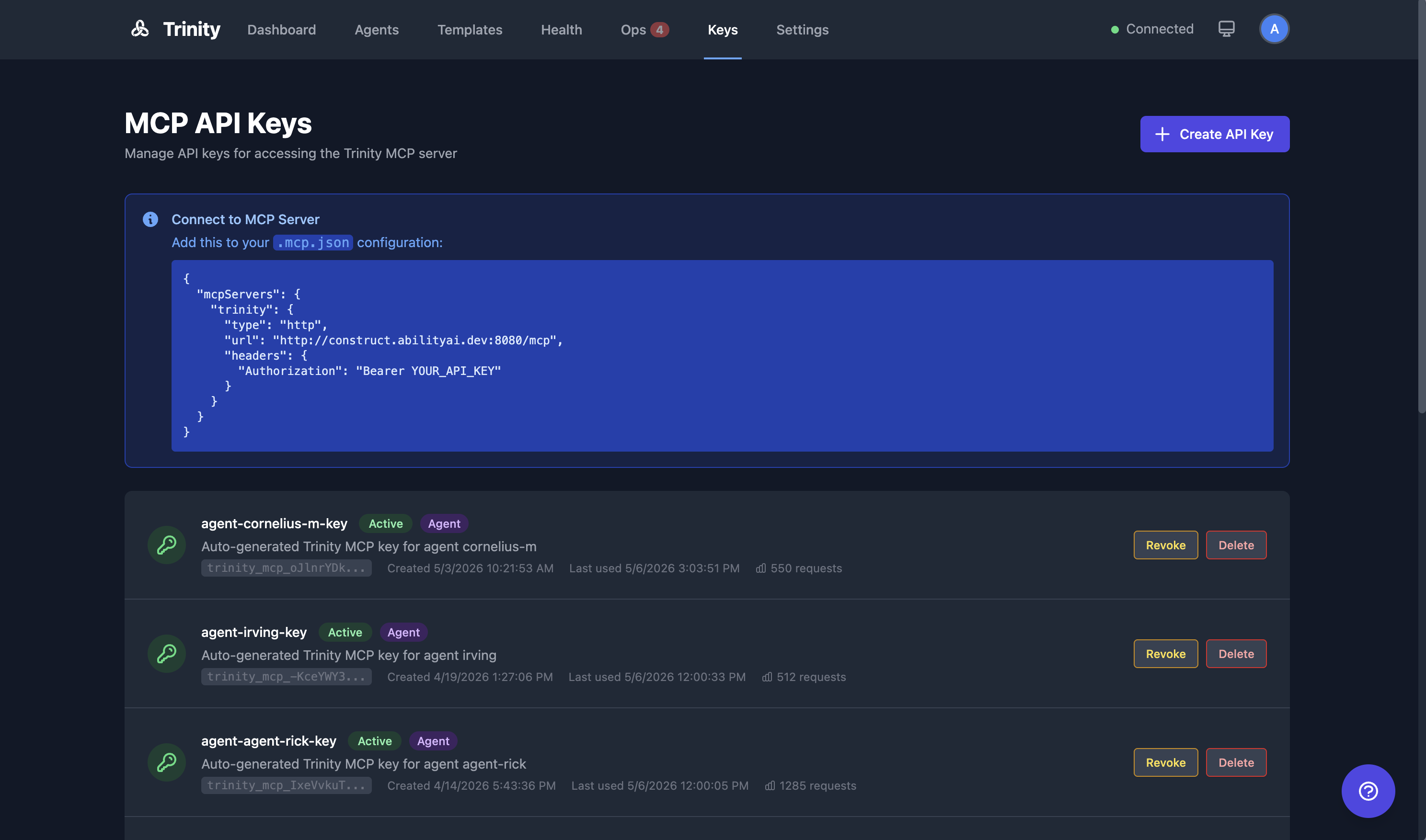
Go to Settings → MCP Keys.
Click Create API Key, name it, and choose a Key scope — Standard for your own use, or one of the bounded scopes.
Copy the generated key (prefixed trinity_mcp_*).
Use the key as a Bearer token in the Authorization header.
Signing in with an email code instead of a key
If your admin has enabled inline authentication, you can connect with no API key at all and sign in from inside your MCP client:
Connect with a keyless connector configuration.
Call request_login(email) — a 6-digit code is emailed to you.
Call verify_login(code).
You can then use the exposed playbooks of every agent shared with that email. This mirrors the /login flow that Telegram and WhatsApp already use.
Two things to know: the login binds a session, not a key — nothing is written to disk and you are never handed a trinity_mcp_* token. And MCP sessions are per-connection, so restarting your client means logging in again.
Inline authentication is off by default (MCP_INLINE_AUTH_ENABLED). Operators enabling it should set INTERNAL_API_SECRET explicitly rather than relying on its fallback.
Connecting from Claude Code
Add Trinity as an MCP server in your Claude Code configuration:
{
  "mcpServers": {
    "trinity": {
      "type": "http",
      "url": "http://localhost:8080/mcp",
      "headers": {
        "Authorization": "Bearer <your-api-key>"
      }
    }
  }
}
Which URL to use
http://localhost:8080/mcp — the MCP server's own published port.https://your-domain.com/mcp. The frontend proxies /mcp to the MCP server, so an install that exposes only ports 80/443 (a firewalled host, a one-click cloud image) still serves MCP without opening port 8080.The URL Trinity advertises — in the MCP Keys page's connection snippet and in an exposed agent's Copy connection config — is auto-detected from the request host as http://<host>:8080/mcp. On an 80/443-only install, an admin sets the real one under Settings → MCP Keys → MCP Server URL (it must end in /mcp); Auto-detect there shows what would be advertised otherwise.
Tool Categories
The MCP server organizes its tools into these modules:
| Module | Tools | Description |
|---|---|---|
| agents.ts | 22 | Agent lifecycle, credentials, SSH, local deploy, GitHub sync, per-agent PAT, runtime-data export/import, compatibility report |
| chat.ts | 4 | chat_with_agent, get_chat_history, get_agent_logs, fan_out — chat and parallel dispatch, all gateway-timeout safe |
| executions.ts | 4 | list_recent_executions, get_execution_result, get_fan_out_result, get_agent_activity_summary — execution queries, polling for async tasks and fan-out batches, activity monitoring |
| schedules.ts | 8 | Schedule CRUD (including retries, post-run validation and Workspace delivery) and execution history |
| skills.ts | 9 | Skill management and assignment, plus the skill-runner tools run_skill and list_runnable_skills (enterprise-gated — return "disabled" in community builds) |
| tags.ts | 5 | Agent tagging |
| systems.ts | 4 | deploy_system, list_systems, restart_system, get_system_manifest — see System Manifest |
| subscriptions.ts | 6 | Subscription management |
| monitoring.ts | 3 | Fleet health |
| nevermined.ts | 4 | Payment configuration |
| notifications.ts | 1 | send_notification — agent-to-platform notifications (alert, info, status, completion, question) |
| events.ts | 4 | Agent event pub/sub |
| docs.ts | 2 | get_agent_requirements, ask_trinity — agent documentation and grounded Q&A about Trinity |
| channels.ts | 2 | Channel group discovery + proactive group messaging (Telegram and Slack) |
| messages.ts | 1 | Proactive user messaging by verified email |
| voice.ts | 1 | send_voice_reply — speak one reply of the current channel turn as a voice note (see Voice Replies) |
| files.ts | 1 | share_file — publish file to a signed download URL |
| memory.ts | 1 | write_user_memory — per-user memory blob, isolated server-side |
| loops.ts | 3 | run_agent_loop, get_loop_status, stop_loop — sequential bounded task loops |
| voip.ts | 1 | call_user — outbound phone call (flag-gated, requires a per-agent voice binding) |
| operator_queue.ts | 3 | list_operator_queue, get_operator_queue_item, respond_to_operator_queue — read and resolve Operating Room queue items |
| reminders.ts | 3 | set_reminder, list_reminders, cancel_reminder — durable one-shot deferred self-triggers |
| rooms.ts | 5 | create_room, list_rooms, read_room, post_to_room, close_room — multi-agent rooms (see Rooms) |
| canvas.ts | 5 | set_canvas, patch_canvas, get_canvas, list_canvases, clear_canvas — the agent's durable render surface in the Workspace (see Agent Canvas) |
| git.ts | 6 | Deterministic git operations — status, sync, log, pull, sync-state, and the destructive reset-to-main recovery |
| pipelines.ts | 2 | Read-only introspection of an agent's self-published pipelines |
| reports.ts | 3 | report, list_reports, get_report — publish a structured report and read reports back (see Agent Reports) |
| a2a.ts | 7 | A2A management plane — per-agent exposure and card, inbound allow-list, outbound endpoint registry (entitlement-gated; see A2A Protocol) |
| a2a_call.ts | 2 | call_a2a_agent, get_a2a_task — task a registered external A2A agent by endpoint name and poll it |
| credential_vault.ts | 2 | list_available_credentials, fetch_credential — pull a granted vault credential by name at runtime (see Credential Management) |
| connector.ts | 3 | list_playbooks, run_playbook, ask — the consumption-only set a connector key sees; operator tools stay hidden from connector keys |
| auth.ts | 2 | request_login, verify_login — registered only when inline email auth is on, advertised only to keyless sessions |
Dedicated Agent Tools (Expose via MCP)
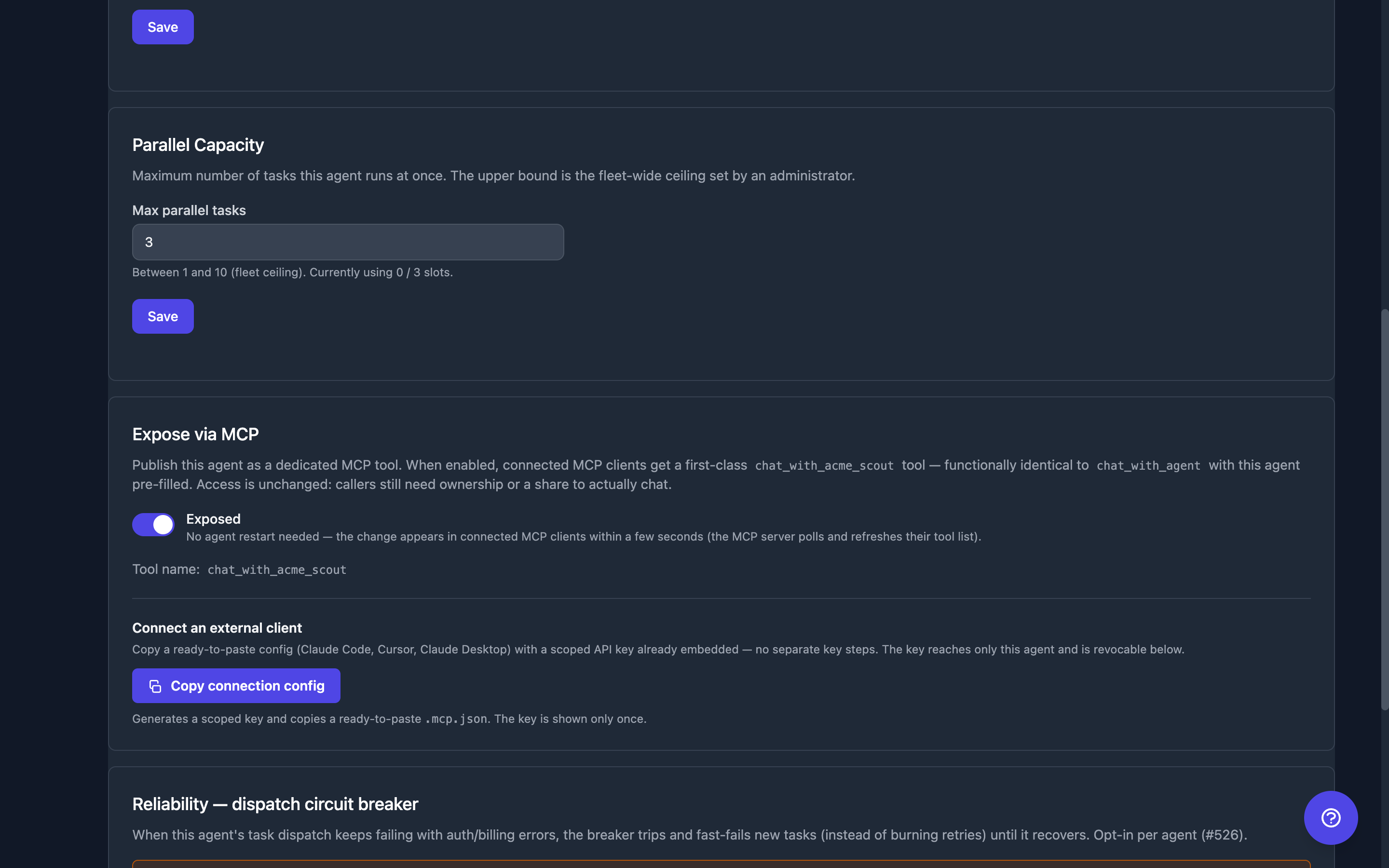
An owner can publish an agent as its own first-class MCP tool. On the agent's Settings tab, the Expose via MCP section has a toggle; when enabled, the MCP server registers a dedicated chat_with_<slug>tool (the slug is derived from the agent name, with a short suffix on name collisions — the resolved tool name is shown next to the toggle).
chat_with_agent with the agent name pre-filled, including idempotency and timeout handling..mcp.json. An existing key is never shown again — Regenerate & copy embeds a fresh one.| Endpoint | Method | Description |
|---|---|---|
| /api/agents/{name}/mcp-exposed | GET | Exposure flag + the resolved tool_name |
| /api/agents/{name}/mcp-exposed | PUT | Toggle exposure ({"enabled": true}, owner-only) |
Each Agent's Own MCP Key
Every agent carries its own agent-scoped key, injected into its container so it can call Trinity's MCP server. That key is what makes the agent-to-agent permission matrix apply — a container carrying a user-scoped key would operate with the owner's identity and bypass the matrix entirely.
The agent's Settingstab surfaces this key so you can see and repair it. You never see the secret itself — only metadata and a health state:
| State | Meaning |
|---|---|
| active | Healthy and in recent use |
| never_used | The key exists but the agent has never authenticated with it |
| stale | The key hasn't been used since well before the agent's last execution — the agent is probably authenticating as something else |
| missing | No active agent-scoped key exists for this agent |
| env_absent | The container has no Trinity MCP key configured |
| env_mismatch | The container's key doesn't match any active key for this agent |
| exempt | The system agent, which uses a system-scoped key by design |
Two actions:
Trinity also self-heals: if an agent starts with a missing or mismatched key, the start path re-mints and re-injects one automatically.
These routes are owner-only and reachable only from an interactive (browser) session — API keys of any scope are rejected, because rotating a credential should not be doable with the credential itself.
| Endpoint | Method | Description |
|---|---|---|
| /api/agents/{name}/mcp-key | GET | Key metadata and health state (never the secret) |
| /api/agents/{name}/mcp-key/verify | POST | Probe the container's actual configuration |
| /api/agents/{name}/mcp-key/regenerate | POST | Rotate and deliver a new key |
Refused Calls
When a tool refuses a call because the caller may not reach the target agent, it returns a result rather than a transport error: {"error": "Access denied", "reason": "..."} (some tools also carry success: false). When an agent-scoped key names an agent it has no permission for, chat_with_agent, fan_out and run_agent_loop give the reason Permission denied: Agent '<caller>' is not permitted to communicate with '<target>'. Tools addressed by an id rather than an agent name — get_loop_status and stop_loop — answer a uniform Loop '<id>' not found or not accessible instead, so the reply never reveals whose loop it is.
Every refusal is recorded in the audit log as a refusal, not as a successful call: the mcp_operation entry carries success: false, denied: true, and the reason. A backend 403 that surfaces through a tool is marked denied too. See Audit Trail → Refused MCP calls.
Key Tools Worth Knowing
| Tool | Why it exists |
|---|---|
| chat_with_agent | Send a message to another agent. Gateway-timeout safe in every sync mode — sequential chat (parallel=false) and the sync task route (parallel=true, async=false) alike: if the call exceeds MCP_CHAT_TIMEOUT_MS (default 25s), it returns {status: "queued_timeout", agent, execution_id, message} so the caller polls get_execution_result instead of duplicate-queueing the request. The receipt is only issued when the running execution can be attributed to your call unambiguously; otherwise the error says so and names list_recent_executions. Calls carry a deterministic idempotency key, so an identical re-send dedupes server-side and answers with the original execution_id — a reworded re-send is a new call and dispatches a second execution. For work you know will outlive the gateway, use parallel=true, async=true from the start. See Agent Network for the async pattern. |
| fan_out | Dispatch N independent tasks to an agent in parallel and collect all the results. Gateway-timeout safe: a batch runs longer than any single task in it, so this is the tool most likely to outlive the 25s ceiling — when it does, it returns {status: "fan_out_timeout", agent, fan_out_id, execution_ids, task_count, message} and the batch keeps running. Poll get_fan_out_result(agent_name, fan_out_id). Re-sending the identical call is deduplicated server-side and answers with the same batch; rewording it dispatches all N tasks again. For a batch you know will run long, pass async_mode: true: the tool returns {fan_out_id, status: "accepted"} at once and you poll. timeout_seconds bounds only the wait — tasks still open at the deadline report running and keep going. See Fan-Out. |
| get_fan_out_result | Poll a fan-out batch: running while any task can still change, then completed, partial (some succeeded — normal for a best-effort batch) or failed, with per-task status and results. Each result carries the task_id you gave the task. |
| run_agent_loop | Run the same task against an agent repeatedly (bounded, sequential), with templated messages and an optional stop signal. Poll with get_loop_status; stop gracefully with stop_loop. An agent-scoped key can loop only on itself or on agents it has permission to call — the same rule as chat_with_agent — and the refusal happens before any loop starts. get_loop_status and stop_loop apply the same rule to the loop's agent. See Agent Loops. |
| list_operator_queue | Read the Operating Room queue (approvals, questions, alerts). Agent-scoped keys see only the calling agent plus its permitted agents. Resolve an item with respond_to_operator_queue. |
| set_reminder | Schedule a durable one-shot deferred self-trigger — the agent re-invokes itself later with a message it picks. Survives restarts; list with list_reminders, cancel with cancel_reminder. See Agent Reminders. |
| run_skill | Run a named skill headlessly (enterprise-gated; returns "disabled" in community builds). Discover runnable skills with list_runnable_skills. |
| create_room | Open a shared multi-agent room and post/read messages (post_to_room / read_room / list_rooms / close_room). Rooms are bounded by message, cost, and time budgets — Rooms owns the budget defaults. Against an older backend that does not serve rooms the tools return a shared_sessions_not_enabled result. |
| set_canvas | Render the agent's canvas in the Workspace — a block layout the person the agent works with sees beside the conversation. patch_canvas updates blocks in place; get_canvas / list_canvases read it back; clear_canvas empties it. See Agent Canvas. |
| fetch_credential | Fetch a vault credential the agent has been granted, by name; list_available_credentials lists the granted names (never values). The value arrives live and is scrubbed from the saved transcript. Where the vault is not available the tools degrade to a result that says so rather than failing. See Credential Management. |
| call_user | Place an outbound phone call to a user and hold a voice conversation. Server-gated: works only when VoIP is enabled platform-wide and the agent has a voice binding; rate-limited and daily-capped. See VoIP Telephony. |
| share_file | The agent drops a file into /home/developer/public/ and calls this tool to mint a signed, expiring download URL (universal — works for web, Slack, Telegram, WhatsApp, email). |
| write_user_memory | Per-user memory blob in an isolated store. Trinity resolves the user's email from execution_id server-side, so an agent cannot accidentally cross-write another user's memory. |
| send_message | Proactive message to a specific user by verified email. Rate-limited and audit-logged. |
| send_group_message | Proactive message to a channel group (Slack channel, Telegram chat). Discovered via list_channel_groups. |
| ask_trinity | Grounded Q&A about Trinity itself, answered from the documentation. Pass the session_id it returns to ask follow-ups; the tool tells you when a session reset dropped your context. Also available standalone as the trinity-docs-mcp npx package, with no Trinity instance or API key required. |
| report | Publish a structured report (table, KPI set, markdown, timeline). Read them back with list_reports / get_report. See Agent Reports. |
API Key Management
| Endpoint | Method | Description |
|---|---|---|
| /api/mcp/keys | POST | Create API key |
| /api/mcp/keys | GET | List API keys |
| /api/mcp/keys/{key_id} | GET | One key's metadata (never the secret) |
| /api/mcp/keys/{key_id}/revoke | POST | Deactivate a key; its record stays for audit |
| /api/mcp/keys/{key_id} | DELETE | Permanently delete a key |
| /api/settings/mcp-url | GET/PUT/DELETE | The advertised MCP URL: read the effective and auto-detected values, set an override, or clear it (admin) |
MCP Endpoint
| Endpoint | Transport | Description |
|---|---|---|
| http://localhost:8080/mcp | Streamable HTTP | MCP tool server on its own port |
| https://your-domain.com/mcp | Streamable HTTP | The same server, proxied by the production frontend — the URL for an install that exposes only 80/443 |
Nevermined x402 Payments
Monetize agents with per-request payments using the Nevermined x402 payment protocol. Users pay per chat message; agents earn credits.
Setup
Open the agent detail page and navigate to payment settings.
Enter the NVM API Key, Agent ID, and Plan ID from Nevermined.
Enable payments. The agent now has a paid chat endpoint: POST /api/paid/{agent_name}/chat.
Payment Flow
Client -> POST /api/paid/{agent}/chat (no token)
  <- 402 Payment Required (includes payment info)

Client -> Purchases credits via Nevermined checkout page
Client -> POST /api/paid/{agent}/chat (payment-signature header)
  <- 200 OK (agent response, 1 credit deducted)
Payment API
| Endpoint | Method | Description |
|---|---|---|
| /api/paid/{agent_name}/chat | POST | Paid chat (returns 402/403/200) |
| /api/paid/{agent_name}/info | GET | Payment requirements (no auth) |
| /api/nevermined/agents/{name}/config | POST/GET/DELETE | Configure payment settings |
| /api/nevermined/agents/{name}/config/toggle | PUT | Enable or disable payments |
Limitations
chat_with_agent and fan_out sync modes cap at MCP_CHAT_TIMEOUT_MS (default 25s). Longer calls switch to poll-mode via the returned execution_id (or fan_out_id); a receipt is issued only when the running work can be attributed to your call unambiguously.model passed to chat_with_agent (it applies with parallel=true) must look like a model id — a short alias such as sonnet or a full id such as claude-sonnet-4-6. Anything else is refused with 422 before the task starts. See Chat API.See Also
0.3.0 discovery and inbound tasking for external orchestrators