Agent Lifecycle
Every Trinity agent follows a well-defined lifecycle from creation to deletion. This page covers the permission model that controls inter-agent communication, the execution system that manages task runs, and the full lifecycle state machine.
Agent Permissions
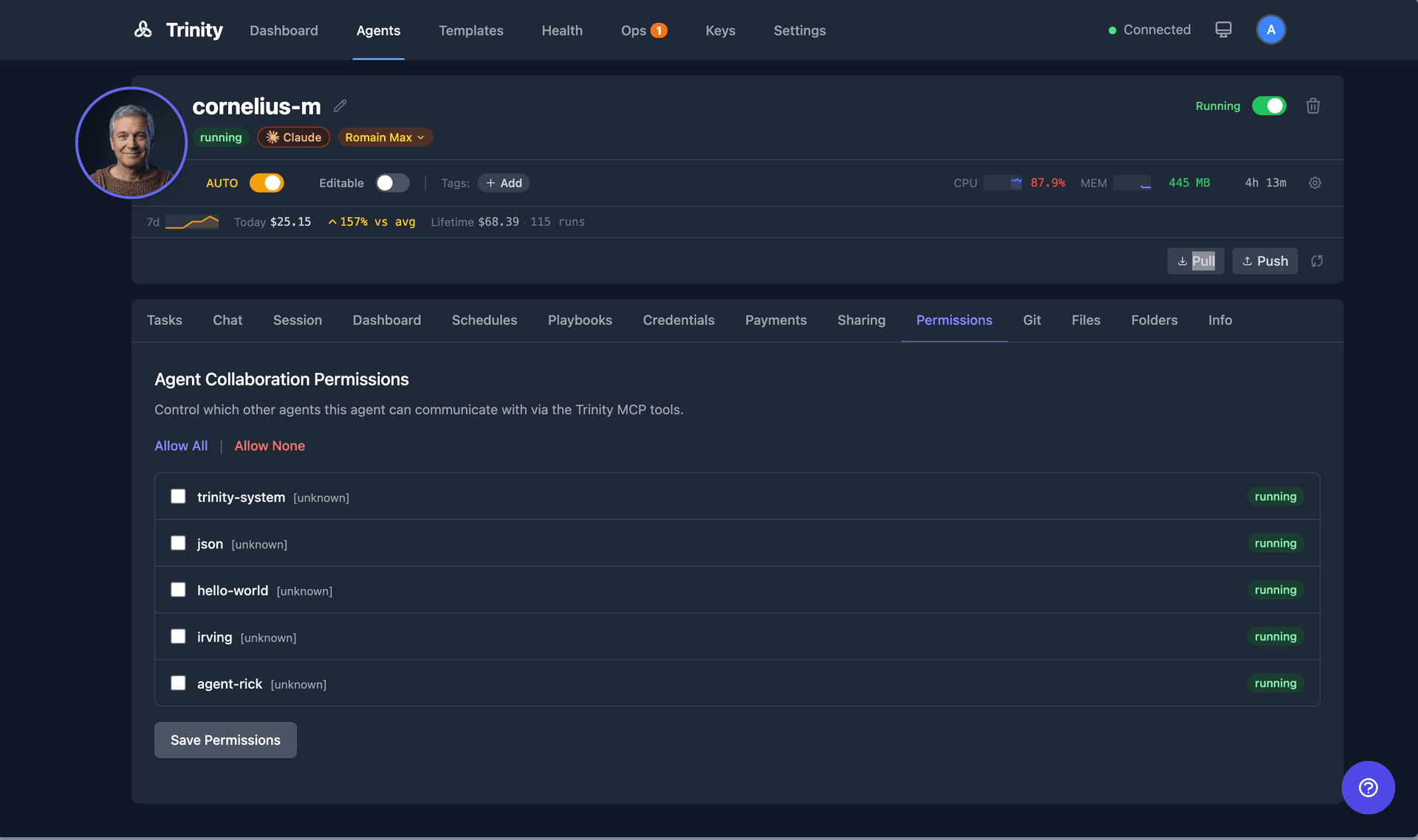
Explicit Permission Model
Restrictive by default — no agent can call another without explicit permission
How It Works
Open the agent detail page and click the Permissions tab (located in the agent files/config area).
You will see a list of all agents in the system.
Toggle permissions to allow or deny each agent from calling the current agent.
Permissions are directional: allowing Agent A to call Agent B does not allow Agent B to call Agent A. Each direction must be granted separately.
System agents (e.g., trinity-system) bypass permission checks entirely.
Default Behavior
- •No permissions are auto-granted. All inter-agent communication must be explicitly allowed.
- •The system agent (
trinity-system) can call any agent without requiring permission.
Enforcement
- •When Agent A attempts to call
chat_with_agent("agent-b", ...), the MCP server checks whether Agent A has permission to communicate with Agent B. - •If permission has not been granted, the MCP tool returns an error and the call is blocked.
- •Permissions also gate shared folder access and event subscriptions between agents.
Permissions are managed through the agent files/config endpoints. Agents do not need to handle permissions themselves. All MCP tools respect the permission model automatically. If a tool call targets another agent, the permission check happens before execution. No special handling is required in agent code.
Executions
View, monitor, and manage task executions across all agents. Executions are created by manual tasks, schedules, MCP calls, and chat interactions.
Execution Concepts
Execution — A single run of a task on an agent. Each execution records: status, started_at, completed_at, duration, message, response, error, cost, model_used, triggered_by, and claude_session_id.
Execution Status — Every execution moves through a lifecycle: queued → running → success, failed, error, cancelled, or skipped.
Parallel Capacity — Each agent has a configurable slot system (default: 3 concurrent slots). Slot TTL equals the agent timeout plus a 5-minute buffer. When all slots are occupied, new executions queue until a slot frees up.
Task Execution Service — A unified execution lifecycle layer used by all callers (UI, schedules, MCP, chat, paid). Handles slot management, activity tracking, and input sanitization.
Live Streaming — Running executions stream logs in real time via Server-Sent Events (SSE) to the Execution Detail page.
Trigger Types
| Trigger | Source |
|---|---|
manual | Tasks tab in agent detail |
schedule | Cron-based schedule |
chat | Chat tab in agent detail |
session | A resumable conversation turn (the Workspace) |
agent | Agent-to-agent call |
mcp | MCP client call |
public | Public chat link |
webhook | Webhook trigger URL |
fan_out | Fan-out to multiple agents |
loop | Sequential agent loop iteration |
reminder | An agent's own deferred self-trigger |
room | A turn inside a shared multi-agent room |
a2a | A task sent in by an external A2A orchestrator |
Fleet Execution List
The fleet execution list lives on the Executions tab of the Operations page at /operations?tab=executions (the legacy /executions route redirects there):
- •Lists all executions across the fleet — admins see every agent; other users see only owned or shared agents
- •Filter by agent, status, trigger type, time range, and free-text search over task messages
- •Click any execution row to open its detail page
See Executions for the full reference.
Execution Detail Page
- •Displays agent name, status, timestamps, duration, cost, model used, and trigger source
- •Shows the full transcript/log of the Claude Code execution
- •For running executions, a green pulsing “Live” indicator streams output in real time
- •Stop button terminates a running execution
- •Continue as Chat button resumes the execution as an interactive chat session
Tasks Tab (Per-Agent)
- •Open agent detail and click the Tasks tab
- •Enter a task message. Optionally select a model.
- •Click Send to start the execution
- •View execution history with status and duration
- •A green pulsing “Live” badge links directly to the running execution
- •Use Make Repeatable to create a schedule from any completed task
Execution Termination
- •Stop running executions via the Stop button on the detail page
- •The system sends SIGINT first, then SIGKILL if the process does not exit
- •Queue slots are released and activity is tracked
Execution API and MCP Tools
| Endpoint | Method | Description |
|---|---|---|
/api/agents/{name}/executions | GET | List executions for an agent |
/api/agents/{name}/executions/{id} | GET | Get execution details |
/api/agents/{name}/task | POST | Submit a new task |
| MCP Tool | Description |
|---|---|
list_recent_executions(name) | List recent executions for an agent |
get_execution_result(id) | Get the result of a specific execution |
get_agent_activity_summary(name) | Get activity summary including execution stats |
The Agent Detail Page
Click any agent to open its detail page. The page lands on the Overview tab and organizes everything else into tabs:
| Tab | ?tab= | Purpose |
|---|---|---|
| Overview | overview | Default landing tab — trends, health, recent activity |
| Tasks | tasks | Headless task execution and history |
| Chat | chat | Stateless conversation |
| Dashboard | dashboard | The agent's own dashboard — only when it ships a dashboard.yaml |
| Brain | brain | Knowledge-graph page — only for agents that declare the capability |
| Reports | reports | Structured results the agent published |
| Canvas | canvas | The surface the agent keeps current |
| Schedules | schedules | Cron-based automation |
| Loops | loops | Sequential bounded task runs |
| Playbooks | playbooks | Reusable command templates |
| Credentials | credentials | Credential injection and export |
| Payments | nevermined | Paid access configuration |
| Access | access | Operator access roster (owners only) |
| Sharing | sharing | External clients and channels (owners only) |
| Permissions | permissions | Which agents may call this one (owners only) |
| A2A | a2a | External-orchestrator interoperability (owners only, where available) |
| Git | git | Git sync controls — only for GitHub-synced agents |
| Files | files | Workspace file browser |
| Folders | folders | Shared folder configuration (owners only) |
| Skills | skills | Assign skills from the library (owners only) |
| Settings | settings | Per-agent configuration (owners only) |
| Info | info | Template metadata and capabilities |
Tabs marked owners only are hidden from users an agent is merely shared with, and are never shown on the system agent. Dashboard, Brain, Git, and A2A appear only when that agent or instance supports them. The Reports tab is described under Agent Reports; Canvas under Agent Canvas; Skills under Skills.
Every visible tab is deep-linkable with ?tab= — including the conditional ones. A ?tab= value naming a tab you cannot see falls back to Overview. Two legacy links still resolve: ?tab=guardrails opens Settings, and ?tab=session redirects to that agent's Workspace conversation.
When the window is too narrow to fit every tab, the trailing tabs collapse into a More ▾ menu at the end of the tab strip. If the active tab is inside the menu, the More button carries the active highlight. Deep links via ?tab= work either way.
Overview Tab
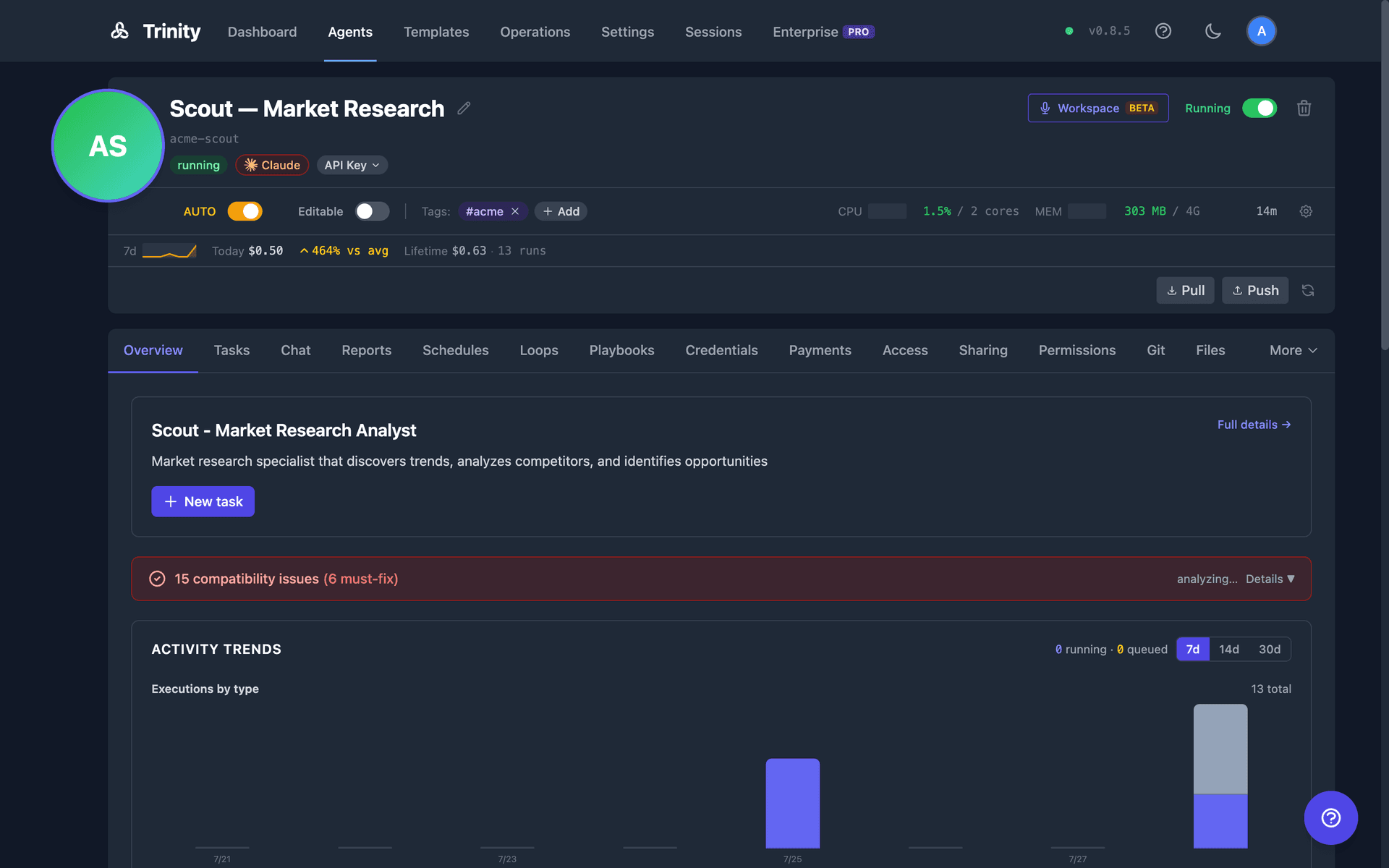
The Overview tab is a glanceable, database-backed summary. It renders even when the agent is stopped:
- •About — display name, tagline, and description, with a “New task” shortcut
- •Needs attention — a combined count of pending notifications, operator-queue items, and sync failures, linking to the Operations page. Hidden when the count is zero.
- •Activity trends — executions per day (stacked by trigger type), success rate, duration (avg and p95), and context consumption over a selectable 7/14/30-day window
- •Health & reliability — current health badge, reachability, restart count, plus uptime and latency trend lines. Health history covers at most the last 7 days.
- •Recent activity — the last five executions; click one to open it in the Tasks tab
- •Footprint — schedule, skill, and share counts, plus git sync status
The persistent header above the tabs still owns live “now” state: status, CPU/memory gauges, cost, and quick controls. The Overview shows trends; the header shows the present. Two of its buttons are doors into other surfaces:
- •Workspace opens this agent in the Workspace — the conversation surface where you and the agent work together.
- •Talk starts a voice call with this agent. The call opens in the Workspace and the conversation lives there, not in this page's Chat tab — see Voice Chat.
API: GET /api/agents/{name}/analytics?window=7d|14d|30d
Display Label, Rename, and Resource Allocation
Display Label — The friendly name shown across the UI: the header, agent pickers, search, sort, and the activity timeline. Editing it is the everyday “rename”: it changes what people read without moving the immutable slug (name), so it never breaks URLs, MCP tool names, schedules, or webhooks. Owner-only; the label is non-unique (the slug guarantees uniqueness) and clears back to the slug when left blank. There is no MCP tool for the display label — it is a UI/API-only, presentation-only change. (GET/PUT /api/agents/{name}/label with body {"label": "My Agent"}; send {"label": null} or an empty string to clear)
Rename — Moves the immutable slug itself — the heavier operation. Because the slug is what URLs, MCP tool names, schedules, and webhooks resolve to, prefer the display label above when you only need to change the friendly name. Click the pencil icon next to the agent name to edit inline. Renaming is atomic: it updates the database, renames the Docker container, and broadcasts the change via WebSocket. System agents cannot be renamed; only owners and admins have permission. (PUT /api/agents/{name}/rename, MCP rename_agent(name, new_name) — the MCP tool moves the slug, not the label)
Resource Allocation— Configure per-agent memory and CPU limits from the agent header: click the gear button (“Configure resources”) to open the resource modal. Limits are enforced at the container level and take effect on the next restart.
Execution Timeout — Configurable per agent (range: 60–7200 seconds, default: 3600 seconds / 60 minutes). The agent's timeout is the ceiling for any of its schedules — setting it below an active schedule's timeout_seconds is rejected with 400 error=agent_timeout_below_active_schedules. (GET/PUT /api/agents/{name}/timeout)
Lifecycle States
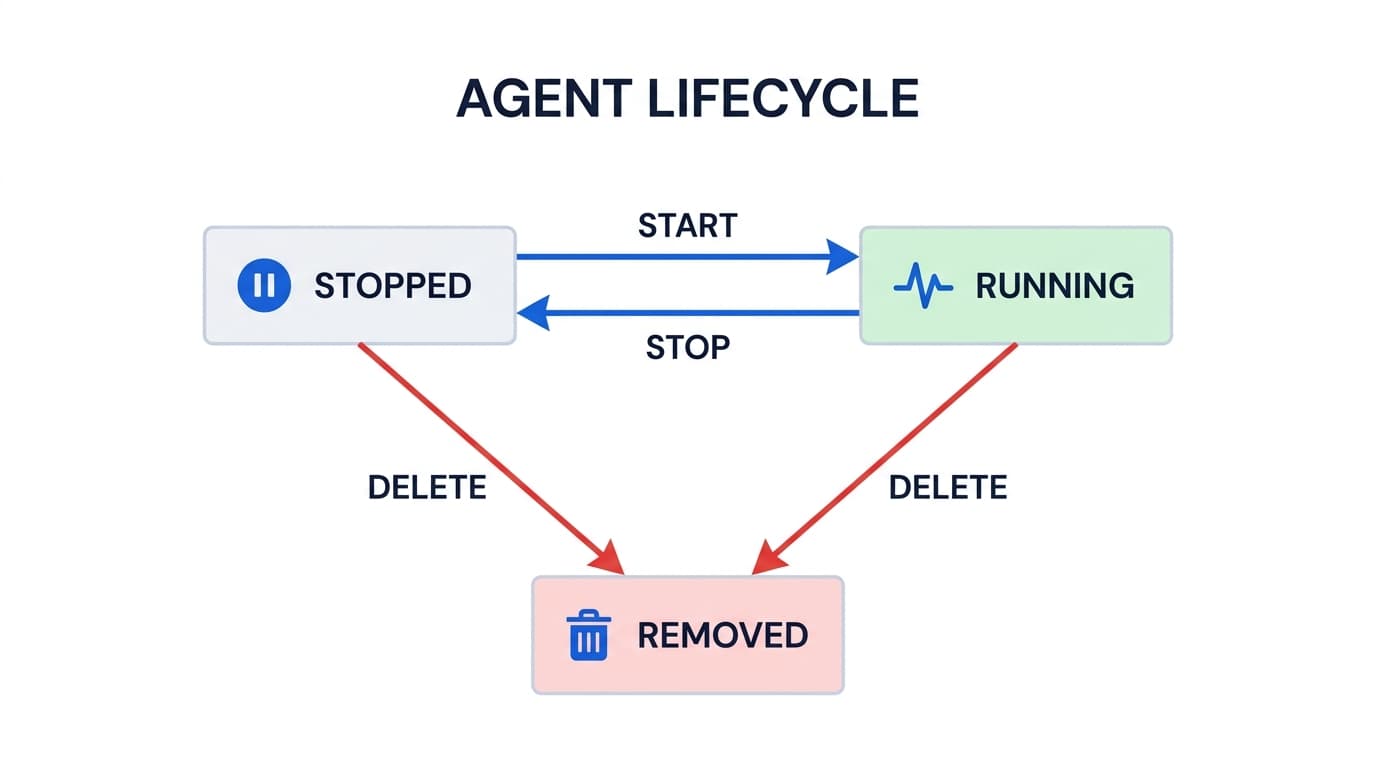
Docker Status Mapping:
  Docker "created"   → "stopped"
  Docker "exited"    → "stopped"
  Docker "dead"      → "stopped"
  Docker "running"   → "running"
  Docker "paused"    → "paused"
  Docker "restarting"→ "restarting"
Trinity normalizes Docker's container statuses into a simpler model. An agent is either running (accepting chat and executing tasks) or stopped (container exists but is not active). All container metadata is stored in Docker labels with the trinity.* prefix.
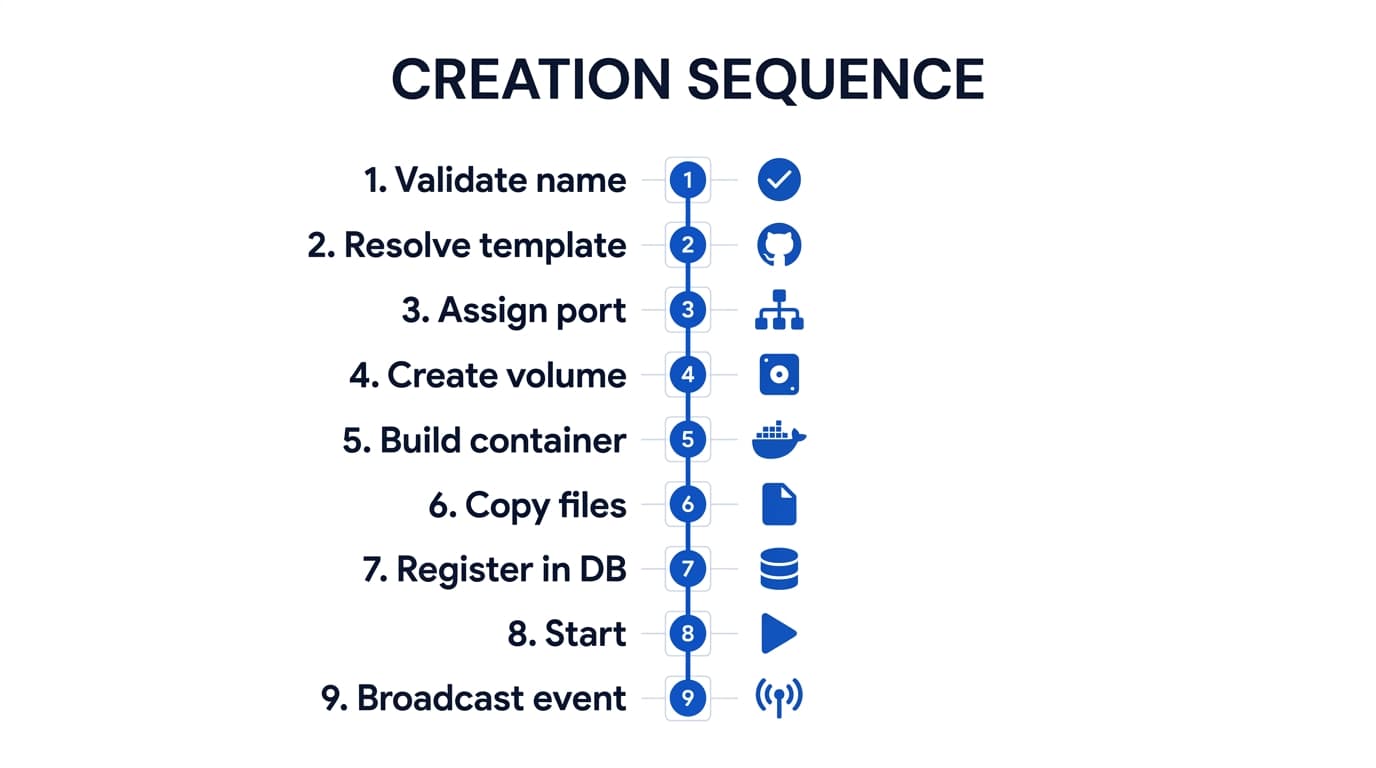
1. Creation
POST /api/agents
Agent creation starts with an AgentConfig payload specifying the agent name, type, base image, resources, tools, and optional template or GitHub repository.
The runtime field supports claude-code (default) or gemini-cli for multi-runtime agents. A model override can be specified (e.g., sonnet-4.5, gemini-2.5-pro).
2. Configuration
Skills, credentials, MCP servers, and instructions
After creation, agents can be configured through multiple channels:
Skills— Attach skill definitions from the Skills Library. Skills are markdown documents that inject domain knowledge and behavioral patterns into the agent's context.
Credentials — Inject API keys, .env files, and .mcp.json configurations. Credentials are encrypted in Redis and injected into the container on start.
MCP Servers — Configure external MCP servers the agent can access. The .mcp.json.template file is resolved with credentials at start time.
CLAUDE.md— Edit the agent's instruction file directly through the file management API. This is the primary lever for controlling agent behavior.
Permissions — Grant other agents access for collaboration. Supports explicit grants and system-level permission presets.
Agent Config — Set autonomy mode, read-only mode, resource limits, parallel capacity, execution timeout, and full-capabilities flag.
3. Starting
POST /api/agents/{name}/start
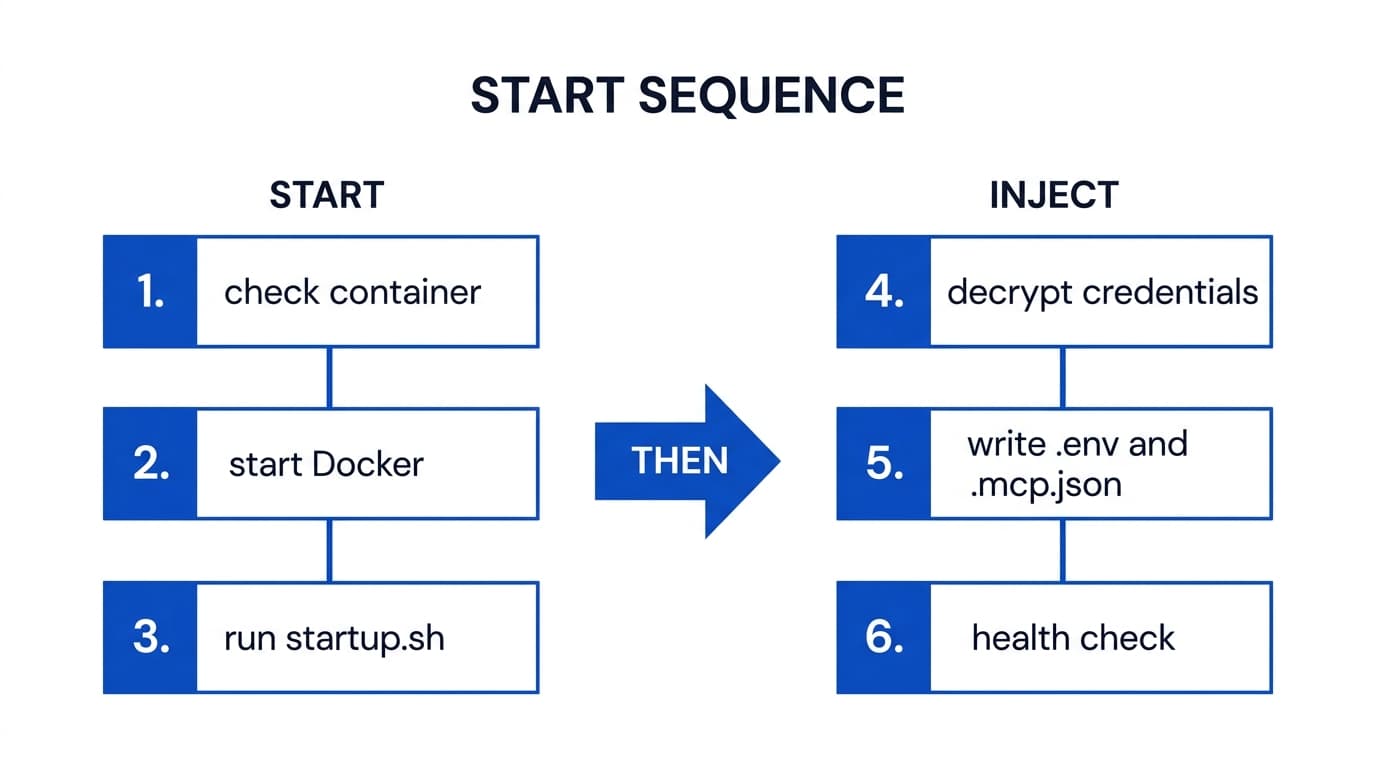
The start process is idempotent — starting an already-running agent is a no-op. If the agent's configuration has changed since the last run (e.g., resource limits, shared folder mounts), the container is recreated with the new settings while preserving the workspace volume.
After a host reboot. Agent containers are created with Docker's unless-stopped restart policy, so when the host reboots or the Docker daemon restarts, every agent that was running comes back on its own — schedules resume without anyone starting agents by hand. An agent you deliberately stopped stays stopped: the policy honours Docker's manual-stop flag, so a quarantined agent is never resurrected by a reboot. While Docker is bringing agents back they may briefly show as stopped. The policy is set when the container is created; agents created before this behaviour shipped adopt it on their next recreate (a resource, runtime, or base-image change), not on a plain restart — an upgrading install can sweep its existing fleet once using the AGENT_RESTART_POLICY_2026-09.md migration note.
4. Running
Chat, task execution, and scheduled operations
A running agent accepts work through multiple entry points:
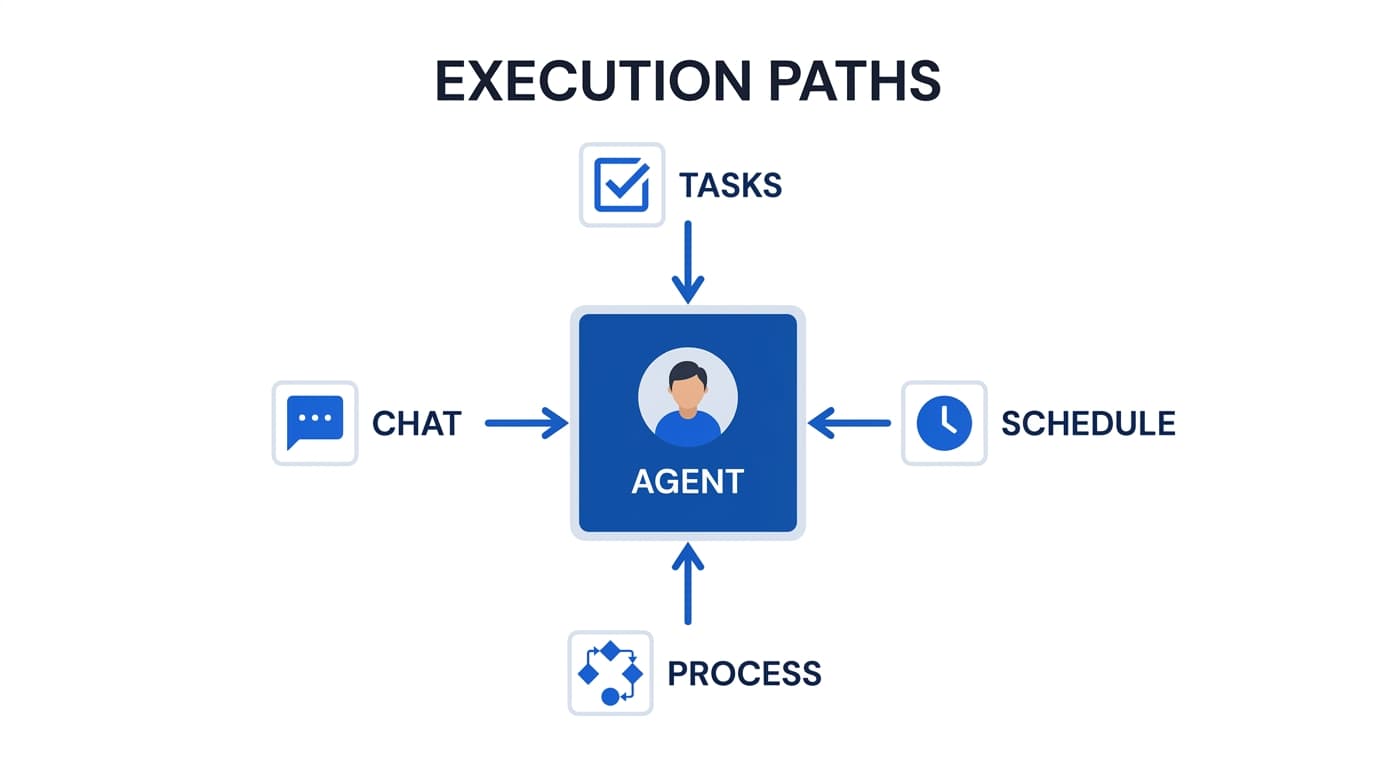
Interactive Chat— Users send messages through the web UI or MCP. Each message is queued (one active execution per agent) and proxied to the agent's internal web server where Claude Code or Gemini CLI processes it.
Parallel Tasks — Stateless task execution for agent-to-agent delegation. Supports tool restrictions, system prompt overrides, timeout controls, and async (fire-and-forget) mode.
Scheduled Tasks — The scheduler dispatches cron tasks to agents via the backend internal API. Each execution acquires a Redis distributed lock and records results in the database.
Process Executions — Multi-step workflows with approval gates, parallel branches, and retry logic orchestrated by the process engine.
All execution sources feed into the activity stream, which tracks every chat, tool call, schedule run, and collaboration event with full timing and status information.
5. Stopping
POST /api/agents/{name}/stop
Stopping an agent sends a graceful shutdown signal to the Docker container. All state is preserved on the persistent workspace volume:
- •Working files, code, and agent-created artifacts persist on the volume
- •CLAUDE.md and CLAUDE.local.md remain unchanged
- •Git repository state (branch, commits, unstaged changes) is preserved
- •Credentials in Redis remain encrypted and ready for re-injection on next start
- •Schedules remain in the database (the scheduler skips stopped agents)
An agent_stopped event is broadcast to all WebSocket clients and filtered listeners.
6. Deletion
DELETE /api/agents/{name}
Agents and schedules are soft-deleted and recoverable — a delete marks the agent as removed and tears down its runtime, but the record is retained so it can be restored. System agents cannot be deleted — they can only be re-initialized.
Permission check
owner or admin only
System agent check
blocked for system agents
Stop and remove Docker container
Delete workspace volume
agent-{name}-workspace permanently destroyed
Clean up all database records
schedules, git config, MCP key, permissions, subscriptions, skills, folders, tags, avatars, ownership
Broadcast agent_deleted event
WebSocket notification to all clients
Deletes are recoverable: the agent and its schedules are soft-deleted and can be restored. Configurable retention automatically prunes old soft-deleted records, execution logs, and audit history over time to keep the database lean. If the agent had a GitHub sync configured, the remote repository is unaffected.
Activity Tracking
Throughout its lifecycle, every agent action is tracked in the activity stream. Activities have a type, state, and optional parent for hierarchical nesting:
Activity Types
chat_start / chat_endUser or MCP chat session
schedule_start / schedule_endScheduled task execution
tool_callIndividual tool invocations
agent_collaborationAgent-to-agent via MCP
execution_cancelledManual cancellation
States
startedTask is in progress
completedFinished successfully
failedEncountered an error
Sources
userHuman via UI or MCP
scheduleCron-triggered
agentAgent-to-agent via MCP