Multi-Agent Collaboration
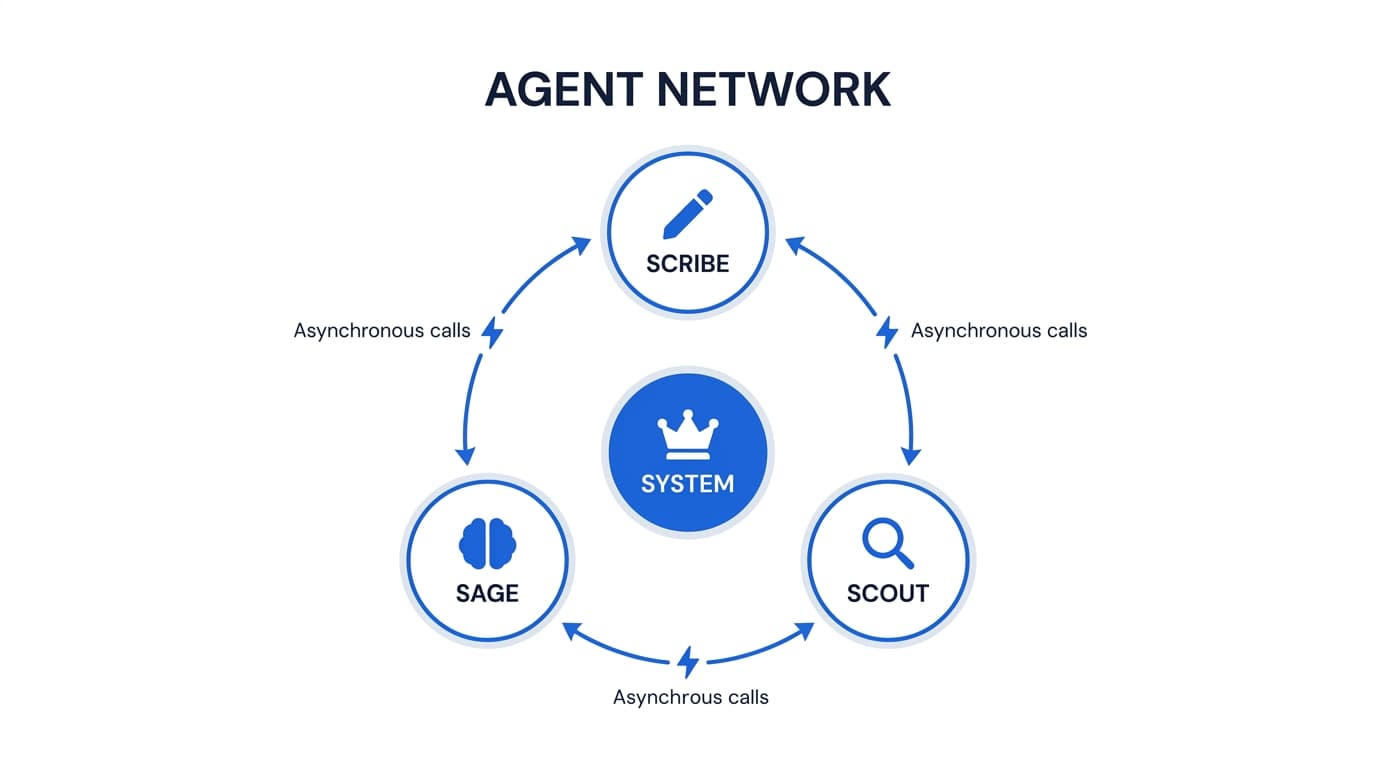
Trinity enables agents to communicate, delegate, and collaborate through MCP tools, event subscriptions, and system manifests. These three pillars of collaboration — direct communication, pub/sub events, and recipe-based deployment — form the foundation of multi-agent systems.
The Multi-Agent Platform I Run My Company On
May 2026
How We Automate Our Own Ops & Marketing
Mar 2026
Agent Network and Communication
Orchestrator-worker patterns, delegation chains, and multi-agent systems
Concepts
Agent-to-Agent Communication — Agents call each other through Trinity MCP tools using agent-scoped API keys. The chat_with_agent MCP tool sends a message to another agent and returns the response.
Async Collaboration — For long-running tasks, use chat_with_agent(async=true) which returns an execution_id immediately. Poll with get_execution_result(id) until complete. This keeps the call under the MCP server's own call bound (MCP_CHAT_TIMEOUT_MS, default 25 seconds, set below the 30–60 second ceiling most MCP gateways enforce). A synchronous call that outlives that bound is not lost either: the tool answers with a receipt — status: "queued_timeout" plus the execution_id — instead of a transport error. Poll get_execution_result(id) and never re-send a reworded version, which dispatches a second execution. To avoid polling entirely, subscribe to the worker's task-completion events and get woken with an automatic report-back task instead (see Event Subscriptions).
Pull-Pilot Routing (experimental) — An alternative routing path for agent-to-agent chat_with_agent calls, behind a default-OFF flag (MCP_AGENT_CHAT_PULL_ENABLED). When enabled, a sequential agent-to-agent call is dispatched through Trinity's durable async task path instead of a held synchronous call: the caller gets an immediate receipt with an execution_id and polls get_execution_result(id)for the result. It is an opt-in proof-of-concept for pull/work-stealing coordination — it does not change human chat, parallel calls, or self-calls. Leave it off unless you are piloting it.
Timeline Replay — Collaboration is surfaced on the Dashboard as a Timeline of executions, color-coded by trigger type with collaboration arrows linking calls between agents. (The old live node/edge graph view was retired; the underlying collaboration data still flows and feeds the Timeline.)
Grid Dashboard — The Grid view lays out the fleet as tiles with per-agent runtime, autonomy, and health chips — a fast at-a-glance fleet status alongside the Timeline. A third List view shows the same fleet as rows. Press v to cycle Timeline → Grid → List.
How It Works
The Dashboard offers a Timeline view, a Grid view, and a List view of the fleet.
Timeline shows execution boxes color-coded by trigger type (manual, schedule, MCP, chat) with collaboration arrows drawn between calls that hand off between agents.
Grid lays agents out as tiles with runtime, autonomy, and health chips.
Click through to any agent's detail page for its full activity.
Collaboration events stream in real time over WebSockets (below) and are replayed on the Timeline.
WebSocket Events
- •
agent_collaboration— Fired when one agent calls another via MCP - •
agent_activity— State changes (started, completed, failed) for all activity types - •Source agent is detected via the
X-Source-Agentheader on the chat endpoint
MCP Tools
| Tool | Description |
|---|---|
chat_with_agent(agent_name, message) | Send a message to another agent and wait for the response |
chat_with_agent(agent_name, message, async=true) | Send a message asynchronously. Returns an execution_id |
get_execution_result(execution_id) | Poll for the result of an async execution |
list_recent_executions(agent_name) | List recent executions for an agent |
get_agent_activity_summary(agent_name) | Activity summary over a configurable time window |
Building Multi-Agent Systems
- •Use System Manifests to deploy pre-configured multi-agent setups
- •Configure permissions to control which agents can call which
- •Use shared folders for file-based collaboration between agents
- •Use event subscriptions for pub/sub patterns between agents
Shared Folder Configuration
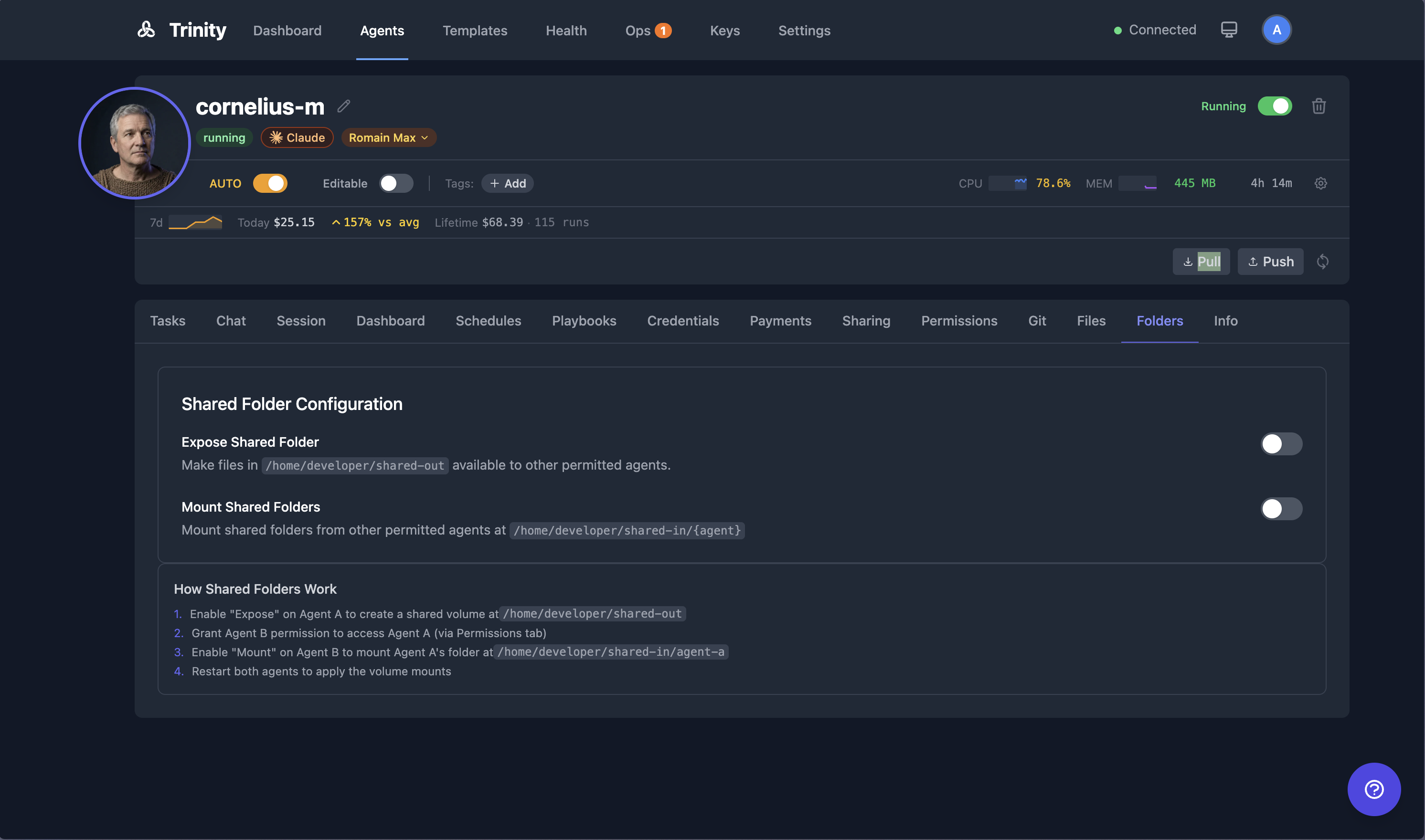
Agents can share files via Docker volumes:
On the source agent, open the Folders tab and enable Expose Shared Folder. Files placed in /home/developer/shared-out are made available to permitted agents.
Grant the consuming agent permission via the Permissions tab.
On the consuming agent, enable Mount Shared Folders. Exposed folders appear at /home/developer/shared-in/{agent-name}.
Restart both agents to apply the volume mounts.
Event Subscriptions
Lightweight pub/sub system for inter-agent event pipelines
Concepts
Event — A named occurrence emitted by an agent with a structured JSON payload. Stored in the agent_events table.
Subscription — A rule that says “when agent X emits event type Y, send agent Z an async task with message template M”. Stored in the agent_event_subscriptions table.
Message Template — Supports {{payload.field}}interpolation. The subscriber's task message is built from the event payload.
Permission-Gated — Uses existing agent_permissions. The subscribing agent must have permission to call the source agent.
How It Works
Agent A emits an event: emit_event(event_type="report_ready", payload={"url": "...", "summary": "..."})
Trinity checks all subscriptions matching agent A + event type report_ready.
For each matching subscription, an async task is dispatched to the subscribing agent.
The task message is built from the subscription's template with payload fields interpolated.
Events are persisted and visible via API.
WebSocket broadcast provides real-time event visibility.
MCP Tools
| Tool | Description |
|---|---|
emit_event(event_type, payload) | Emit a named event with data |
subscribe_to_event(source_agent, event_type, message_template) | Create a subscription |
list_event_subscriptions(agent_name) | List subscriptions |
delete_event_subscription(subscription_id) | Remove a subscription |
API Endpoints
| Endpoint | Method | Description |
|---|---|---|
/api/agents/{name}/event-subscriptions | POST | Create subscription |
/api/agents/{name}/event-subscriptions | GET | List subscriptions |
/api/event-subscriptions/{id} | GET | Get by ID |
/api/event-subscriptions/{id} | PUT | Update |
/api/event-subscriptions/{id} | DELETE | Delete |
/api/events | POST | Emit event (agent-scoped) |
/api/agents/{name}/emit-event | POST | Emit for specific agent |
/api/agents/{name}/events | GET | Event history |
/api/events | GET | All events |
System Manifests
Recipe-based multi-agent deployment via YAML manifest files
Concepts
System Manifest — A YAML file defining a set of agents, their templates, permissions, shared folders, and schedules. All agents in a manifest are deployed as a single unit.
System View — A saved filter/view in the UI that groups related agents by tags. Use system views to monitor and manage agents that belong to the same manifest.
How It Works
Create a system manifest YAML file defining agents and their relationships.
Deploy via the deploy_system MCP tool or the REST API.
All agents are created, configured, and started according to the manifest.
Agents appear on the Dashboard with appropriate tags for grouping.
What a Manifest Describes
- •A list of agents with name, template, and configuration
- •Permission presets (which agents can call which)
- •Shared folder configuration for inter-agent file access
- •Schedule definitions for autonomous execution
- •Auto-start settings controlling which agents launch on deploy
MCP Tools
| Tool | Description |
|---|---|
deploy_system(manifest) | Deploy a system from a manifest |
list_systems() | List all deployed systems |
restart_system(name) | Restart all agents in a system |
get_system_manifest(name) | Retrieve the manifest for a deployed system |
The Four Pillars of Deep Agency
The collaboration features above implement the first pillar. Together with the remaining three, they define what separates a deep agent from a chatbot.
1. Hierarchical Delegation
Complex goals decompose into task graphs. An orchestrator agent breaks work into sub-tasks and delegates to specialized worker agents, each with distinct skills and access credentials. Workers can delegate further, creating hierarchies of arbitrary depth. Context is quarantined between execution boundaries.
2. Persistent Memory
Deep agents accumulate knowledge over time. They remember past decisions, build working artifacts, maintain dashboards of ongoing state, and evolve their own instructions. Per-agent Docker volumes, GitHub sync, shared folders, and dashboard.yaml provide the substrate for continuous improvement.
3. Extreme Context Engineering
Every token in the prompt carries signal. Instructions are layered: platform-level directives, role-specific CLAUDE.md files, skill definitions, and runtime state combine into a coherent instruction set that gives the model exactly what it needs.
4. Autonomous Operations
Agents execute on schedules, monitor their own health, recover from failures, and escalate to operators only when they judge it necessary. The platform provides scheduling, alerting, and self-healing infrastructure; the agent decides when and how to use it.
Pillars Working Together
The four pillars are not independent features — they compound. An orchestrator delegates to a worker whose persistent memory contains the project context, whose engineered prompt defines exactly how to process the task, running on a cron schedule with no human in the loop. Remove any pillar and the system degrades from autonomous agent to interactive assistant.