System Overview
Trinity provides a real-time operational layer for monitoring, managing, and interacting with your agent fleet. The Dashboard, Operations page, and monitoring systems give operators full visibility into agent activity, health, and collaboration.
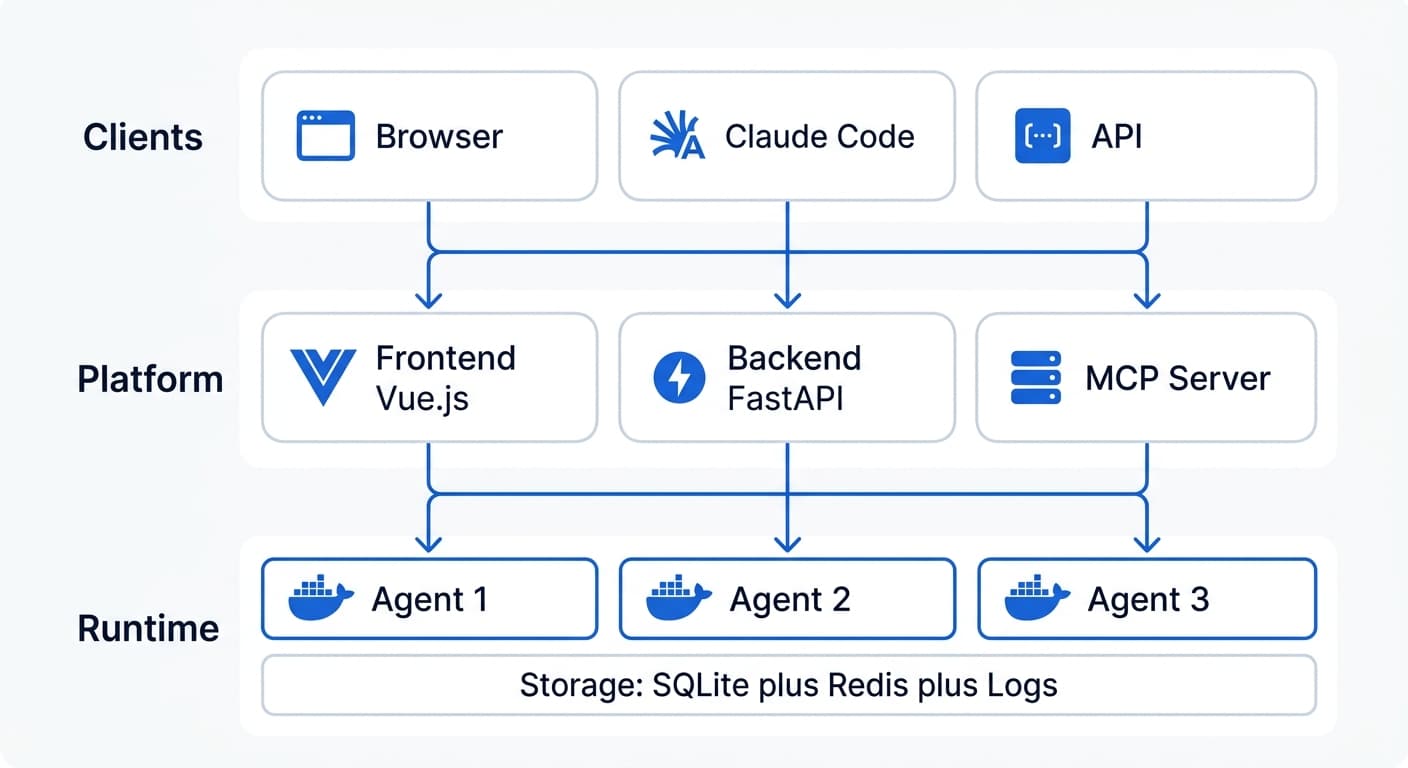
Architecture Diagram
Dashboard
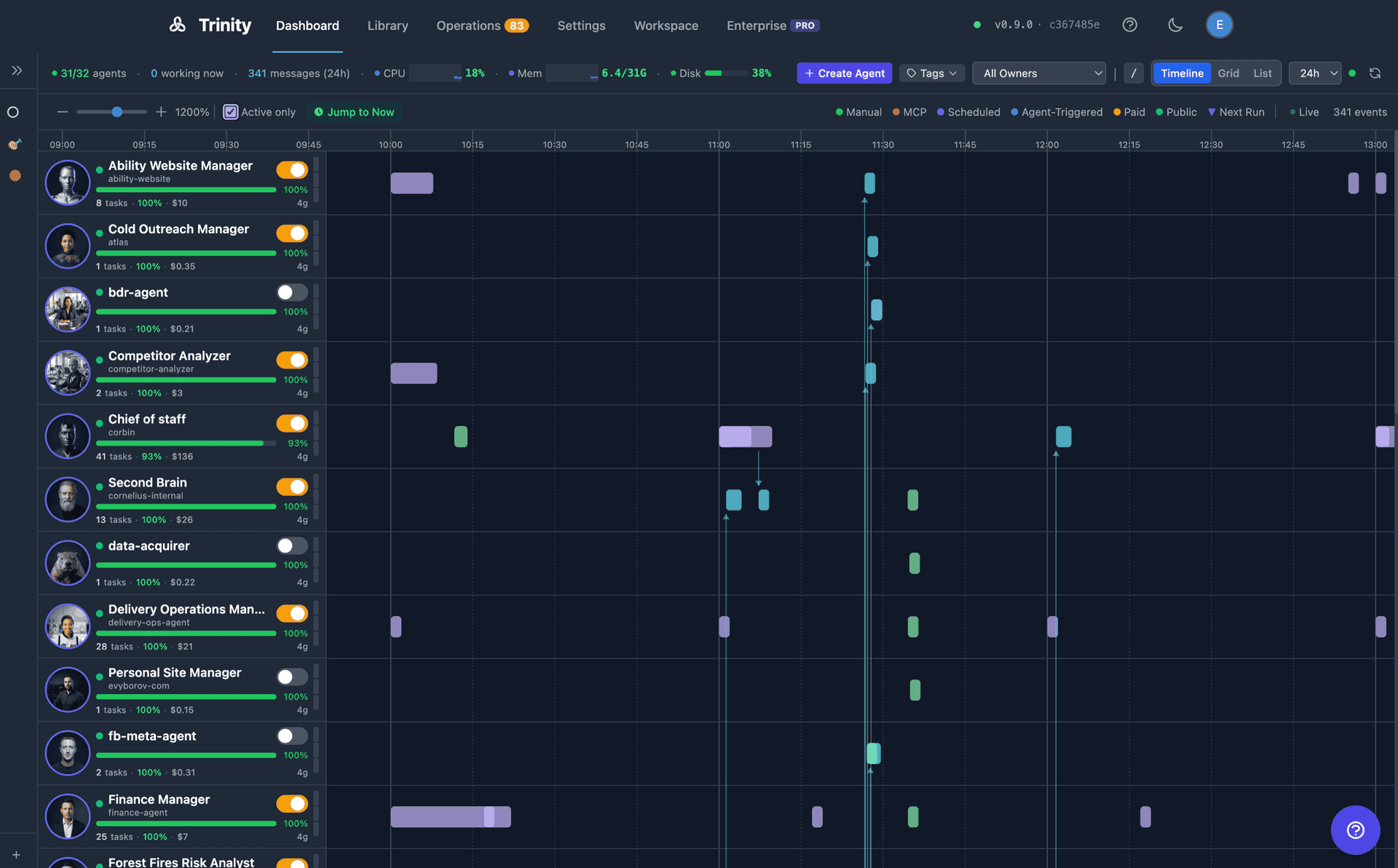
The main Dashboard monitors all agents and their activities in real time, with three switchable view modes — Timeline, Grid, and List — chosen from the switcher at the far right of the header (or by pressing v to cycle). Timeline is the default; the choice persists per browser. Header filters (type-to-filter with /, tags, owner, and a time range of 1h, 6h, 24h, 3d, or 7d) apply to every mode, and Create Agent sits in the header. Each pane shows a skeleton while the fleet loads, a Couldn't load agents message with Retry if it cannot be read, and No agents yet with a Get started button on an empty fleet. See the full Dashboard reference.
Grid View
A magnetic tile canvas holding two kinds of occupant on one lattice: agent tiles (one per agent, with avatar, runtime badge, live status chips including subscription pressure, and inline Running and Autonomy toggles) and info tiles. Four info tiles ship today, all on by default: Fleet summary, Recent failures, Executions (24 hourly columns split by trigger, with failures on their own rail), and Subscription pressure (admins only).
- •Drag a tile to move it, or drop it onto another to swap positions — tile positions, your info-tile selection, and the Zones/Lines toggles are saved to your user account on the server, so the same board follows you to any browser
- •Tidy up re-packs tiles compactly; Reset restores the default auto-generated layout and clears your server record
- •Pan by dragging the background and zoom with scroll, pinch, or the Zoom in / Zoom out / Fit view controls bottom-left; tile metrics hydrate lazily so large fleets stay responsive
- •An optional org overlay draws departments (
dept-*tags) as labelled zones and reporting lines (reports-to-*tags) as arrows between tiles; Group by dept arranges the fleet into department blocks once, and tiles stay hand-editable afterwards
Timeline View (Default)
The default mode. Timeline shows execution boxes per agent, arranged chronologically.
- •Color-coded by trigger type: Manual (green), MCP (pink), Scheduled (purple), Agent-Triggered (cyan), Paid (yellow), Public (teal)
- •Each row shows the agent's completion rate, total cost, and parallel slot count
- •Live streaming: running executions show progress in real-time with a “Live” indicator
- •Time range filter: 1h, 6h, 24h, 3d, or 7d
- •Active only toggle hides agents with no recent activity
- •Jump to Now snaps the view to the current time
Agent-to-agent collaboration is surfaced here — in the Timeline replay via the Agent-Triggered trigger type — rather than as a live node graph.
List View
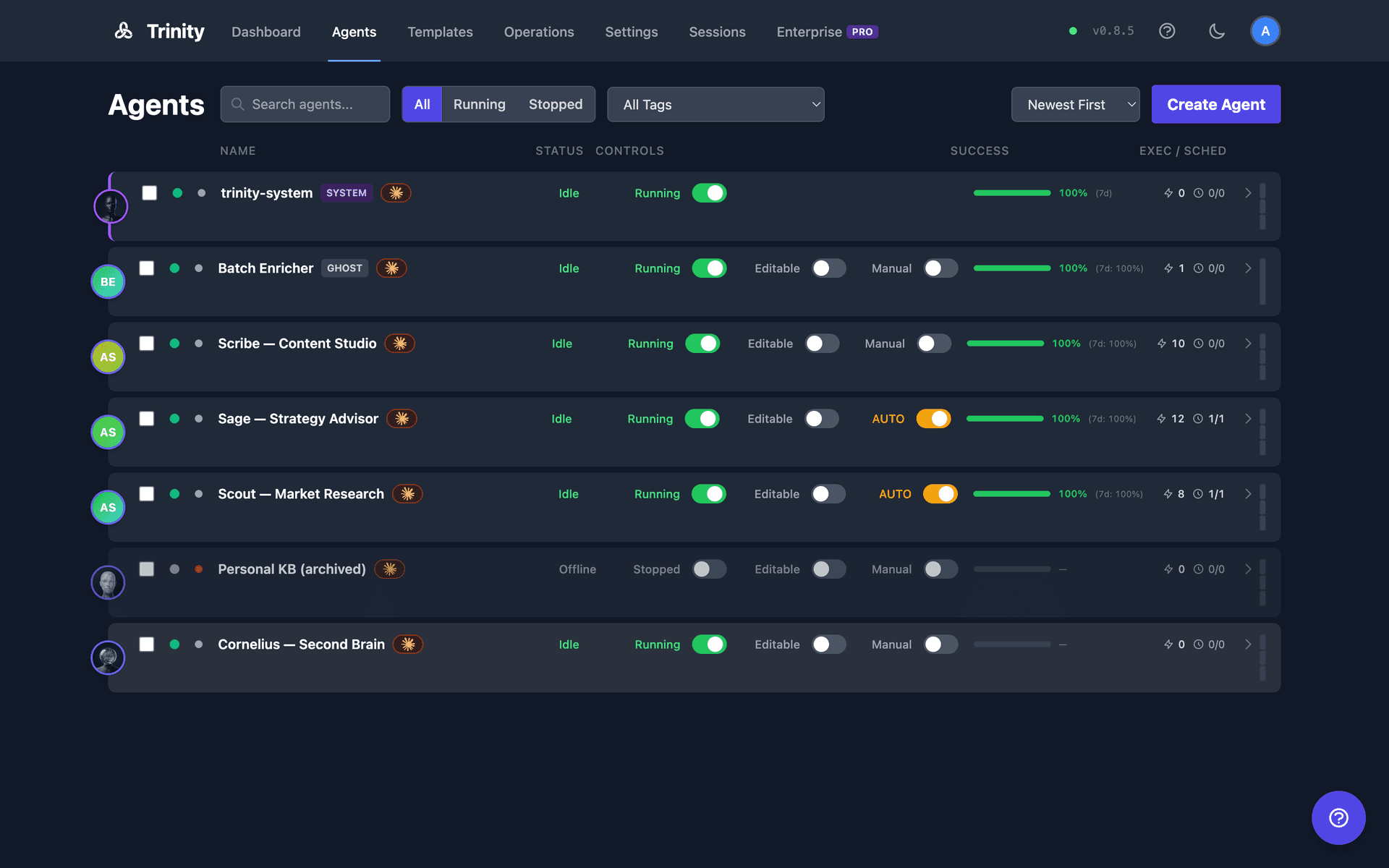
The former standalone Agents page, folded into the Dashboard as a third mode (/agents now redirects here).
- •One row per agent. Columns: Name, Status, Controls, Success, Exec / Sched, plus a capacity meter — with inline Run and Autonomy toggles
- •The name cell carries only exception markers — SYSTEM, GHOST, Shared; a labelled agent shows its display label with the slug, subscription pressure badge, runtime badge, and tags on the secondary line
- •Sort by Newest First, Oldest First, Name (A-Z), Name (Z-A), Running First, or Success Rate; filter by name and status (All / Running / Stopped); select multiple rows for bulk tag operations
- •System agents pin to the top and hide the Run toggle
Fleet Stats Bar
The header's left side carries live fleet telemetry: n/total agents, N working now, N messagesfor the selected time range, and the host's CPU, memory, and disk meters. On narrow viewports it degrades gracefully — dropping the least important readouts first — rather than clipping; the agent count always survives.
Dashboard API Endpoints
| Endpoint | Method | Description |
|---|---|---|
/api/agents | GET | List all agents |
/api/agents/context-stats | GET | Context and activity state for all agents |
/api/agents/autonomy-status | GET | Autonomy status for all agents |
/api/agents/subscription-pressure | GET | Per-agent subscription pressure — the source of the per-agent chips |
/api/activities/timeline | GET | Cross-agent activity timeline (filterable) |
/api/executions/stats | GET | Windowed fleet totals plus live running/queued counts |
/api/executions/timeline | GET | Bucketed fleet rollups (the Executions tile reads group_by=hour&hours=24&split=trigger) |
/api/users/me/preferences | GET | Your board preferences (grid_layout, grid_widgets, grid_org) — interactive sessions only |
/api/agents/{name}/tags | PUT | Set an agent's full tag list, including dept-* and reports-to-* org tags (rejected for agent-scoped keys) |
/api/telemetry/host | GET | Host CPU/memory/disk |
Monitoring
Multi-layer health monitoring for the agent fleet with real-time alerts, automatic cleanup of stuck resources, and a fleet-wide health view on the Operations page. In addition to the periodic health-check loop, each running agent pushes a lightweight heartbeat to the backend every 5 seconds.
Health Levels
Agent health is reported at five severity levels:
| Level | Meaning |
|---|---|
healthy | All checks passing |
degraded | Minor issues detected |
unhealthy | Significant problems |
critical | Immediate attention required |
unknown | Unable to determine status |
Three Monitoring Layers
Docker Layer — Container status, CPU/memory usage, restart count, OOM detection.
Network Layer — Agent HTTP reachability with latency tracking.
Business Layer — Runtime availability, context usage, error rates.
Alert Cooldowns: Repeated alerts for the same condition are throttled to prevent notification spam.
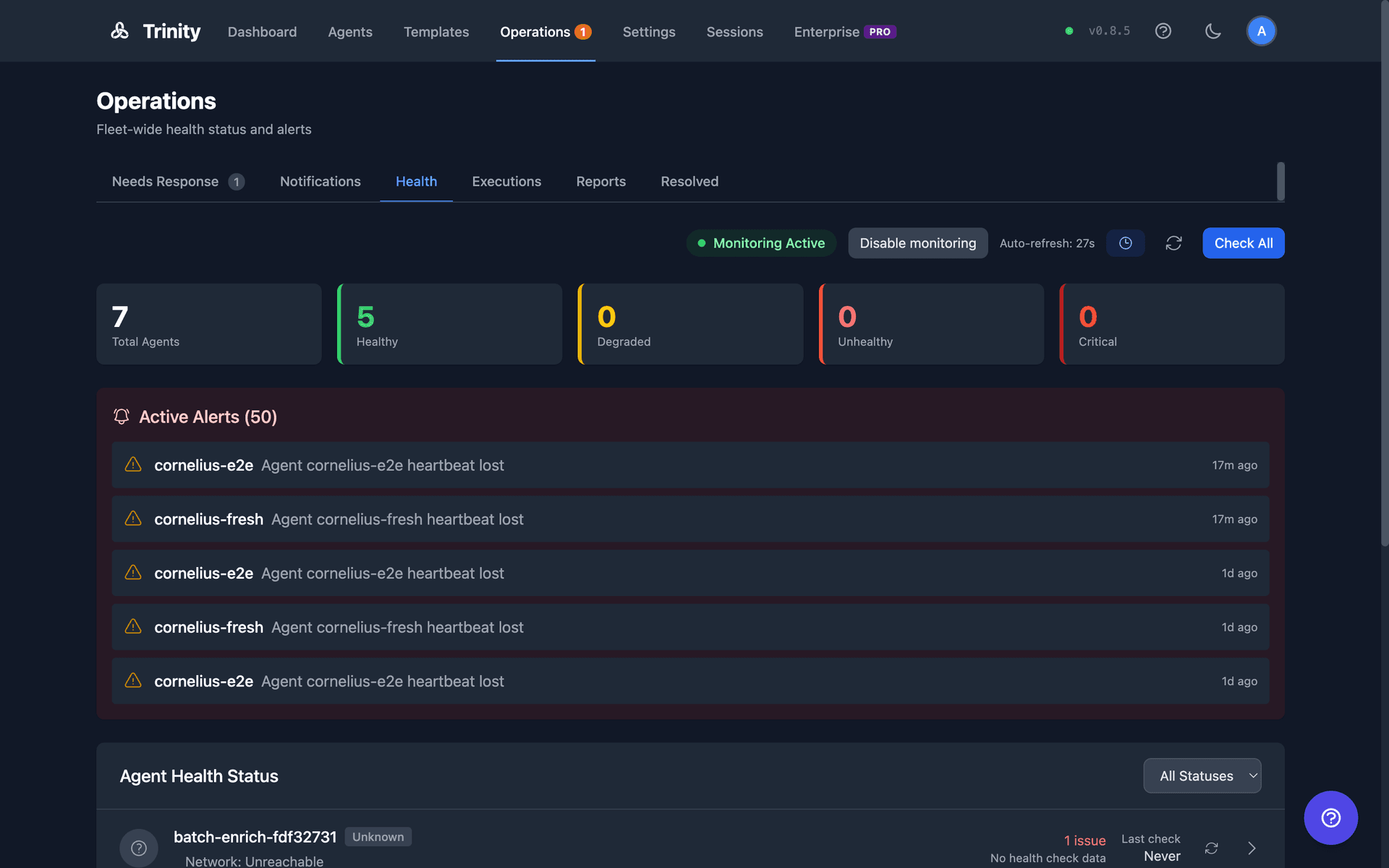
Health Tab (Operations Page)
Fleet health lives on the admin-only Health tab of the Operations page (/operations?tab=health). It shows summary cards, active alerts, and a per-agent health list with a status filter; admins can trigger a fleet-wide check with Check All. The periodic health-check loop is disabled by default and can be enabled via the API. Real-time WebSocket updates push health state changes as they occur. Individual agent health is visible in both the agent header and the Agents listing page.
Cleanup Service
A background service that automatically recovers stuck resources:
- •Orphaned executions — The watchdog asks each running agent which executions it knows about. A
runningrow the agent does not know is orphaned only if no live backend dispatcher owns it either; rows withheld this way are reported asdispatch_inflight_skipped, not as recoveries - •Stale executions — Any execution with
status='running'past its per-slot timeout is markedfailed - •Stale activities — Any activity with
activity_state='started'past the configured threshold is markedfailed - •Stale Redis slots — Orphaned slot reservations are released
- •Run frequency — Every 5 minutes, plus a one-shot sweep on backend restart
- •Startup recovery — Orphaned executions (container down, not in process registry, and not owned by a dispatcher in another worker) are marked
failedimmediately and their slots are released
A close the cleanup service fabricates records no duration — duration_ms is NULL, not a number computed from started_at. Earlier versions wrote a made-up duration, and on PostgreSQL a row older than about 25 days overflowed the column and rolled back the whole sweep. If you upgrade an instance in that state, the restart's startup recovery closes those rows; no manual SQL is needed.
Monitoring MCP Tools
| Tool | Description |
|---|---|
get_fleet_health() | Fleet-wide health summary |
get_agent_health(name) | Individual agent health |
trigger_health_check() | Force an immediate health check |
Monitoring API Endpoints
| Endpoint | Method | Description |
|---|---|---|
/api/monitoring/status | GET | Fleet health summary (includes heartbeat_* fields) |
/api/monitoring/enable | POST | Start the health-check loop; persisted (admin) |
/api/monitoring/disable | POST | Stop the health-check loop; persisted (admin) |
/api/monitoring/check-all | POST | Trigger a fleet-wide health check (admin) |
/api/monitoring/cleanup-status | GET | Cleanup service status (admin) |
/api/monitoring/cleanup-trigger | POST | Force a cleanup run (admin) |
Operations
The Operations page at /operations is the single fleet-operations surface: one tabbed view with Needs Response, Notifications, Health, Executions, Reports, and Resolved tabs. It replaces the former standalone Health, Operating Room, and Executions pages, and the navigation bar shows a single Operations entry with one unified badge of pending items.
Needs Response Tab
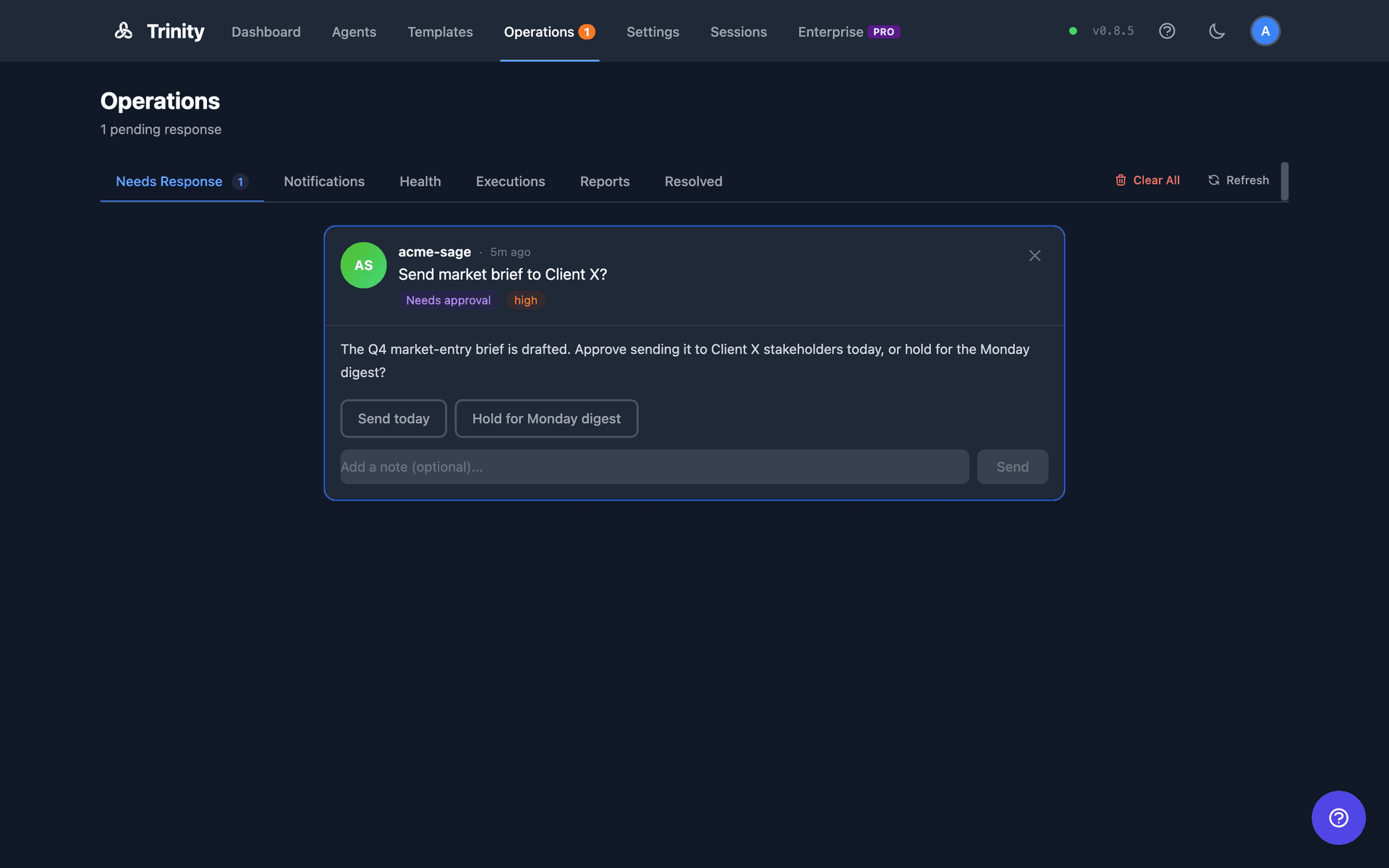
Shows items from agents' operator queues that are waiting on a human: questions, approval requests, and alerts.
- •Agents write to
~/.trinity/operator-queue.jsoninside their container - •A background sync service polls running agents every 5 seconds and persists items to the backend database
- •Operators respond to items directly; responses are written back to the originating agent
- •The first open item auto-expands once when items arrive. A card you collapse stays collapsed through refreshes and new arrivals; the auto-expand re-arms only after the queue empties
- •Each card carries a type pill and a matching control — Needs approval (pick one of the agent's own options, optional note; a free-text decision is refused), Question (type an answer), Heads up (click Got it). If the item stopped being pending while you were answering, your response is not recorded and the page says so
- •The platform files its own alerts here too: git sync failures, weekly-limit subscription alerts, and a notice after a push whose
.gitignoresweep changed which files are tracked - •WebSocket events:
operator_queue_new,operator_queue_responded,operator_queue_acknowledged,operator_queue_cleared
Notifications Tab
Consolidated view of agent notifications (replaces the former standalone Events page).
- •Filter by agent, type, priority, or status; optionally show dismissed items
- •Stats cards display pending, acknowledged, total, and per-agent counts
- •Bulk selection and bulk actions
- •Real-time updates via WebSocket
Health and Executions Tabs
The Health tab hosts fleet health monitoring (admin-only); the Executions tab lists all task runs across the fleet, and Operations → Reports shows the structured results agents publish (see Agent Reports). See the Monitoring and Executions sections above and the Operations page reference.
Resolved Tab
Terminal operator-queue items (responded, acknowledged, cancelled, expired). Responded items stay visible until the agent confirms delivery of the response.
Sync Service
Restart-resilient sync between agent containers and the backend database, with a manual refresh button on the operator tabs. Cancelled and expired statuses are written back into agent queue files, so agents stop waiting on cleared items.
Operator Queue API
| Endpoint | Method | Description |
|---|---|---|
/api/operator-queue | GET | List queue items |
/api/operator-queue/stats | GET | Queue statistics |
/api/operator-queue/bulk-cancel | POST | Cancel listed pending items |
/api/operator-queue/clear-resolved | POST | Hide terminal items |
/api/operator-queue/{id} | GET | Get single item |
/api/operator-queue/{id}/respond | POST | Submit response — for an approval, the decision must be one of the item's own options (else 422); 409 if the item is no longer pending |
/api/operator-queue/{id}/cancel | POST | Cancel item |
/api/operator-queue/agents/{name} | GET | Items for a specific agent |
/api/notifications/dismiss-all | POST | Dismiss all pending + acknowledged notifications |
MCP Tool: send_notification(agent_name, message, priority) — sends a notification to the Operations page from within an agent.
Infrastructure Components
Backend (FastAPI)
:8000Python 3.11, FastAPI, Uvicorn
Central orchestrator with 40+ routers covering agents, chat, schedules, credentials, skills, processes, monitoring, and more. Manages agent containers via the Docker socket (mounted read-only). Broadcasts real-time events over WebSocket.
Frontend (Vue.js 3)
:80Vue.js 3, Tailwind CSS, Vite, Nginx
Single-page web dashboard for managing agents, viewing activity streams, monitoring schedules, and interacting with agents via chat. Connects to the backend API and WebSocket for live updates.
MCP Server
:8080Node.js, TypeScript, SSE transport
Model Context Protocol server exposing 129 tools across 33 modules for agent management, chat, schedules, skills, systems, tags, notifications, and monitoring. Enables Claude Code and other MCP clients to control Trinity programmatically.
Scheduler Service
:8001Python, APScheduler, Redis distributed locks
Dedicated single-instance service for cron-based agent task execution. Uses Redis distributed locking to prevent duplicate runs. Syncs schedules from the SQLite database and dispatches tasks to agents via the backend API.
Redis
:6379Redis 7 Alpine, AOF persistence
Stores encrypted credentials, distributed locks for the scheduler, execution queue state, and pub/sub events. Supports optional password authentication for production deployments.
SQLite
:N/ASQLite 3, /data/trinity.db
Primary data store for agents, users, schedules, activities, permissions, skills, tags, chat sessions, audit logs, and execution history. Stored on the trinity-data volume shared between backend and scheduler.
Vector (Log Aggregation)
:8686Timber Vector 0.43, Docker log source
Collects logs from all containers via the Docker socket. Writes structured NDJSON to the trinity-logs volume. The backend reads these logs for the activity stream and log viewer in the dashboard.
OTel Collector (Optional)
:4317 / 8889OpenTelemetry Collector Contrib 0.120
Receives OTLP metrics and traces from Claude Code agents running inside containers. Exports metrics in Prometheus format on port 8889. Enabled by setting OTEL_ENABLED=1.
Data Flow
A typical request flows through the system as follows:
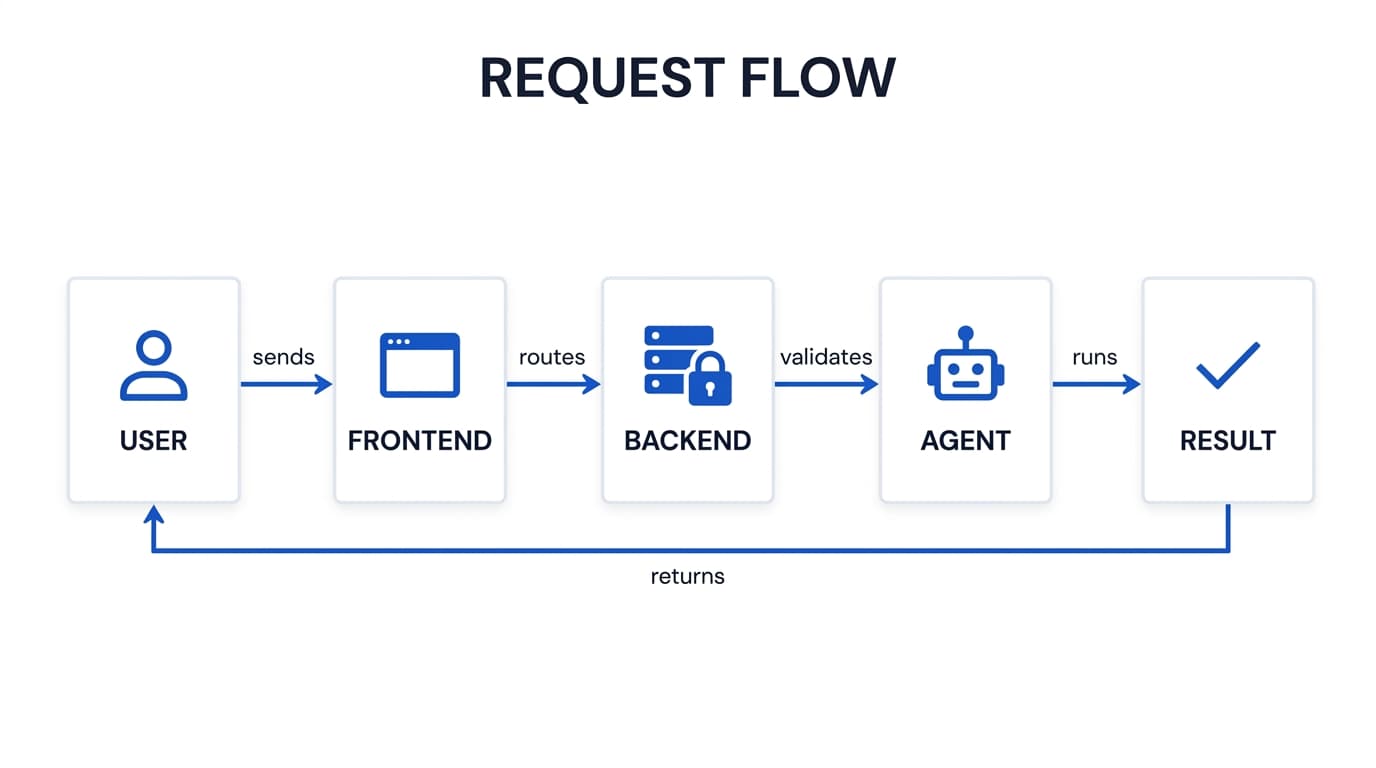
Authentication — JWT tokens for browser sessions, MCP API keys for programmatic access. WebSocket connections require token authentication.
Execution Queue — Each agent processes one request at a time. Additional requests queue (up to 3). The slot service tracks capacity for the dashboard meter.
Agent Execution— The backend proxies chat to the agent's internal web server (running inside the container). Claude Code or Gemini CLI processes the request with full tool access.
Real-time Updates — Events broadcast over WebSocket to the dashboard and filtered to MCP clients based on agent access permissions.
Network Topology
All services run on a single Docker bridge network (trinity-agent-network, subnet 172.28.0.0/16). Agent containers are dynamically attached to this network when created.
Exposed Ports (Host)
| Port | Service | Notes |
|---|---|---|
| 80 | Frontend (Nginx) | Configurable via FRONTEND_PORT |
| 8000 | Backend (FastAPI) | REST API + WebSocket |
| 8080 | MCP Server | SSE transport, API key auth |
| 8001 | Scheduler | Health check endpoint only |
| 6379 | Redis | Optional password auth |
| 8686 | Vector | Health/API endpoint |
| 4317 | OTel Collector | gRPC OTLP receiver (optional) |
| 8889 | OTel Collector | Prometheus exporter (optional) |
| 2222+ | Agent SSH | Auto-assigned, one per agent |
Internal Communication
Services reference each other by container name on the Docker network. The MCP server reaches the backend at http://backend:8000. The scheduler connects to Redis at redis://redis:6379. Agent containers communicate with the backend using the internal API secret for authentication.
Storage
| Volume | Purpose | Mounted In |
|---|---|---|
| trinity-data | SQLite DB, archives | Backend, Scheduler |
| redis-data | Redis AOF persistence | Redis |
| trinity-logs | Vector NDJSON logs | Vector, Backend (ro) |
| trinity-archives | Compressed log archives | Backend |
| agent-configs | Agent configuration | Backend |
| agent-{name}-workspace | Per-agent persistent FS | Agent container |
SQLite (/data/trinity.db) stores all platform state: users, agents, permissions, schedules, activities, chat sessions, audit logs, skills, tags, and execution history.
Redis stores encrypted credentials, distributed scheduler locks, execution queue state, and pub/sub events. Configured with AOF persistence.
Agent Workspaces — Each agent gets a dedicated Docker volume (agent-{name}-workspace) mounted at /home/developer. This volume persists across container restarts and contains the agent's code, configuration, CLAUDE.md, and working files.
Host Mounts — The Docker socket is mounted read-only into the backend for container management. Agent templates, process templates, hooks, and process docs are mounted read-only from the host config directory.
Security Posture
All platform containers run with no-new-privileges and drop all Linux capabilities except what is required. The backend uses a tmpfs for /tmp with noexec. Agent containers can optionally run in restricted mode (default) or full-capabilities mode for packages that require apt-get.