A2A Protocol
Trinity speaks the open A2A (Agent-to-Agent) protocol, so an exposed Trinity agent is reachable by any A2A-capable orchestrator — Google ADK, LangChain, AWS Bedrock AgentCore, or another Trinity — and can, in turn, call external A2A agents. To an outside orchestrator, your agent looks like any other A2A agent; it never needs to know Trinity's internal API.
This guide covers both directions:
Availability. Exposing an agent over A2A requires the A2A capability to be enabled (entitled) for your instance. When it isn't, the A2A tab is hidden and the public routes return 404— off and invisible by default. Everything below assumes it's enabled.
Concepts
| Term | Meaning |
|---|---|
| Agent Card | A JSON document (A2A's discovery primitive) advertising the agent's name, skills, endpoint URL, and auth scheme. Generated from the agent's template.yaml. |
| Well-known URL | The public, unauthenticated discovery URL: {base}/a2a/{agent}/.well-known/agent-card.json. This is what you hand to an external client. |
| JSON-RPC endpoint | POST {base}/a2a/{agent} — the A2A task endpoint (spec v0.3.x): message/send, message/stream, tasks/get, tasks/cancel. |
| Inbound allow-list | Optional per-agent list of caller account emails permitted to task the agent. Empty = any authenticated owner/shared caller. |
| Outbound endpoints | External A2A endpoints (+ optional credentials) your agent may call. |
Part 1 — Expose an Agent (Inbound)
Using the web UI
Open the agent's detail page and select the A2A tab.
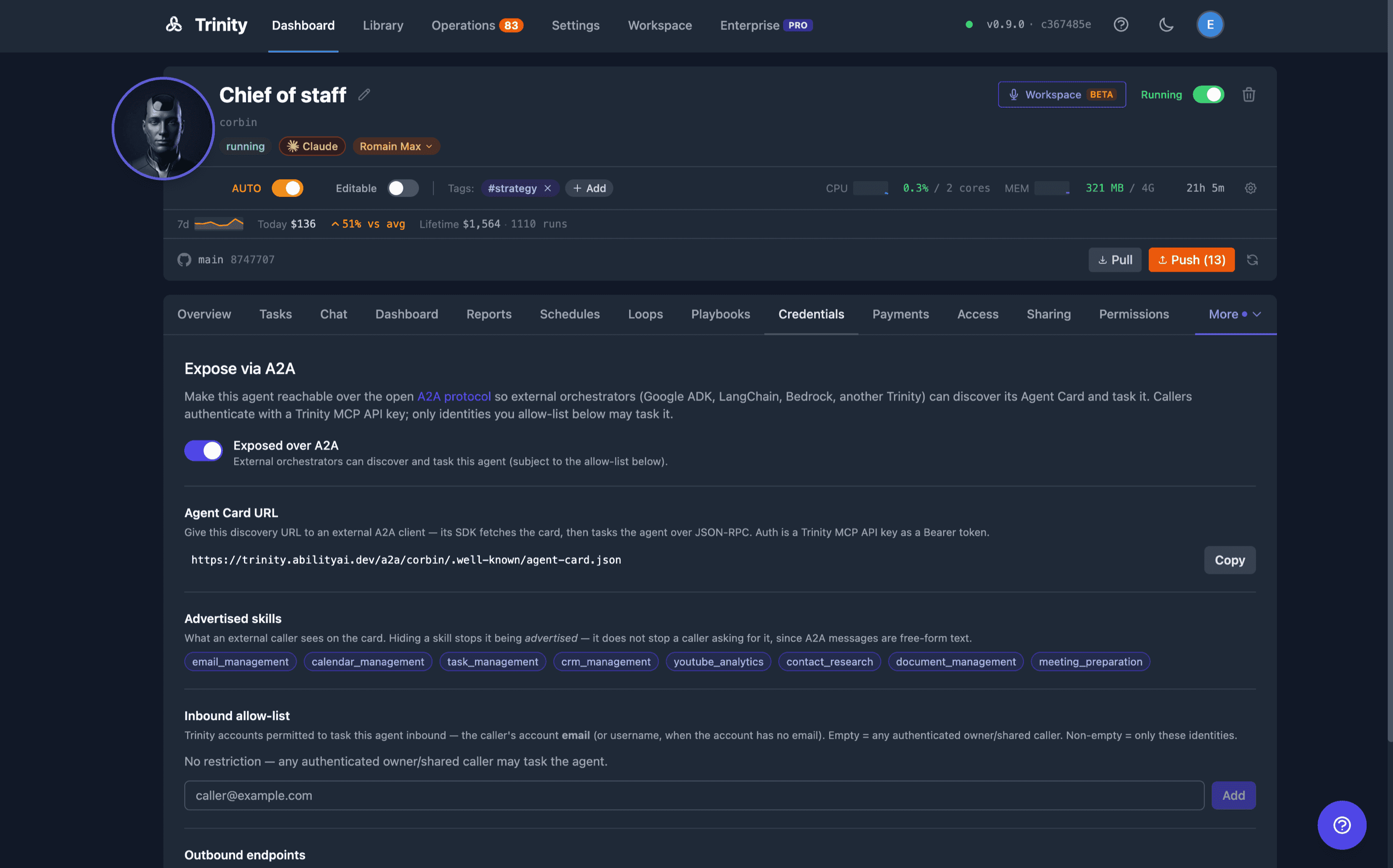
Flip "Expose over A2A" on. It's OFF by default. While off, the public routes return 404 and the agent is invisible to the A2A ecosystem.
Copy the Agent Card URL. Once exposed, the panel shows the public discovery URL with a one-click Copy button. Hand this to whoever is wiring up the external orchestrator.

Review the advertised skills — exactly what an external caller sees on the card (derived from the agent's template.yaml capabilities).
Manage the inbound allow-list (optional) — add the account emails of callers that may task the agent. Leave it empty to allow any authenticated owner/shared caller.
Register outbound endpoints (optional) — external A2A endpoints your agent may call, with credentials stored encrypted (never shown again).
Using MCP (drive it from an agent / automation)
The same controls are available as MCP tools, so you can expose and configure agents conversationally or from a script:
| Tool | What it does |
|---|---|
| get_agent_a2a_config | Read exposure state, card URL, skills, allow-list, endpoints |
| set_agent_a2a_exposure | Toggle A2A exposure on/off |
| get_agent_a2a_card | Fetch the served Agent Card JSON |
| set_a2a_inbound_allowlist | Add/remove inbound identities |
| register_a2a_endpoint / list_a2a_endpoints / remove_a2a_endpoint | Manage the per-agent outbound endpoint list (see the note under Outbound endpoints for which list call_a2a_agent resolves against) |
Exposure and credential operations are owner/admin and human-only— an agent-scoped key can't flip its own exposure. Reads use the standard agent-access gate.
Part 2 — Consume an Exposed Agent (External Orchestrator)
Once an agent is exposed, an external A2A client discovers and tasks it in three steps. The examples below use curl against a local instance (front door on port 8001); a real A2A SDK does the same automatically.
1. Discover — fetch the Agent Card
curl -s http://localhost:8001/a2a/new_cool_agent/.well-known/agent-card.json | jq{
"protocolVersion": "0.3.0",
"name": "new_cool_agent",
"url": "http://localhost:8001/a2a/new_cool_agent",
"preferredTransport": "JSONRPC",
"capabilities": { "streaming": true },
"securitySchemes": { "bearerAuth": { "type": "http", "scheme": "bearer" } },
"skills": [ ]
}url is the JSON-RPC task endpoint; securitySchemes.bearerAuth tells the client to attach a Trinity MCP API key as a Bearer token.
2. Authenticate — a Trinity MCP API key
Issue an MCP key from Settings → MCP Keys (or the API) and share it with the external client. It's a trinity_mcp_… key, sent as Authorization: Bearer $TOKEN on every task call; unauthenticated calls fail closed with 401. The examples below assume you've exported it: export TOKEN=trinity_mcp_….
3. Task — JSON-RPC 2.0
Synchronous (message/send):
curl -s -X POST http://localhost:8001/a2a/new_cool_agent \
  -H "Authorization: Bearer $TOKEN" \
  -H 'Content-Type: application/json' \
  -d '{
    "jsonrpc": "2.0", "id": 1, "method": "message/send",
    "params": { "message": {
      "role": "user", "messageId": "req-1",
      "parts": [{ "kind": "text", "text": "Summarize today’s sales." }]
    }}
  }' | jq
Returns an A2A Task:
{ "jsonrpc": "2.0", "id": 1, "result": {
  "id": "zAS45ahu2fwsHG9rwdKxQQ", "kind": "task",
  "status": { "state": "completed" },
  "artifacts": [{ "parts": [{ "kind": "text", "text": "…the answer…" }] }]
}}
Streaming (message/stream, Server-Sent Events): same params, method: "message/stream". You receive a working status event, then a final completed task event.
Poll / cancel: tasks/get and tasks/cancel take { "id": "<taskId>" } — the taskId is the id from the send response.
Idempotency. Re-sending the same messageId returns the original task without re-executing— safe to retry on a dropped connection.
Inbound Allow-List
By default, any caller authenticated as an owner/shared identity for the agent may task it. To restrict further, add identities in the Inbound allow-list section. With a non-empty list, only listed identities are accepted; everyone else gets 403.
Use the caller's Trinity account email— the identity Trinity compares against is the calling account's email, falling back to its username when the account has no email. A DID or caller URL will never match, so a list containing only those denies every real caller.
The allow-list is a restriction, not a security boundary. It layers on top of authentication — every caller has already passed the 401 and the owner/shared access check before it is consulted. It also fails open: if the policy backend errors, the request is allowed rather than denied, matching Trinity's availability bias. Don't rely on it as the only thing standing between an untrusted caller and the agent; that job belongs to authentication and sharing.
Outbound Endpoints
Register the external A2A endpoints your agent is allowed to call (name + URL + optional credential). Credentials are stored encrypted and never shown again— the UI only indicates whether an endpoint has one (🔒 credentialed).
Which list does call_a2a_agent actually read? Trinity resolves an outbound target through a provider seam, and in this build the resolver is the platform-wide list you manage in Part 3 — not this per-agent panel. If you register a target here and your agent answers endpoint_not_found, that is why: register it in Part 3. The per-agent panel becomes the resolver on a build that registers a provider for it, in which case it takes precedence.
Part 3 — Call an External A2A Agent (Outbound)
Your agents can task otherpeople's A2A agents — a Google ADK agent, a LangChain or Bedrock agent, or another Trinity instance — and get the answer back inside a single tool call.
Turn it on (admin, once)
Outbound calls are off by default. Enable them either way:
# .env, then restart
A2A_OUTBOUND_ENABLED=true
…or flip it at runtime with no restart (the stored setting wins over the environment variable):
curl -X PUT http://localhost:8000/api/settings/a2a_outbound_enabled \
  -H "Authorization: Bearer $TOKEN" -H 'Content-Type: application/json' \
  -d '{"value": "true"}'
GET /api/settings/feature-flags reports a2a_outbound_available so you can confirm it took.
Once a stored setting exists it wins in both directions, and the environment variable is ignored until you clear the row with DELETE /api/settings/a2a_outbound_enabled. If .env says true and the feature still looks off, that stored row is why.
There is no settings panelfor the endpoint registry — it is an API-only surface. Don't go hunting for it next to the per-agent A2A tab.
Register an endpoint (admin, human-only)
An agent cannot supply a URL. It picks a target by name from a list an administrator registered:
curl -X PUT http://localhost:8000/api/settings/a2a-endpoints \
  -H "Authorization: Bearer $TOKEN" -H 'Content-Type: application/json' \
  -d '{
        "name": "research-partner",
        "url": "https://partner.example.com/a2a/researcher",
        "credentials": "their-api-token"
      }'
Registry rules worth knowing before your first attempt:
name updates that endpoint. Omitting credentials on an update keeps the stored secret; send "clear_credentials": true to remove it.422 — that is the single most common first-try failure.# List them (credentials are never returned — only whether one is set)
curl -H "Authorization: Bearer $TOKEN" http://localhost:8000/api/settings/a2a-endpoints
# Remove one
curl -X DELETE -H "Authorization: Bearer $TOKEN" \
http://localhost:8000/api/settings/a2a-endpoints/research-partnerThe URL must be HTTPS and must resolve to a public address; Trinity refuses anything pointing inside your network. It re-checks this on every call, not just at registration, so a hostname that later resolves somewhere internal stops working rather than being trusted because it was once accepted.
⚠ Registering an endpoint is a trust decision, not a configuration step. Trinity removes the literal credential from anything the remote sends back. It cannot stop a remote that base64-encodes, splits or otherwise transforms it — and an agent under prompt injection can be talked into asking for exactly that. Registering an endpoint grants that endpoint the ability to exfiltrate its own credential. Register peers you would trust with the token you are handing them.
Call it (from an agent)
call_a2a_agent(
  agent_name  = "my-agent",
  endpoint    = "research-partner",     # the NAME you registered, not a URL
  message     = "Summarise the latest findings on X",
  dedup_label = "research-step-1"
)
dedup_label is required, and it must differ for each distinct question you ask in one turn. Calls are deduplicated on the endpoint and the conversation — never on the message text — so reusing a label returns the earlier answer instead of asking the new question.
If the remote replies with state: "working" or "submitted", it is still thinking. Poll it:
get_a2a_task(agent_name="my-agent", endpoint="research-partner", task_id="<task_id from the call>")What comes back
| Field | Meaning |
|---|---|
| state | completed, working, submitted, failed, canceled, … |
| text | The remote's answer (capped at 32 KB, truncation marked) |
| task_id / context_id | Handles for polling or continuing the conversation |
| protocol_version | The A2A dialect negotiated from the remote's card |
| truncated | true when the reply exceeded the 32 KB response cap and was cut |
| endpoint | Which registered endpoint answered |
| replayed | true when this is a deduplicated replay of an earlier identical call, not a fresh answer |
Messages are capped at 100,000 characters on the way out.
Pass the current execution_id alongside dedup_label when you have one: together they make the call at-most-once even if the turn itself is re-delivered.
A few behaviors that surprise people, all deliberate: the calling agent's container does not need to be running (the backend places the call, not the container); read-only mode and the autonomy switch do not gate outbound calls; and an ephemeral agent's own key cannot place them at all.
Trinity → Trinity
Register the remote instance's agent endpoint (https://their-trinity.example.com/a2a/their-agent) with a Trinity MCP API key from that instance as the credential. Both sides speak A2A v0.3, so it works with no extra configuration.
Troubleshooting
| Symptom | Cause |
|---|---|
| outbound_disabled (404) | A2A_OUTBOUND_ENABLED is off |
| endpoint_not_found (404) | No endpoint registered under that name — check spelling, or ask an admin |
| endpoint_not_https (400) | The registered URL is http://. Re-register it as https:// — Trinity refuses rather than silently upgrading, so a credential never travels in clear |
| endpoint_private_address (400) | The hostname resolves inside your network |
| card_origin_mismatch (502) | The remote's agent card points somewhere other than the registered host. Trinity refuses: a card cannot redirect a credentialed call |
| endpoint_dns_failure (400) | The hostname does not resolve. Trinity treats a DNS failure as fatal rather than retrying blindly |
| card_url_ambiguous (502) | The remote's card declares a URL that doesn't unambiguously match what you registered. Register the origin, or a URL matching the card's declared url exactly |
| unsupported_protocol_version (502) | The remote speaks A2A 1.x, which Trinity deliberately refuses — there is no peer to verify that dialect against |
| message_too_long (422) | The message exceeds 100,000 characters |
| timeout (504) | The remote took too long. If it accepted a task, poll with get_a2a_task |
| 409 | The same labelled call is already in flight — use a distinct dedup_label |
| 429 | Too many outbound calls: the limit is 30 per minute per agent and 120 per minute fleet-wide |
Timeouts, and what "it failed" actually means
A single call is bounded at 30 seconds for the remote's reply and 45 seconds wall-clock including the card fetch. The MCP tool gives up on its own side a little earlier (MCP_A2A_TIMEOUT_MS, 40 seconds by default) so it can hand the agent a structured receipt instead of an opaque network error.
That receipt matters: a timed-out call_a2a_agent returns possibly_delivered: true. The remote may well have accepted and run the task. Do not simply re-send — poll with get_a2a_task if you have a task_id, or reuse the same dedup_label, which replays the earlier answer rather than paying for the work twice.
Behavior & Security Notes
404 (no way to enumerate which agents exist).401./a2a/ to the backend (nginx in production, the dev proxy locally). Set PUBLIC_CHAT_URL so the card's published url is reachable from outside your network.source=a2a, with the caller identity).Reference
Public routes (per exposed agent)
| Method | Path | Auth | Purpose |
|---|---|---|---|
| GET | /a2a/{agent}/.well-known/agent-card.json | none | Discovery card |
| POST | /a2a/{agent} | Bearer MCP key | JSON-RPC task endpoint |
Outbound routes (calling out)
| Method | Path | Auth | Purpose |
|---|---|---|---|
| POST | /api/agents/{agent}/a2a/call | Bearer (owner/shared; an agent key only as itself) | Task a registered external A2A agent |
| POST | /api/agents/{agent}/a2a/task | same | Poll a remote task by id |
| GET/PUT | /api/settings/a2a-endpoints | admin, human-only | List / register endpoints |
| DELETE | /api/settings/a2a-endpoints/{ref} | admin, human-only | Remove an endpoint — ref is its id or its name |
The two agent routes return 404 while outbound calling is off. The three settings routes are not gated by the flag: an admin can register endpoints before switching the feature on, which is the intended order.
GET /api/settings/a2a-endpoints answers {"endpoints": [{"id": …, "name": …, "url": …, "has_credentials": true}], "enabled": false} — credentials are write-only and never echoed back, and enabled is a second way to confirm the flag.
JSON-RPC methods
| Method | Purpose |
|---|---|
| message/send | Send a message, get a Task (synchronous) |
| message/stream | Same, streamed over SSE |
| tasks/get | Fetch a task's current state |
| tasks/cancel | Cancel a running task |
JSON-RPC error codes
| Code | Meaning |
|---|---|
| -32700 | Parse error (body isn't valid JSON) |
| -32600 | Invalid request (not a JSON-RPC 2.0 envelope) |
| -32601 | Method not found |
| -32602 | Invalid params (e.g. no message text) |
| -32001 | Task not found |
Auth failures are transport-level 401; exposure/allow-list failures are 404/403.
See Also
Trinity docs
External references