Dashboard
The main Dashboard at / monitors all agents and their activities in real time. Switch between three view modes with the switcher at the far right of the header — Timeline, Grid, and List. Timeline is the default; your choice persists per browser in localStorage['trinity-dashboard-view']. (A previously saved mode that no longer exists — such as the retired graphview — falls back to the default.)
The Dashboard is also where you create agents: Create Agent sits in the header and is available in every view mode.
The Multi-Agent Platform I Run My Company On
May 2026
Concepts
| Term | Meaning |
|---|---|
| View mode | Timeline, Grid, or List — three renderings of the same fleet. Switching modes never refetches or resets your filters. |
| Agent tile | One agent's card on the Grid canvas — avatar, runtime badge, live chips, and inline Run/Autonomy toggles. |
| Info tile | A fleet-level readout that shares the Grid canvas with agent tiles. It summarizes; it never operates an agent. |
| Department | A visual grouping of agents on the Grid canvas, backed by a dept-<name> tag. |
| Reporting line | An arrow between two tiles on the Grid, backed by a reports-to-<agent> tag on the reporting agent. |
| Board preferences | Your Grid tile positions, your info-tile selection, and the Zones/Lines toggles. Saved to your user account on the server, so the same board follows you to any browser. |
Filtering (All Three Modes)
Filters live in the Dashboard header and apply to every view mode:
Type-to-filter — Press / anywhere on the page (or click the / button in the header) and start typing to narrow the fleet by name. Matching is a case-insensitive substring over both the agent slug and its display name. Press Esc to clear. This filter is an accelerator, not a saved preference — it is never persisted and clears when you leave the page. It narrows agents only: Grid info tiles are fleet-scope readouts and keep reporting on the whole fleet regardless of the query.
View-mode shortcut — Press v to cycle Timeline → Grid → List (the switcher's tooltip reads "Switch view (press v to cycle)"). The choice is saved exactly as if you had clicked the switcher. The switcher is pinned as the last header control, so it stays in the same place in every mode.
Tags — Narrow to one or more tags.
Owner filter — Narrow to agents owned by a particular user.
Time range — 1h, 6h, 24h, 3d, or 7d.
When a type-to-filter query matches nothing, the Dashboard tells you so explicitly rather than showing an empty fleet.
Loading, Errors, and Refresh (All Three Modes)
On first load each pane shows a skeleton in the shape of its content — rows for Timeline and List, tile outlines for Grid — until the fleet arrives. Skeletons are for "no data yet" only; a pane with data never regresses to one.
If the fleet can't be read, the pane shows Couldn't load agents (or Couldn't load timeline data) with a Retry button, instead of an empty list that looks like a fleet with no agents.
A fleet with no agents shows No agents yet and a Get started button that opens the Create Agent dialog. First-run setup is a separate overlay that opens over the Dashboard on a fresh install. The Getting started checklist, on instances that have it, lives in the left Systems sidebar under the view list rather than in the fleet pane, so it never shifts the fleet down. It stays there until its milestones are done, and collapsing the sidebar hides it. Both are described in Setup.
Background polls swap values in place. A poll that fails after a successful one keeps the numbers on screen and marks them stale rather than blanking them — for example, the Executions tile's stamp becomes 24h · stale.
Timeline View (Default)
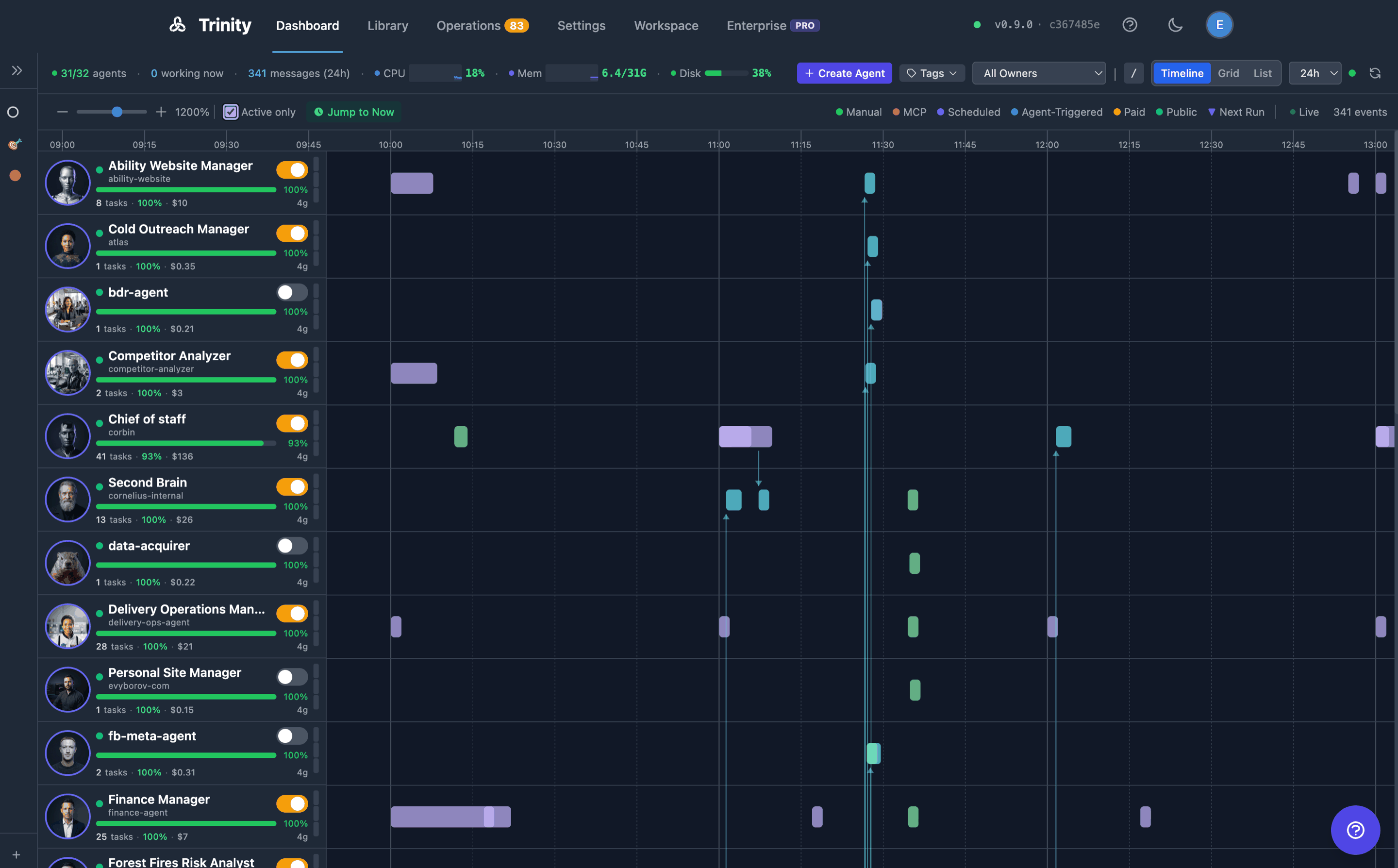
Execution boxes per agent, arranged chronologically.
Color-coded by trigger type: Manual (green), MCP (pink), Scheduled (purple), Agent-Triggered (cyan), Paid (yellow), Public (teal).
Each row shows the agent's completion rate, total cost, and parallel slot count.
Live streaming: running executions show progress in real time with a "Live" indicator.
Active only toggle hides agents with no recent activity.
Jump to Now snaps the view to the current time.
Agent-to-agent collaboration is surfaced here — via the Agent-Triggeredtrigger type — rather than as a live node graph.
Grid View
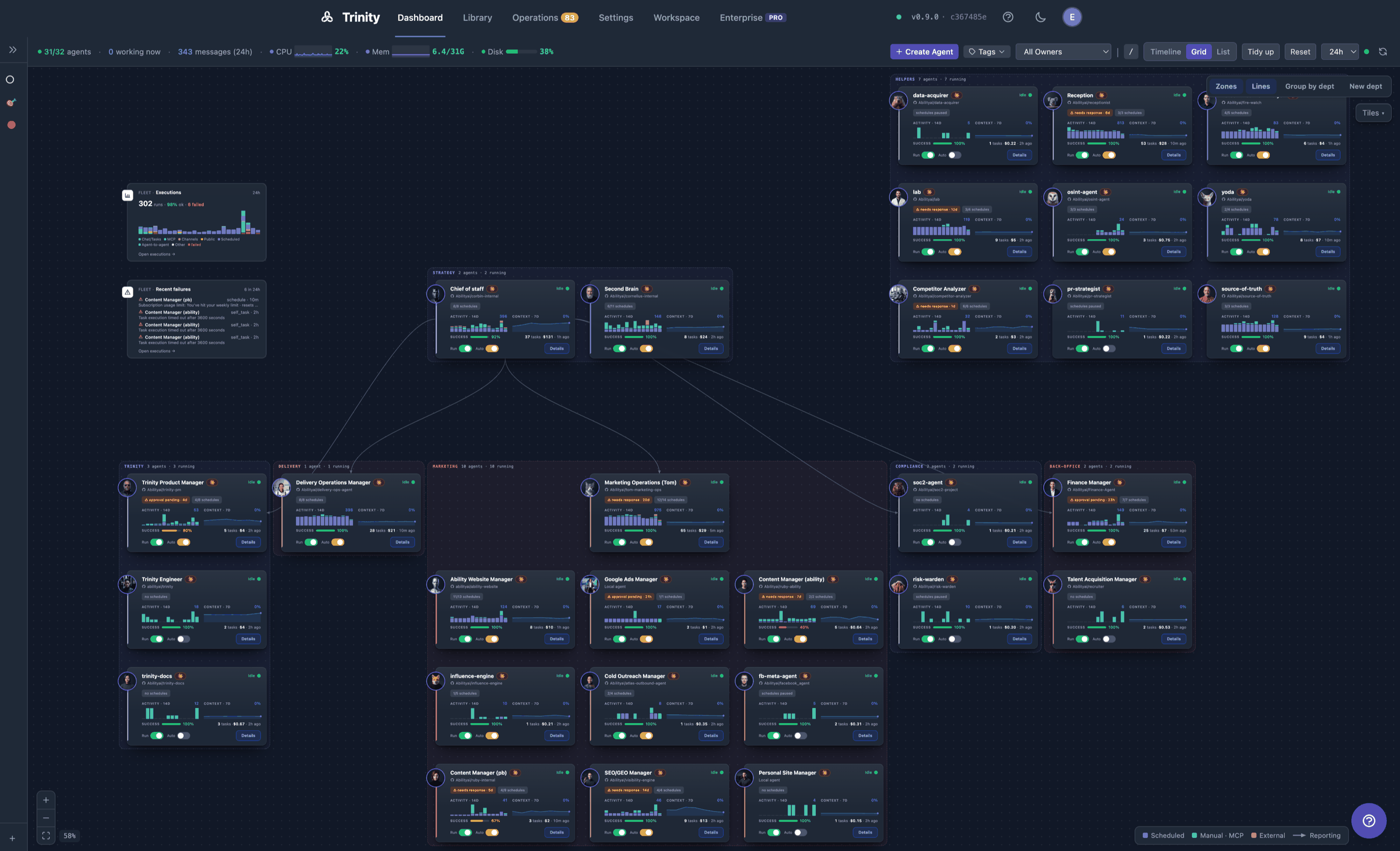
A magnetic tile canvas. It holds two kinds of occupant on one lattice: agent tiles (one per agent) and info tiles (fleet-level readouts). Each agent is a five-zone tile showing its avatar, runtime badge, and inline Running and Autonomytoggles, plus live status chips (git sync health, pending operator-queue items, subscription pressure). When an agent has a display label, the tile's name line shows the label and the meta line beneath leads with the slug in a click-to-copy code style, so the name that URLs and MCP keys use is always visible.
Drag a tile to move it; drop it onto another tile to swap positions. The layout snaps to an unbounded lattice.
Tidy up re-packs the tiles into a compact arrangement without losing your ordering.
Reset restores the default auto-generated layout, then re-seeds your enabled info tiles above the fleet.
Pan by dragging the background; zoom with the scroll wheel or pinch, or use the zoom controls bottom-left (Zoom in, Zoom out, Fit view). Tiles are keyboard-navigable.
Tile metrics hydrate lazily as they scroll into view, so large fleets stay responsive. Each chart zone plays a scanline sweep while its data loads and wipes the chart in once; a background refresh never replays it.
Everything in that list applies to info tiles too — they drag, swap, tidy, and take keyboard focus exactly like agent tiles.
What persists, and where. Three things are saved to your user account on the server: tile positions, which info tiles you show (the Tiles ▾ choices), and the Zones / Lines toggles. Sign in from another browser or device and the same board comes back; two people sharing one browser never see each other's board. Each is stored separately, so resetting your tile selection never disturbs your layout or the org toggles. Your browser keeps a per-user copy so the board paints before the server answers and stays editable if the server can't be reached; if a save or load fails, a dismissable notice on the canvas says so (Couldn't save your layout to the server (…)) and the change is retried on your next edit. A board you arranged before this release is adopted into the account of the first person who signs in on that browser after upgrading; everyone after starts from the default. Reset clears your server record and your browser copy, then re-saves the default.
The view mode, the List view's name/status filters, and the header filters stay browser-local.
Info Tiles
Info tiles put fleet-level answers on the same canvas as the fleet. They are deliberately easy to tell apart from an agent: a squarepeg badge on the left edge instead of a round avatar, no Run or Autonomy toggles, and no connect port — an info tile can never join a department or terminate a reporting line.
Four ship today, all on by default:
| Tile | Shows | Opens |
|---|---|---|
| Fleet summary | Running (n/total), Autonomous, and Stopped counts, with the fleet size in the header | Open the fleet → — the fleet in List view |
| Recent failures | The 4 newest failed executions across every agent you can access — agent, trigger, age, and the truncated error — plus the 24-hour failure total in the header | Open executions → — the Executions tab; each row opens that execution's detail page |
| Executions | The last 24 hours as 24 hourly columns, each stacked by trigger type (Chat/Tasks, MCP, Channels, Public, Scheduled, and so on, in the server's order), with failures drawn as a separate red rail below each column so they are never hidden inside totals. The headline reads N runs · N ok · N failed; live N running / N queued chips sit beside it. A legend names the trigger types; when they don't all fit, a +N chip names the rest on hover. Header stamp 24h, or 24h · stale after a failed refresh | Open executions → — the Executions tab |
| Subscription pressure (admins only) | One row per Claude subscription: the share of its 5-hour and 7-day limits already spent, each as a small bar plus the number, colour-banded — green below 60%, amber from 60%, red from 85% — with a chip on the left when something needs attention. Header stamp N subscriptions, or 3 of 9 when the tile can't fit them all (the last row becomes +N more), with · stale after a failed refresh | Open subscriptions → — Settings → Integrations → Claude Subscriptions |
Subscription pressure chips. auth — the provider rejected the token; re-register it. limit — rate-limited right now; the row says when the limit resets (resets 19:10, reset due once that time has passed, or reset unknown). 429s — rate-limit errors in the last 24h, but not limited right now. near — inside the red band, or the provider's own "approaching limit" warning even below it. ? — no usable reading. Rows sort by severity, so a token that needs a person outranks a limit that needs a wait. Percentages appear only from a provider reading under 30 minutes old; otherwise the row shows a short status (rate-limited, 3× 429, token invalid, no provider data, unavailable, ok) rather than a stale number. What each state means, and how to read the same figures in Settings, is on Subscription Credentials.
Per-agent pressure chips. Agent tiles (and List rows) carry a small badge when the agent's own subscription is under strain: sub limit (rate-limited now), sub 429s (rate-limit errors in the last 24h), or sub auth (the token was rejected). Hover it for the subscription name, the event count, and the 5h utilization.
Showing and hiding them. A Tiles ▾ button sits on the Grid canvas itself, top-right, just below the org-overlay controls (Zones · Lines · Group by dept · New dept). It is Grid-only — you won't find it in the Dashboard header or the other two view modes. Tick a tile to show it, untick to hide it, and use Reset to defaults at the bottom to restore the default set. Close the menu with Esc, by clicking the button again, or by clicking anywhere else on the canvas. Subscription pressure is listed only for admins.
Because the show/hide store records only your explicit choices, a tile added in a later release appears automatically, while one you deliberately hid stays hidden.
How they refresh.Info tiles ride the Grid's existing 60-second fleet poll — no extra load, and no request at all for a tile you have switched off. The poll pauses while the browser tab is hidden and refreshes immediately when you return to it, so a tab left open overnight never greets you with a stale all-clear. Enabling a tile fetches straight away rather than waiting for the next tick, and the header refresh button forces a round. Reading the Subscription pressure tile is what keeps subscription headroom warm: an open dashboard triggers the provider probe at most once per 15 minutes per subscription.
Failures are contained and claims are honest. If one tile's data can't be read, only that tile shows an error — with a Retry button — and the rest of the board stays live. A failed refresh over data already on screen keeps the last good numbers and marks the stamp stale rather than blanking them.
The Recent failures tile treats "no failures" as a claim that needs evidence, so it shows the green No failures in 24h ✓ only when it can positively confirm one. If the fleet list can't be enumerated, or the 24-hour total can't be read, it says exactly that instead of implying an all-clear. And when the 24-hour count is above zero while the latest page is empty — older failures, or legacy rows the list filters out — it explains the discrepancy rather than showing a checkmark beside a non-zero number. The Executions tile applies the same rule to its headline: while loading it shows — rather than 0 runs · 100% ok.
Org Overlay — Departments and Reporting Lines
The Grid can render an organizational layer on top of the same lattice, so a fleet reads like an org chart instead of a flat pile of tiles.
Departments are drawn as labelled zones around their member tiles. Each department gets its own color, and members carry a matching ribbon on their tile.
Reporting lines are drawn as arrows between tiles. The arrow points from the reporting agent to the one it reports to.
Assign by drag — drop a tile into a zone to move it into that department, or use New dept to create one and click agents to assign them.
Draw a line — drag from a tile's connect port onto another tile to create a reporting line. A live pill previews the relationship before you drop.
Move a department — drag its zone header to relocate the whole group.
Group by dept arranges the fleet into department blocks once; tiles stay fully hand-editable afterwards.
Every org change surfaces a canvas toast with Undo.
Both are stored as ordinary agent tags — dept-<name> for departments, reports-to-<agent> on the reportingagent for lines — so nothing new is persisted and you can inspect or bulk-edit them from the tag surfaces. Zones are derived from where tiles already sit; they never constrain your layout. If an agent is renamed, its reporting references follow; if it is permanently purged, dangling references are cleaned up.
Org tags are human-only: agent-scoped API keys cannot add or remove them.
List View
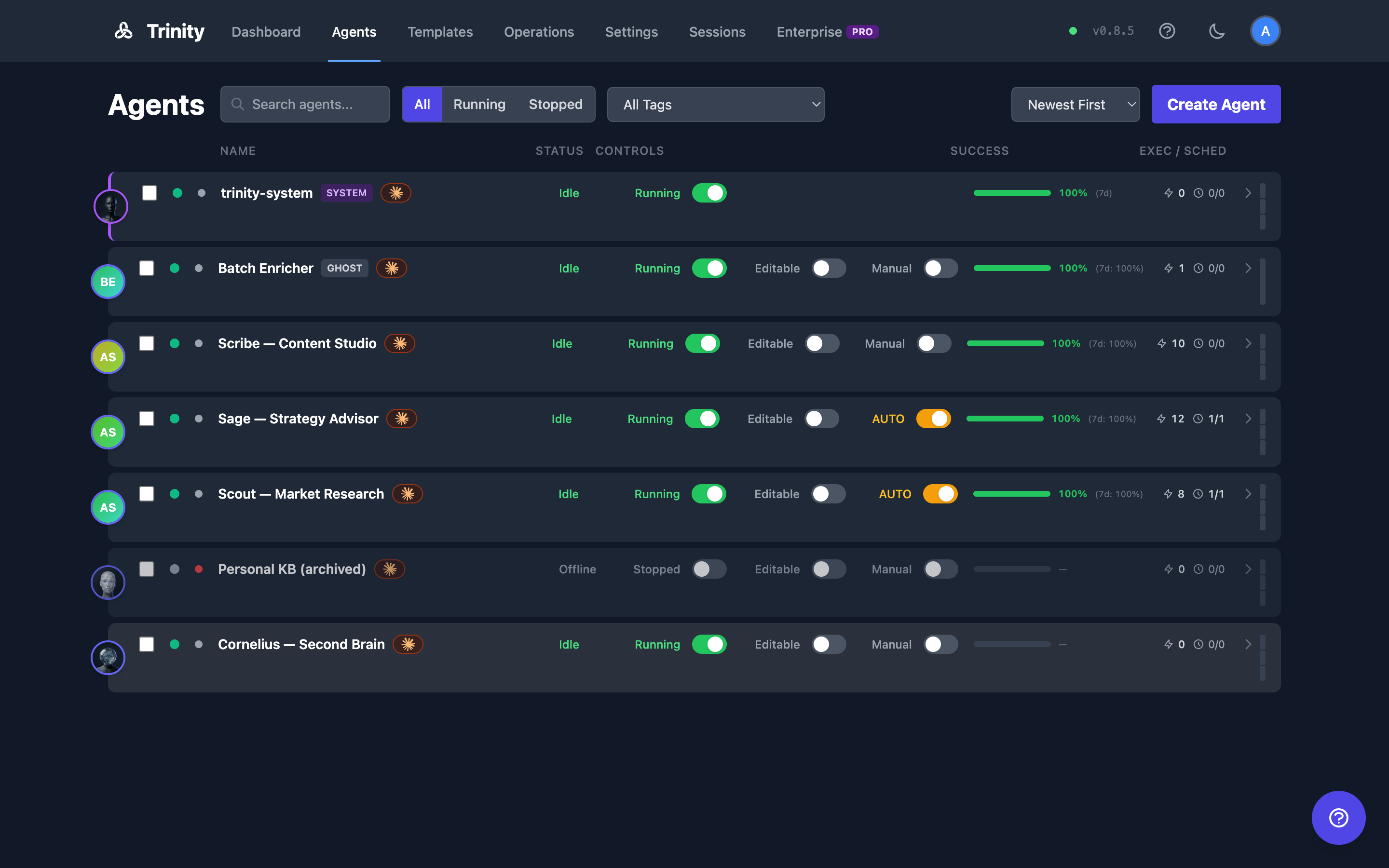
The former standalone Agents page, folded into the Dashboard as a third mode (/agents now redirects here).
One row per agent. Columns: Name, Status, Controls, Success, Exec / Sched, plus a capacity meter. The header and every row share one column grid, so the columns line up regardless of what each row contains.
The name cell carries only exception markers — SYSTEM, GHOST, Shared. A labelled agent shows its display label in the name cell and its slug, in a click-to-select code style, first on the row's secondary line — followed by the subscription pressure badge (if any), a runtime badge for any non-default runtime, and the agent's tags with a +N overflow count.
Run and Autonomy toggles inline on each row.
Sort by Newest First, Oldest First, Name (A-Z), Name (Z-A), Running First, or Success Rate; filter by name (Search agents...) and status (All / Running / Stopped). These two filters persist per browser.
Select multiple rows for bulk tag operations.
Three responsive layouts — the row list reflows down to mobile widths.
System agents pin to the top and hide the Run toggle.
Tag and owner filtering use the shared Dashboard header controls; Clear (and Clear all filters in the no-match state) clears both the row-level and header-level filters at once.
Fleet Stats Bar
The header's left side carries live fleet telemetry: n/total agents, N working now, N messages (Nh)for the selected time range, and the host's CPU, memory, and disk meters. On narrow viewports it degrades gracefully — dropping the least important readouts first — rather than clipping; the agent count always survives.
For Agents
| Endpoint | Method | Description |
|---|---|---|
| /api/agents | GET | List all agents (carries tags, read_only_enabled, and display_label per row) |
| /api/agents/context-stats | GET | Context and activity state for all agents |
| /api/agents/autonomy-status | GET | Autonomy status for all agents |
| /api/agents/subscription-pressure | GET | Per-agent subscription pressure — auth mode, subscription name, 24h failure events, rate_limited_now, token status, 5h utilization. The source of the per-agent chips |
| /api/activities/timeline | GET | Cross-agent activity timeline (filterable) |
| /api/executions | GET | Recent executions — the Recent-failures tile reads it with status=failed&hours=24&limit=4 |
| /api/executions/stats | GET | Windowed fleet totals plus live running/queued counts — the source of the tile headers |
| /api/executions/timeline | GET | Bucketed fleet rollups — the Executions tile reads group_by=hour&hours=24&split=trigger, which folds a trigger breakdown into each hour. See Executions |
| /api/subscriptions + /api/subscriptions/{id}/usage | GET | Admin-only; what the Subscription pressure tile reads. See Subscription Credentials |
| /api/agents/{name}/tags | PUT | Set an agent's full tag list — including dept-* and reports-to-* org tags. Rejected for agent-scoped keys. |
| /api/users/me/preferences | GET | Your board preferences (grid_layout, grid_widgets, grid_org). Interactive sessions only — rejected for MCP and agent keys, since a board has no machine consumer |
| /api/users/me/preferences/{key} | PUT / DELETE | Save one preference conditionally (base_updated_at: null inserts, a timestamp compares-and-sets; 409 returns the live record) or remove it |
| /api/telemetry/host | GET | Host CPU/memory/disk |
API Endpoints: See Backend API Docs for full schemas.
Limitations
See Also
- Managing Agents
- Tags and Organization — the tag model behind departments and reporting lines
- Subscription Credentials — what the pressure chips and the Subscription pressure tile mean
- Scheduling
- Operations Page — Operator queue, health, and fleet executions
- Executions — Fleet execution list and completion metrics