Operations
The Operations page at /operations is the single fleet-operations surface. It replaces the former standalone Health, Operating Room, and Executions pages with one tabbed view.
The Six Tabs
| Tab | What it shows |
|---|---|
| Needs Response | Pending operator-queue items: questions, approval requests, alerts from agents |
| Notifications | Agent notifications with filters, stats, and bulk actions |
| Health | Fleet health monitoring (admin-only) — see Monitoring |
| Executions | All task runs across the fleet — see Executions |
| Reports | Structured reports published by every agent you can access — see Agent Reports |
| Resolved | Terminal operator-queue items (responded, acknowledged, cancelled, expired) |
Tabs are addressable via ?tab= (e.g. /operations?tab=notifications). Legacy routes redirect here: /operating-room (deep links keep their query), /monitoring → the Health tab, /executions → the Executions tab, and /events → the Notifications tab. Non-admin deep links to ?tab=health fall back to the default tab.
The navigation bar shows a single Operations entry with one unified badge: the count of pending operator-queue items plus pending notifications. The badge pulses when any pending item is critical or urgent.
Needs Response Tab
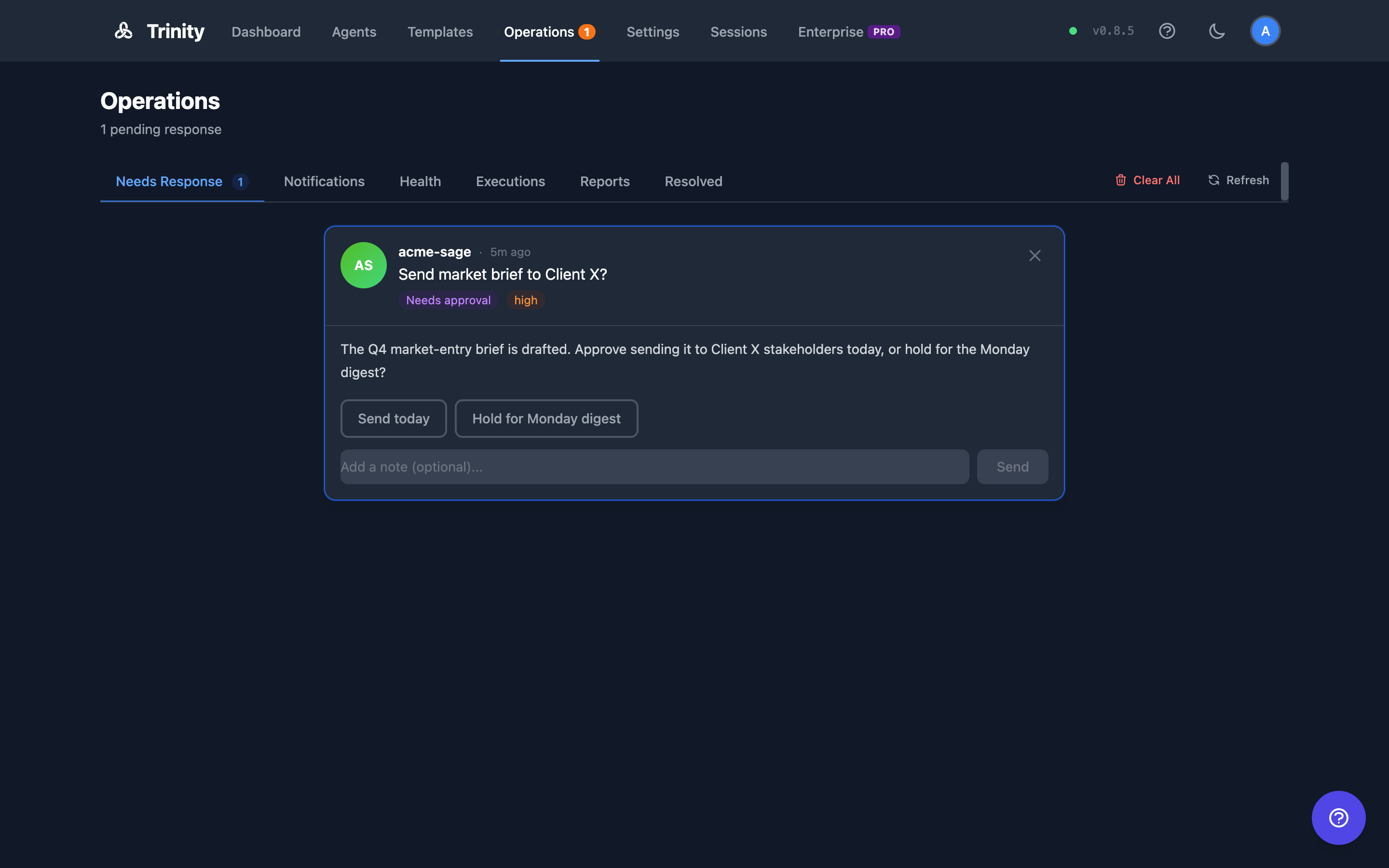
Shows items from agents' operator queues that are waiting on a human: questions, approval requests, and alerts. For how agents pause work and ask for approval, see the Approvals guide— that page is the canonical reference for approval semantics.
~/.trinity/operator-queue.json inside their container.operator_queue_new, operator_queue_responded, operator_queue_acknowledged, operator_queue_cleared.Each card carries a type pill — Needs approval, Question, or Heads up— and the control matches the type:
| Type | What you do |
|---|---|
| Needs approval | Pick one of the options the agent offered, optionally add a note, and send. The decision is always one of the agent's own options — a free-text decision is refused. |
| Question | Type an answer and send. |
| Heads up | Click Got it to acknowledge. |
If the item stopped being pending while you were answering — another operator's response or Clear All landed first, or it expired — your response is not recorded and the page says so.
Besides agent-authored items, the platform files its own alerts into this tab:
.gitignore sweep changed which files are tracked — see GitHub Sync.Notifications Tab
Consolidated view of agent notifications (replaces the former standalone Events page).
Resolved Tab
Terminal operator-queue items. Responded items stay visible until the agent confirms delivery of the response.
Clear All
Each operator tab has a Clear All button (with a confirmation dialog) when there is something to clear. The action depends on the tab:
| Tab | Action |
|---|---|
| Needs Response | Cancels the pending items currently shown. Agents waiting on them are told their requests were cancelled. |
| Notifications | Dismisses every non-dismissed notification from your accessible agents — including any hidden by the current filters. |
| Resolved | Clears resolved items from view. Items still awaiting agent confirmation are kept. |
All clear operations are scoped to agents you can access, affect all operators of those agents, and are recorded in the audit log.
Clear All only hides — it does not delete. Terminal operator-queue rows are removed automatically by the operator-queue retention sweep: acknowledged, cancelled, and expired rows are deleted past operator_queue_retention_days (default 90, 0 disables); responded rows are kept at least 30 days so their answer can still be delivered; and pending items are never deleted. See Retention Sweeps.
Sync Service
Sync Health Alerts
For agents with GitHub sync enabled, the Sync Health Service polls every 60 seconds by default (SYNC_HEALTH_POLL_INTERVAL_SECONDS) and writes sync_failing queue entries when an agent's consecutive_failures hits 3. These appear in the Needs Response tab alongside agent-emitted items, so a broken git remote, expired PAT, or upstream divergence surfaces in the same place operators already watch.
Per-agent sync state (last sync at, last error, ahead/behind counts on main and the working branch) is also visible on the agent header dot and at GET /api/agents/{name}/git/sync-state.
Operator Queue API
| Endpoint | Method | Description |
|---|---|---|
| /api/operator-queue | GET | List queue items |
| /api/operator-queue/stats | GET | Queue statistics |
| /api/operator-queue/bulk-cancel | POST | Cancel listed pending items ({"ids": [...]}); returns {cancelled, skipped} |
| /api/operator-queue/clear-resolved | POST | Hide terminal items (acknowledged/cancelled/expired); returns {cleared} |
| /api/operator-queue/{id} | GET | Get single item |
| /api/operator-queue/{id}/respond | POST | Submit response — body {"response": "<decision>", "response_text": "<optional note>"}. For an approval, response must be one of the item's own options (exact match) or the call fails with 422 response_not_an_offered_option carrying offered_options; 409 if the item is no longer pending |
| /api/operator-queue/{id}/cancel | POST | Cancel item |
| /api/operator-queue/agents/{name} | GET | Items for a specific agent |
| /api/notifications/dismiss-all | POST | Dismiss all pending + acknowledged notifications (optional agent_name) |
MCP Tool
send_notification(agent_name, message, priority)— sends a notification to the Operations page from within an agent.