Executions
View, monitor, and manage task executions across all agents. Executions are created by manual tasks, schedules, MCP calls, and chat interactions.
What Is an Execution
An Execution is a single run of a task on an agent. Each execution records: status, started_at, completed_at, duration, message, response, error, cost, model_used, triggered_by, and claude_session_id.
Trigger Types
How an execution was initiated:
| Trigger | Source |
|---|---|
| manual | Tasks tab in agent detail |
| schedule | Cron-based schedule |
| chat | Chat tab in agent detail |
| session | A resumable conversation turn (the Workspace) |
| agent | Agent-to-agent call |
| mcp | MCP client call |
| public | Public chat link |
| webhook | Webhook trigger URL |
| fan_out | Fan-out to multiple agents |
| loop | Sequential agent loop iteration |
| reminder | An agent's own deferred self-trigger |
| room | A turn inside a shared multi-agent room |
| a2a | A task sent in by an external A2A orchestrator |
| operator_response | An answer to a parked request waking the agent, on an agent with wake-on-answer turned on (see Approvals) |
Channel and voice triggers (telegram, slack, whatsapp, voip, voice, paid) are recorded too and are folded into the Channels, Voice, and Public groups on the analytics charts. Rooms and operator answers get their own Rooms and Operator queue groups, beside Loops and Reminders.
Execution Status
Every execution moves through a lifecycle: queued → running → success, failed, cancelled, or skipped, with pending_retry in between when a run is awaiting an automatic retry. A run you stop yourself terminates as cancelled — a distinct state, not a failure: it has its own filter option and badge in the Executions list, and renders neutral (not red) on the activity timeline. Some long-lived installs still carry historical rows with a legacy error status; the fleet stat cards count those alongside failed.
Parallel Capacity
Each agent has a configurable slot system (default: 3 concurrent slots). Slot TTL equals the agent timeout plus a 5-minute buffer. When all slots are occupied, new executions queue until a slot frees up.
Task Execution Service
A unified execution lifecycle layer used by all callers (UI, schedules, MCP, chat, paid). Handles slot management, activity tracking, and input sanitization.
Live Streaming
Running executions stream logs in real time via Server-Sent Events (SSE) to the Execution Detail page.
Turn Integrity
A turn that ends while a background command it started is still running has that command killed a few seconds later, so its announced result may describe work that never happened. Such a run is not recorded as a clean success: the stored response opens with a visible notice (⚠️ Background work lost: N background task(s) … were still running when this turn ended and were killed at CLI exit), and the row carries a structured turn_integrityrecord on the API. An empty record means "no evidence", never "verified healthy".
Executions Tab (Operations Page)
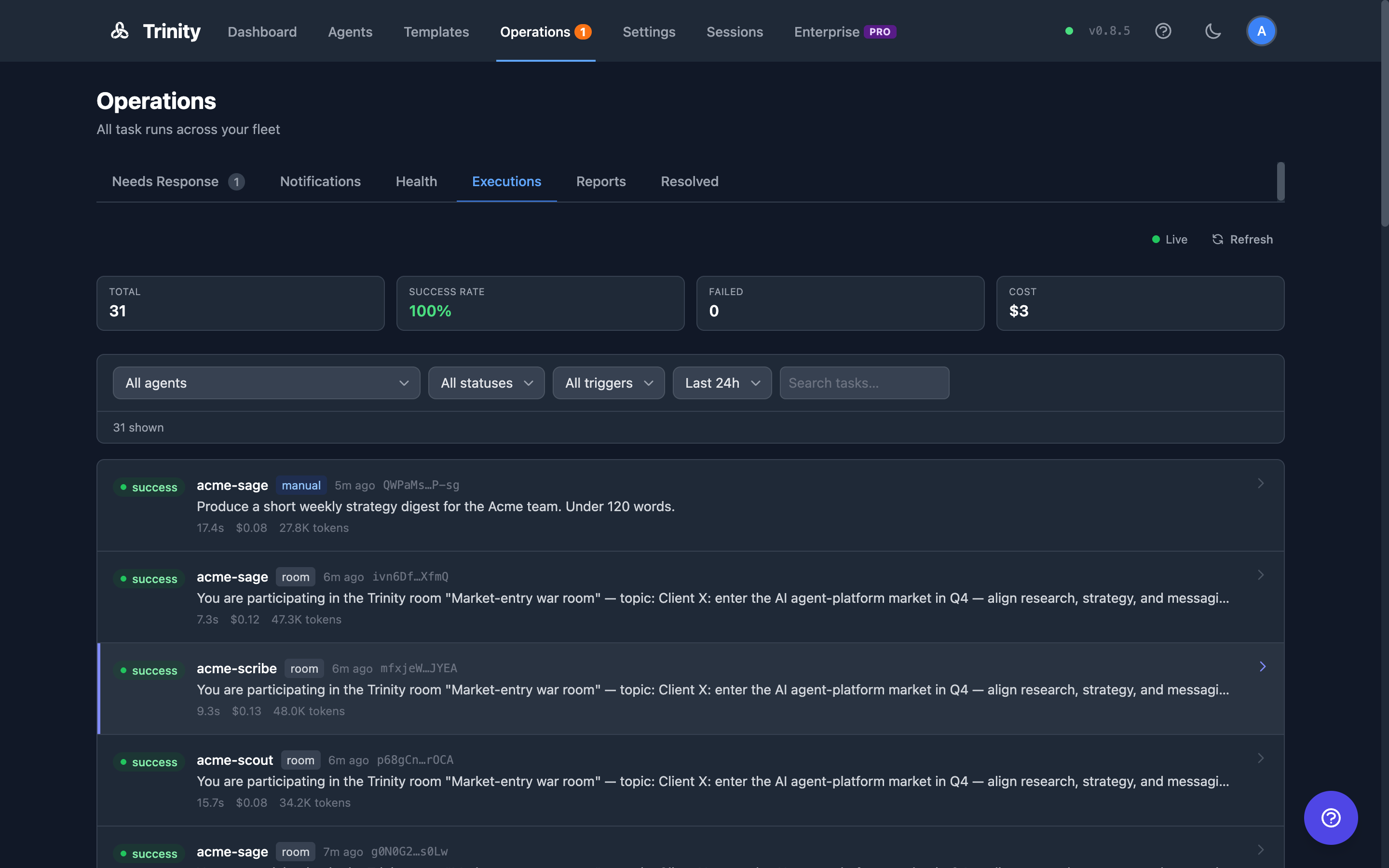
The fleet execution list lives on the Executions tab of the Operations page (/operations?tab=executions). The legacy /executions route redirects there.
Lists all executions across the fleet. Admins see every agent; other users see only agents they own or that are shared with them.
Stat cards show Total, Completion, Failed, and Cost for the selected time window. Running and queued counts are always live, regardless of the window.
Filter by agent, status, trigger type, time range (1h to 30d, or all time), and free-text search over task messages.
The list loads 50 rows at a time; Load more appends the next page.
A "N running now" strip appears whenever executions are in flight.
A status dot shows Live when WebSocket updates are connected, or Polling (every 30s) as fallback.
Click any execution row to open its detail page (/agents/{name}/executions/{id} — this route is unchanged).
Completion Is Not Quality
"Completion" means the run finished cleanly — the process exited without error. It says nothing about whether the work was any good. That is a separate axis, recorded as an evaluation.
Evaluations are written by the platform or by a human admin — never by the agent being graded, which is the entire point of keeping them apart from reports (an agent publishes its own reports). An ungraded run has no quality score at all; that is different from scoring zero.
An agent can read its own evaluations — seeing its own bad score is the feedback loop. Only humans with admin rights can write one.
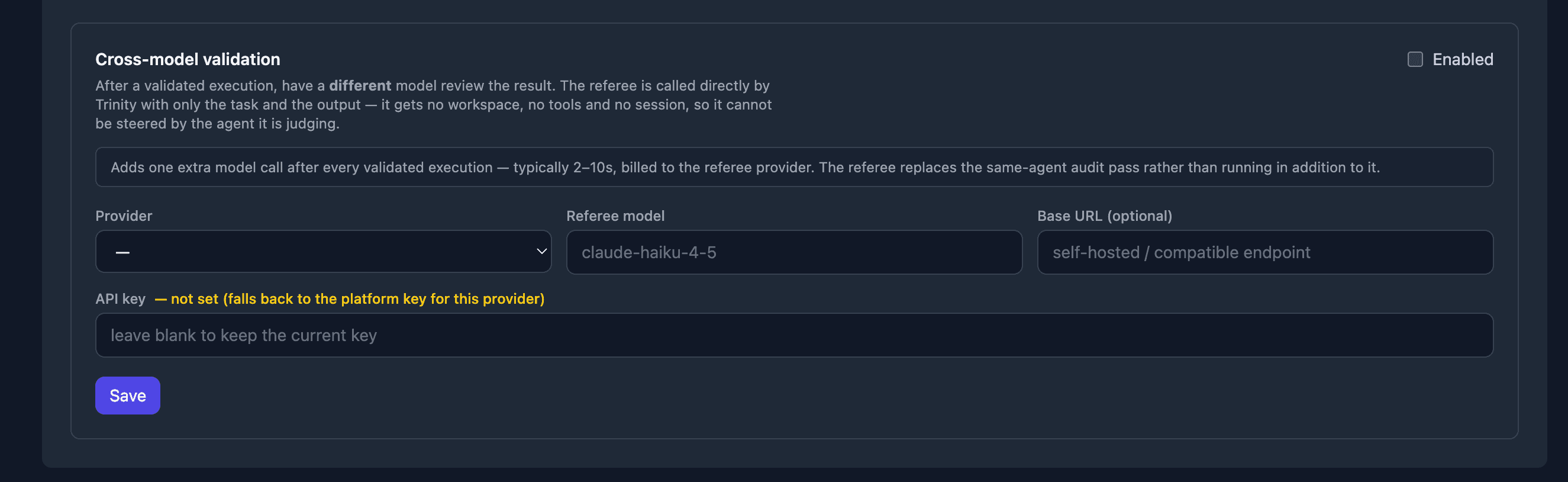
An instance can additionally enable cross-model validation: after a validated execution, a differentmodel reviews the result. The referee is called directly by Trinity with only the task and the output — it gets no workspace, no tools, and no session, so it cannot be steered by the agent it is judging. It replaces the same-agent audit pass rather than running in addition to it, at the cost of one extra model call (typically 2–10s) billed to the referee's provider.
Execution Detail Page
Displays agent name, status, timestamps, duration, cost, model used, and trigger source.
Shows who or what initiated the run, including scheduler-triggered executions.
Shows the full transcript/log of the execution.
Tool calls are recorded as a summary — which tools ran and how often — not as a second copy of the transcript.
For running executions, a green pulsing "Live" indicator streams output in real time.
Stop button terminates a running execution.
Continue as Chat button resumes the execution as an interactive chat session.
Durations are always non-negative, and a run that ends through a recovery path (a timeout, a restart, an expired lease) closes its activity record with a real duration rather than being left open until a sweep guesses one.
Tasks Tab (Per-Agent)
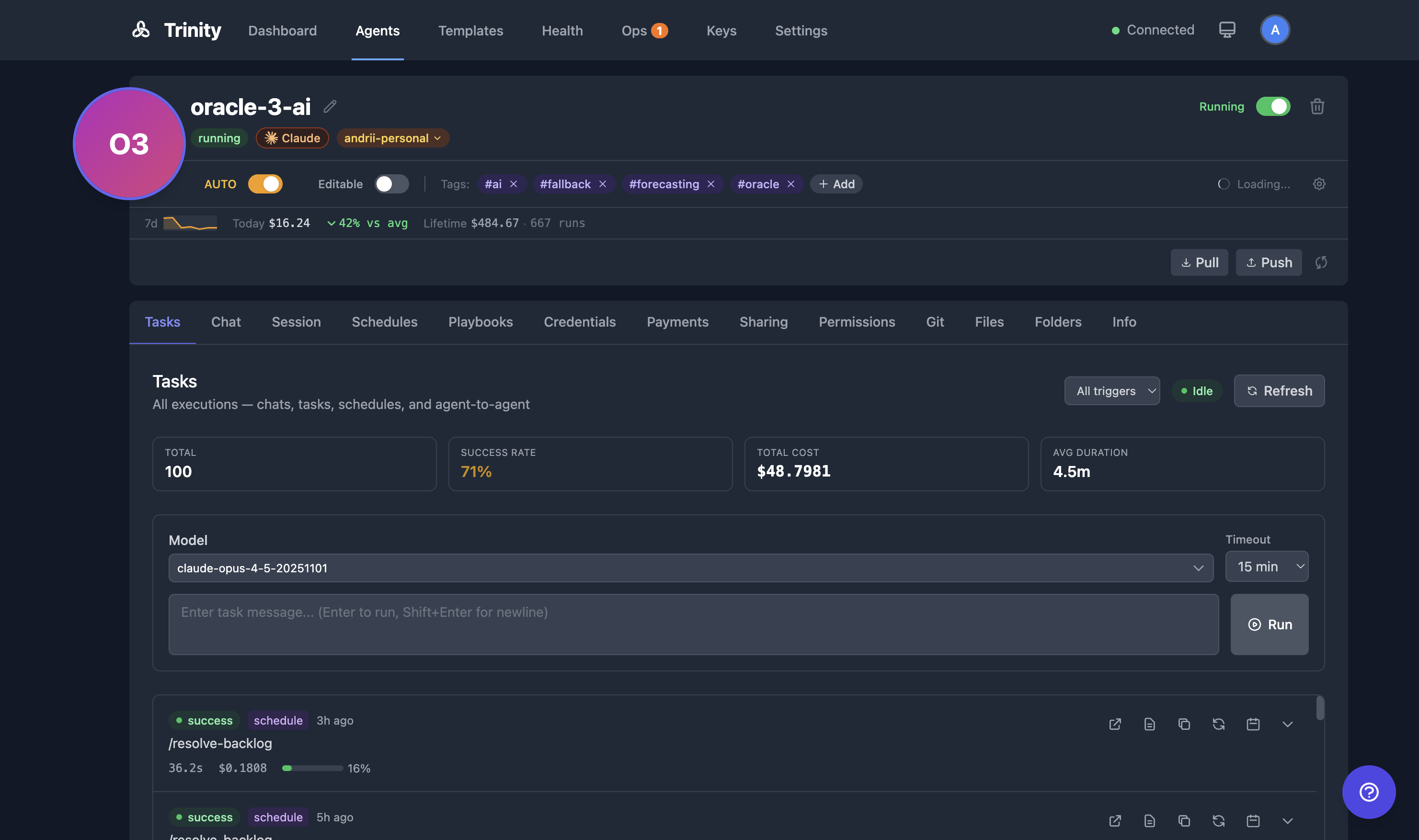
Open agent detail and click the Tasks tab.
Enter a task message. Optionally select a model.
Click Send to start the execution.
View execution history with status and duration.
A green pulsing "Live" badge links directly to the running execution.
Use Make Repeatable to create a schedule from any completed task.
Execution Termination
Work in the Workspace
Platform users see their executions inside the Workspace too, in the vocabulary of the chat rather than the ledger. An external client sees only the live card under their own message, never the Work tab.
The live card. When a message starts a longer job, a card under it shows the status word, how long it has been going, what the agent is doing right now, and — where the agent publishes a pipeline — the steps with the agent holding each one. Its controls are only those the platform can honour: Stop (where a stop would be accepted — your own turn, a job it handed on, or a room turn your message started), Open in Work (the rail, on this tab), and after a job that failed, timed out, was stopped or was lost, Ask about it, which pre-fills the composer with a question naming the job and how it ended and never sends on its own. A card for a finished job survives a reload; a reply that lands replaces it.
Steps are one of three sentences, never two: the stages themselves, {agent} doesn't report steps. when a reachable agent publishes none, or Steps could not be read right now. when nobody can tell (a stopped or unreachable agent, or two runs on the same agent).
The Work tab in the rail has three sections:
| Section | Holds |
|---|---|
| Waiting on you | Open asks from this chat's participants, answerable in place — see Approvals |
| Now | A live card per job in flight; Nothing running right now. otherwise |
| Earlier | The last 30 days: N in the last 30 days · latest 3 shown, with Show all N / Show fewer |
Each row is labelled by kind — You asked, Handed on (a job the agent delegated), Loop run, Scheduled, Room turn, Background — and by outcome: Waiting for a slot, Working, Done, Failed, Timed out, Stopped by you, Skipped, or No longer tracked for a run that stayed "running" past the agent's own turn bound with nothing watching it. A job the agent handed on to another agent is found through the chat it started from, so it appears here even though it ran on a different agent; an agent outside your roster is named only as another agent. In a room, rows are grouped by participating agent. While anything is live the tab refreshes every 12 seconds; the collapsed rail signals N running.
API Endpoints
| Endpoint | Method | Description |
|---|---|---|
| /api/executions | GET | Fleet execution list. Filters: status, triggered_by, hours (0 = all-time), agent, search; limit (max 200, default 50), offset |
| /api/executions/stats | GET | Fleet stat cards: total, success/failed counts, total cost for the hours window; running and queued counts always live |
| /api/executions/timeline | GET | Bucketed fleet rollups for charts. group_by = hour|day|trigger|agent (default day); hours ∈ {0, 1, 6, 24, 168, 720} (default 168); optional agent. Each bucket carries total, success, failed, cost, and context use. split=trigger (with a time grouping) folds a per-trigger breakdown into each bucket and returns the trigger_order to draw it in |
| /api/agents/{name}/executions | GET | List executions for an agent |
| /api/agents/{name}/executions/{id} | GET | Get execution details |
| /api/agents/{name}/task | POST | Submit a new task |
| /api/agents/{name}/evaluations | GET | Read an agent's quality evaluations (access-scoped) |
| /api/agents/{name}/evaluations | POST | Write an evaluation (admin and human-only — an agent can never grade itself) |
| /api/enterprise/client-portal/work?agents=a,b&chat_id= | GET | The Workspace's Work read for a platform session: now, earlier (bounded, with earlier_total and window_days), the open chat's delegated children, and each row's can_stop. Up to 50 agent names; off-roster names are dropped; a Workspace client token gets 404 |
Access control on the fleet endpoints mirrors the UI: admins see everything; other users see only owned or shared agents.
The success_ratefield name is unchanged in the API — only the UI label moved to "Completion".
MCP Tools
| Tool | Description |
|---|---|
| list_recent_executions(name) | List recent executions for an agent |
| get_execution_result(id) | Get the result of a specific execution |
| get_agent_activity_summary(name) | Get activity summary including execution stats |
See Also
- Operations Page — The tabbed view that hosts the Executions tab
- Workspace — The live card and the rail's Work tab
- Agent Reports — Structured results an agent publishes about its work
- Scheduling — Automate recurring executions with cron
- Agent Chat — Interactive chat sessions with agents
- Monitoring — Fleet-wide health and activity monitoring