Sequential Agent Loops
Run the same task against one agent repeatedly, in order, with a bounded run count — for example “process the next backlog item” × 20. Start a loop once, get back a loop_id, and disconnect: the loop runs server-side, dispatching each iteration through the standard execution pipeline and advancing when that iteration finishes. A loop is a durable record, so it survives a backend restart.
Build Autonomous Loops for Your AI Agents
Jun 2026
Loops are the sequential counterpart to Fan-Out (parallel batch) and a single chat turn (one-shot). Their time-deferred sibling is Agent Self-Reminders— a one-shot, durable, agent-scheduled follow-up.
Concepts
max_runs task executions against one agent. Iterations run strictly one at a time, in order.{{run}} (the 1-indexed run number) and {{previous_response}} (the trailing 2,000 characters of the previous iteration's response; empty on run 1).max_runs iterations.stop_signal is set: after each iteration, Trinity checks whether the agent's response contains the stop signal as a plain substring. On match, the loop ends early with reason stop signal matched. A recommended sentinel is [[DONE]] — tell the agent to emit it when the work is finished.stopped by user.max_duration_seconds wall-clock limit on the whole loop, checked between runs. The in-flight run always finishes, so the overshoot is at most one run; on expiry the loop stops with reason deadline_exceeded.no_progress_threshold consecutive identical responses (default 3; 0 disables), the loop stops with reason no_progress rather than burning budget on a doom loop. A tolerated failure between two identical successes does not reset the count.max_cost_usd ceiling on total loop spend. It is checked between runs, not mid-run: before each iteration Trinity sums the cost of completed runs and, once that meets or exceeds the budget, stops the loop with reason budget exhausted before starting the next run. The current run always finishes, so one run — including the very first — can overshoot the budget by any amount; this is a guardrail against runaway loops, not a hard mid-call cap. A run that reports no cost counts as $0 toward the budget (the loop is still bounded by max_runs).How It Works
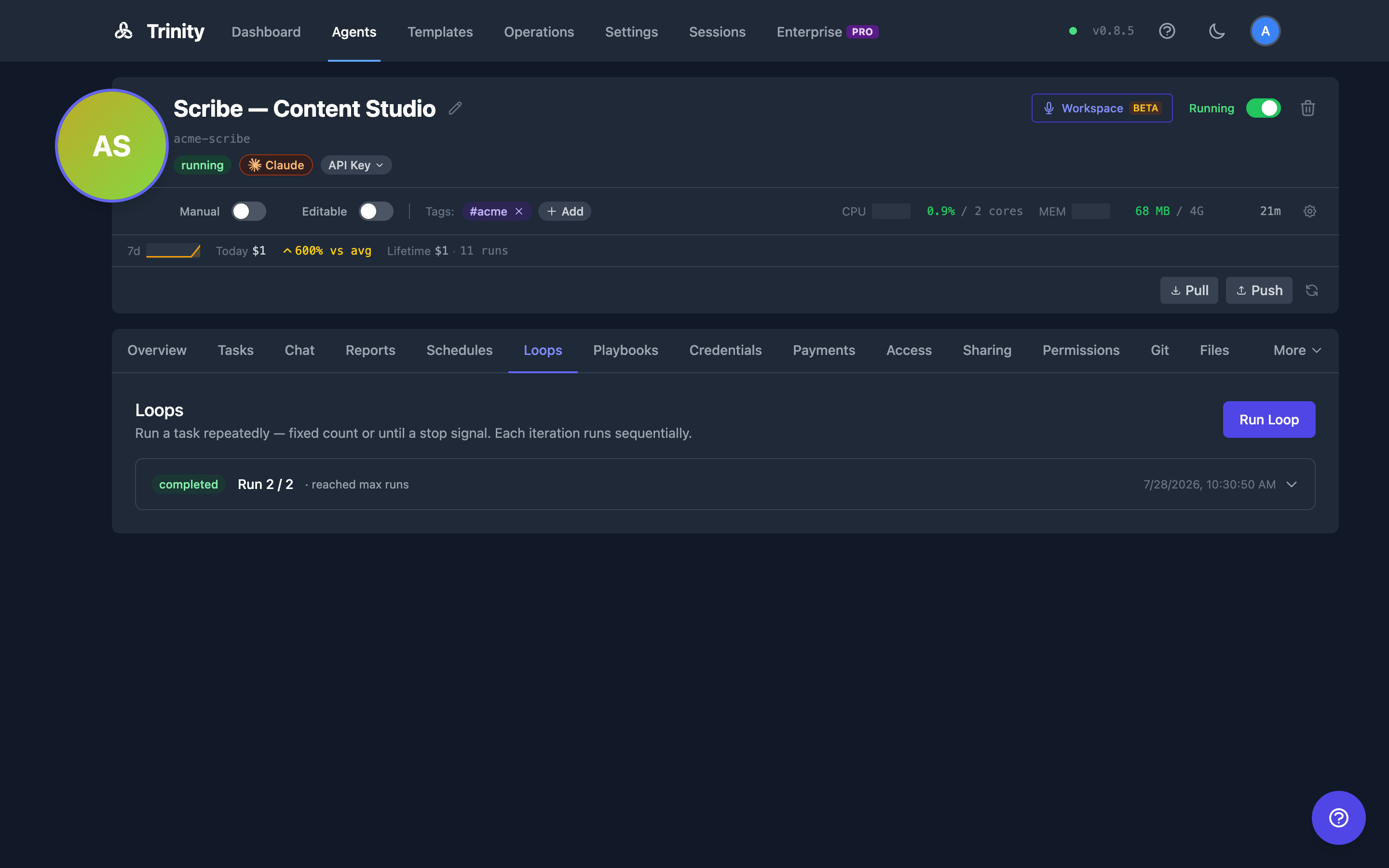
Open an agent's detail page and select the Loops tab.
Click Run Loop (the agent must be running — the button is disabled otherwise).
Fill in the form: Message template (required, e.g. Process item {{run}}. Previous result: {{previous_response}}), Max runs (required, 1–100), Stop signal (optional), Delay between runs (0–3600 seconds — a pacing knob: a parked loop is picked up by a sweep that runs every few seconds, not a precision timer), Timeout per run (10–7200 seconds; defaults to the agent's execution timeout, and cannot exceed it), Max duration (optional wall-clock deadline for the whole loop, in seconds), Max cost (optional USD spend budget), No-progress threshold (stop after this many identical responses in a row; default 3, 0 disables), On iteration failure / Max consecutive failures (the failure policy — see Handling Failures below), Model (per-loop override), and Allowed tools (restrict tools for every iteration, or leave All Tools / Unrestricted).
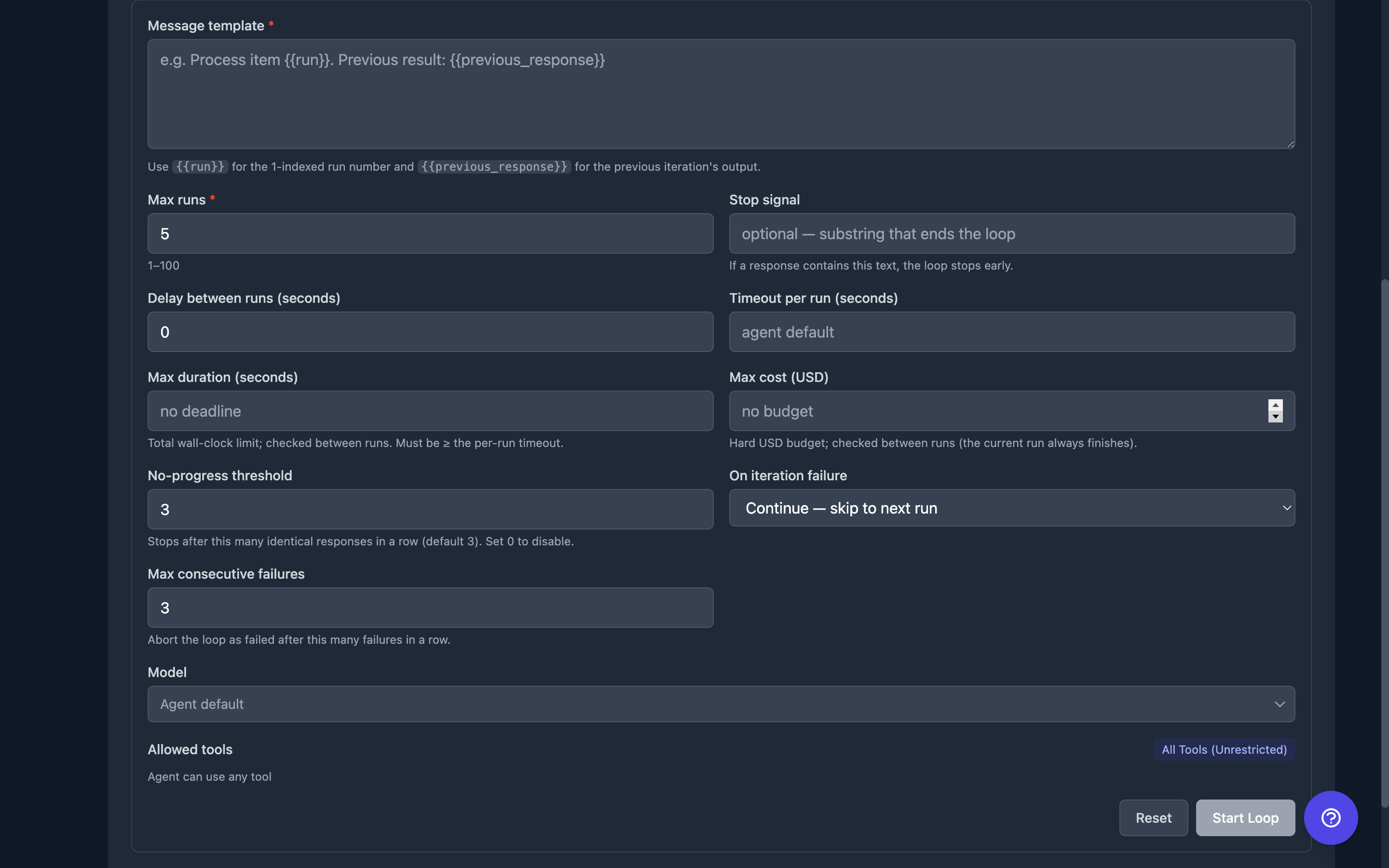
Click Start Loop. The loop appears in the list below with a live status badge and a Run N / M progress counter.
Click a loop row to expand it: a per-run table shows each iteration's status, cost, duration, and a response preview; a deadline or budget you set shows as elapsed/limit and spend/budget rows; and the Last response is rendered as markdown below the table.
Click Stop on an active loop to request a graceful stop. The badge shows the current iteration finishing, then the loop ends with reason stopped by user.
The panel updates in real time via WebSocket events as each run completes, with a periodic backstop refresh while a loop is active.
From the Workspace
Platform users can run and watch loops from the chat they belong to, in the Workspace rail's Loopstab. An external client never sees this tab, and the agent's activity shown to a client omits loop runs altogether — a loop is an operator capability.
continue-mode loop tolerated failures), how much of each guardrail is left, and Stop while it is active. A guardrail you never set shows no bar — “no budget” and “budget untouched” are different facts.The status words there say why a loop ended rather than only that it did:
| What you see | Meaning |
|---|---|
| Done | Reached its run limit or matched its stop signal, with no failed runs |
| Done, with errors | Reached its run limit with tolerated failures along the way |
| Stopped by you | You pressed Stop |
| Stopped — cost budget reached / time limit reached / it stopped making progress | A guardrail ended it |
| Failed / Failed — too many errors in a row | The failure policy ended it |
Asking the agent to loop
Telling an agent in chat to “run a loop” or “do this every few minutes” starts a Trinity loop (or a reminder): the platform routes repetition to these primitives and blocks the harness's own loop and wake-up tools, which would report success and then never fire once the turn ended.
Loop Lifecycle
| Status | Meaning |
|---|---|
| queued / running | Loop active; iterations dispatching |
| completed | Reached max runs, or the stop signal matched — with no failed iterations |
| completed_with_errors | A continue-mode loop reached its run limit (or matched its stop signal) with at least one tolerated failure along the way |
| stopped | Stopped by a user, or a guardrail ended it at a run boundary — the cost budget (budget_exhausted), the deadline (deadline_exceeded), or repeated identical responses (no_progress); the in-flight iteration finished first |
| failed | The loop aborted on a failed iteration — in abort mode at the first failure, or in continue mode after max_consecutive_failures consecutive failures |
| interrupted | Only on loops from older builds. A backend restart no longer interrupts a loop — on boot, a loop between runs is picked up again, and a loop whose run was in flight continues from that run's outcome |
Observability: every iteration is a normal execution — it creates its own row with triggered_by: "loop" and the parent loop_id, visible on the Executions page and per-execution detail view. In analytics timeline views, loop executions appear as their own Loopscategory with a distinct color — they are not folded into Scheduled.
The loop record also reports failed_runs — the count of tolerated failures. It is always 0 in abort mode (the first failure ends the loop); in continue mode it counts every iteration that failed but was tolerated, and it is what distinguishes a clean completed from a completed_with_errors finish.
Common Patterns
These shapes cover most loop use cases. Pick by what ends the loop: a count, a condition, or a clock.
Iterative refinement (fixed mode + chaining)
Run a fixed number of progressively better passes, feeding each result into the next:
{
  "message": "Improve the draft. Previous version: {{previous_response}}",
  "max_runs": 4
}
{{previous_response}} is lossy — only the trailing 2,000 characters carry over. When iterations build a real artifact (a draft, a migration, a report), don't rely on it: instruct the agent to keep the artifact in a file in its workspace and re-read it each run — Refine the draft in report.md — read it first, improve it, write it back.The agent's filesystem persists across runs; the loop context doesn't.
Agentic retry (until mode)
Keep trying until it works, bounded by a safety cap:
{
  "message": "Attempt the migration. If it succeeds, paste the passing output and end your reply with [[DONE]]. Otherwise, fix the error and report what failed.",
  "max_runs": 8,
  "stop_signal": "[[DONE]]",
  "timeout_per_run": 600
}
The loop exits with stop signal matched on the first success, and max runs reached if it never succeeds within the cap.
Bounded polling (until mode + delay)
Watch something external on a cadence, without holding a connection open:
{
  "message": "Check the deploy health endpoint. If healthy, reply [[DONE]]; else report the current status.",
  "max_runs": 30,
  "stop_signal": "[[DONE]]",
  "delay_seconds": 120
}
This polls every 2 minutes for up to an hour and exits the moment the condition holds. For cadences slower than the 1-hour delay ceiling, a loop is the wrong tool — use a schedule instead.
Backlog draining (until mode + a work skill)
If the agent has a work-queue skill (for example the abilities work-loop pattern: pick one issue, do it, close it, exit), a loop turns it into a bounded autonomous session:
{
  "message": "Run /work-loop. Process exactly one backlog item. If the backlog is empty, reply [[DONE]].",
  "max_runs": 20,
  "stop_signal": "[[DONE]]"
}
Each iteration is one unit of work with its own execution row, cost, and timeout — far more observable than one giant “do everything” task.
Writing Good Until-Mode Loops
Until mode is only as reliable as the stop condition you write. Three rules:
Tie the sentinel to verifiable evidence, not self-assessment. Models skew positive when grading their own work — “reply [[DONE]] when the report is good” exits on the first pass. Anchor the sentinel to something checkable: passing test output, an HTTP 200, zero remaining TODO markers. If the condition is inherently subjective, keep max_runs low instead.
Always set the cap. stop_signal is best-effort — the agent has to actually emit it. max_runs is guaranteed. The cap is the safety net, not the expected exit.
Set timeout_per_run. A hung iteration silently stalls the whole sequence. Size it to the task (e.g. 600s for a test suite) rather than inheriting a long agent default.
And once a loop is running, watch for stalls: if consecutive responses are near-identical (same failure, same output, no state change), the loop is burning budget without progress. Stop it rather than letting it run to the cap.
Handling Failures
The on_failure policy decides what happens when an iteration fails (a task error or an exception):
abort (default) — fail fast. The first failed iteration ends the loop with status failed; remaining runs are skipped. Use this when each iteration depends on the last succeeding, or when a failure means the whole batch is invalid.continue — tolerate failures and keep going. A failed iteration does not stop the loop; the next run starts as usual. This is bounded by max_consecutive_failures (default 3): once that many iterations fail in a row, the loop aborts with status failed. Any success resets the streak to zero. Use this for independent work items — draining a backlog where one bad item shouldn't kill the run.A continue-mode loop that reaches its run limit (or matches its stop signal) with at least one tolerated failure finishes as completed_with_errors, and reports how many iterations it tolerated via failed_runs.
{{previous_response}} always carries the last successfulresponse — a failed iteration never overwrites it, so chaining survives a tolerated failure.
For Agents
Agents (and scripts) start loops via MCP tools or REST. The permission model matches chat_with_agent: a person needs owner, admin, or shared access on the target agent. An agent can loop on itself, and on another agent only if it has permission to call that agent (see Agent Permissions).
Permission checks on the loop tools
The MCP loop tools check the calling agent's permission before they act:
run_agent_loop— an agent-scoped key that names an agent it may not call is refused before any loop starts, with the same reasonchat_with_agentgives:Permission denied: Agent '<caller>' is not permitted to communicate with '<target>'.get_loop_status/stop_loop— these take only aloop_id, so they look up the loop's agent first and apply the same rule. A refusal readsLoop '<id>' not found or not accessibleand never names the agent.stop_loopsends no stop when it is refused.
If an agent started a loop and its permission to that agent was removed afterwards, it can no longer read or stop the loop. The agent's owner can still stop it from the Loops tab, the Workspace, or POST /api/loops/{loop_id}/stop. Refused calls are recorded in the audit log as refusals.
From Claude Code: /trinity:loop
If you work in Claude Code with the abilities trinity plugin installed, /trinity:loop is the fastest way to start a loop — it parses a natural-language request (/trinity:loop @ci-agent run the test suite until it passes, max 10), picks the mode, writes the sentinel instruction into the message for you, fires run_agent_loop, and watches progress locally.
MCP Tools
| Tool | Description |
|---|---|
| run_agent_loop | Start a loop; returns loop_id immediately. agent_name is required for user-scoped keys; agent-scoped keys default to the bound agent |
| get_loop_status | Loop status plus per-run summaries (run number, execution id, status, response preview, cost, duration) and the last full response |
| stop_loop | Graceful stop; returns stopping (runner signaled) or already_done (loop already terminal) |
mcp__trinity__run_agent_loop({
  agent_name: "my-agent",
  message: "Process the next backlog item ({{run}} of 20). Reply [[DONE]] if the backlog is empty.",
  max_runs: 20,
  stop_signal: "[[DONE]]",
  delay_seconds: 30
})
// → { success: true, loop_id: "loop_...", status: "queued", ... }
REST API
| Endpoint | Method | Description |
|---|---|---|
| /api/agents/{name}/loops | POST | Start a loop; returns 202 with {loop_id, status, agent_name, max_runs} |
| /api/agents/{name}/loops | GET | List the agent's loops, most recent first (?status=, ?limit= 1–200, default 50) |
| /api/loops/{loop_id} | GET | Status, per-run summaries, last full response (404 unknown; 403 if the caller is neither the initiator nor has agent access) |
| /api/loops/{loop_id}/stop | POST | Graceful stop → {status: "stopping" | "already_done"} |
curl -X POST http://localhost:8000/api/agents/my-agent/loops \
  -H "Authorization: Bearer $TOKEN" \
  -H "Content-Type: application/json" \
  -d '{
    "message": "Process item {{run}}. Previous result: {{previous_response}}",
    "max_runs": 10,
    "stop_signal": "[[DONE]]",
    "delay_seconds": 5
  }'
Parameters
| Parameter | Default | Range | Description |
|---|---|---|---|
| message | — (required) | 1–100,000 chars | Template; supports {{run}} and {{previous_response}} |
| max_runs | — (required) | 1–100 | Hard ceiling on iterations |
| stop_signal | none (fixed mode) | ≤200 chars | Substring that ends the loop early; whitespace-stripped, blank = fixed mode |
| delay_seconds | 0 | 0–3600 | Pause between iterations |
| timeout_per_run | agent's execution timeout | 10–7200 | Per-iteration timeout in seconds. Refused with 400 (naming agent_cap_seconds) when above the agent's execution timeout |
| max_duration_seconds | none (no deadline) | 1–604800 | Wall-clock deadline for the whole loop; checked between runs. Stops with reason deadline_exceeded. Must be at least the effective per-run timeout (400 otherwise) |
| no_progress_threshold | 3 | 0 or ≥ 2 | Stop after this many consecutive identical responses (reason no_progress); 0 disables, 1 is rejected |
| max_cost_usd | none (no budget) | > 0 | Total USD spend budget; checked between runs (the current run always finishes). Stops with reason budget exhausted once spend meets/exceeds it. Runs reporting no cost count as $0. |
| on_failure | abort | abort | continue | Failure policy. abort stops at the first failed iteration; continue tolerates a failed iteration and proceeds |
| max_consecutive_failures | 3 | 1–100 | continue mode only: abort the loop (failed) after this many failed iterations in a row. The streak resets on any success |
| model | agent default | — | Model override applied to every iteration |
| allowed_tools | unrestricted | — | Tool restrictions applied to every iteration |
Limitations
max_parallel_tasks budget alongside chat, schedules, and other traffic.abort (default) stops the loop with status failed at the first failed iteration. continue tolerates failed iterations and proceeds, but still aborts (failed) after max_consecutive_failures consecutive failures — the streak resets on any success. See Handling Failures above.delay_seconds is re-dispatched by a sweep every few seconds, so the pause is approximate.max_runs is capped at 100, delay at 1 hour, per-run timeout at 2 hours (and at the agent's own execution timeout), and the deadline at 7 days.See Also
- Fan-Out — The parallel counterpart: N independent tasks at once
- Agent Self-Reminders — The time-deferred sibling: a one-shot, durable, agent-scheduled follow-up
- Scheduling — Cron-based recurring tasks; the right tool for cadences slower than 1 hour
- Executions — Where each loop iteration appears
- Workspace — The rail's Loops tab
- Agent Configuration — Execution timeout and parallel task limits