Skills and Playbooks
Reusable capability packages that Trinity syncs from git repositories, assigns to agents, and delivers into their containers — invocable from the Playbooks tab, from chat autocomplete, or by the agent itself.
Building Agents — Playbooks, Plugins, Deployment
Apr 2026
Build an AI Recruiter Agent
Jun 2026
Concepts
SKILL.md plus optional scripts/, templates, and resources./ in the Chat tab to see available playbooks with argument hints.The Skills Library Is Multi-Source
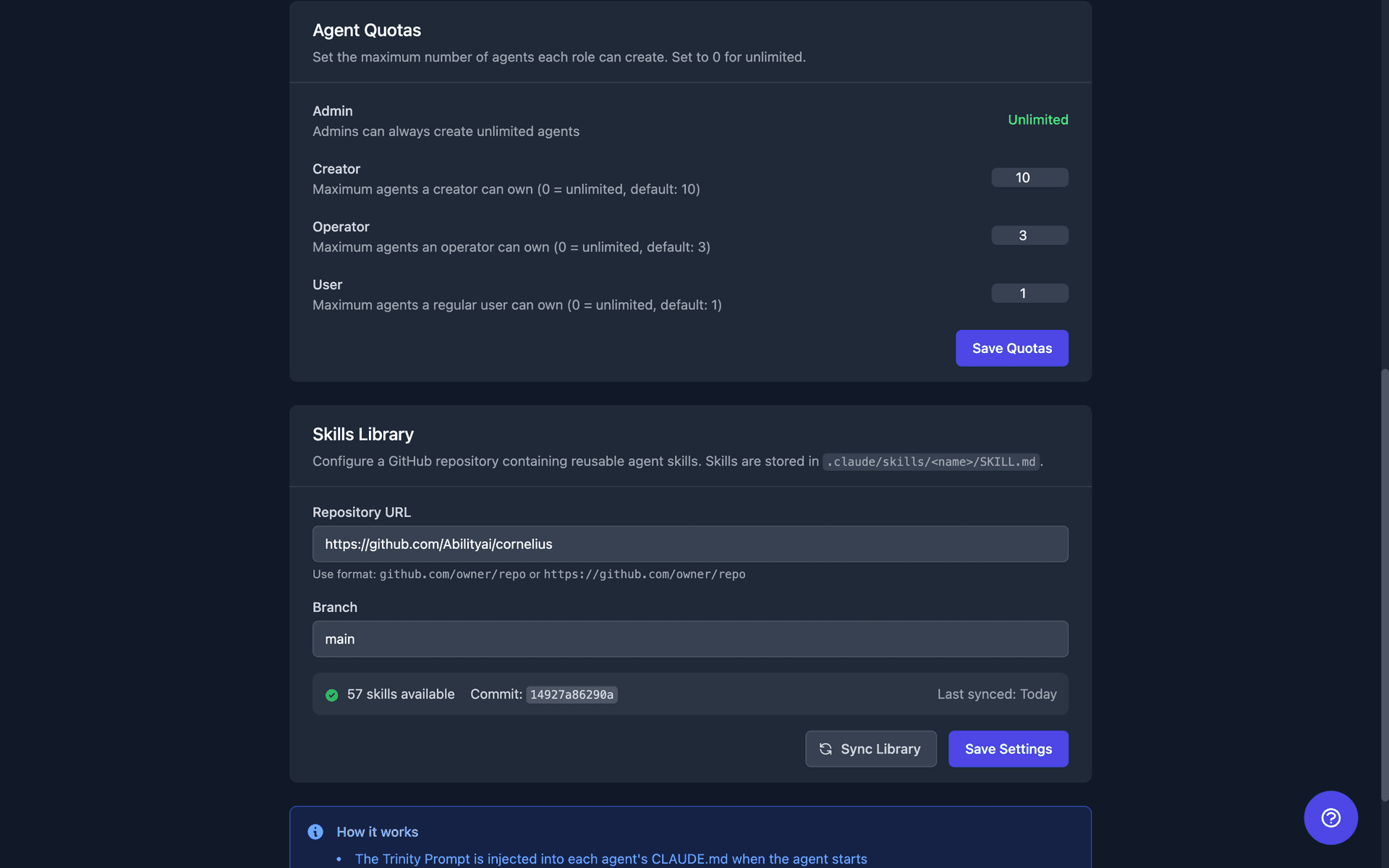
Trinity syncs from one or more GitHub repositories: a bundled public community catalog (github.com/abilityai/trinity-skills, shown as Trinity Community Skills) that is seeded on fresh installs, plus any custom repositories your admin adds.
Manage sources in Settings → Agents → Skills Library. The panel lists sources in resolution order — the first row is marked wins conflicts, the seeded catalog bundled, and each row shows whether it tracks a branch or is pinned to a tag, with the ref. Per source you can Sync, Disable/Enable, or Remove; Sync all pulls every enabled source. + Add a skills repository asks for a Name, a Repository URL (github.com only), what to Track — Branch (follows new commits) or Tag (pinned — a moved tag is refused)— and the branch or tag name. Errors are shown verbatim under the source, so a refused tag names the tag and says what to do.
A private source repository authenticates with the platform GitHub PAT. Trinity offers that token only to github.com and hands it to git with each request, so it is not written into the library's checkout in the platform data directory. A checkout cloned by an earlier release can still hold the token in its remote URL — one more reason to rotate the platform token after upgrading (see Upgrading).
When two sources ship the same skill name, resolution is by priority (lower wins), then by age. Custom sources default to priority 100 and the bundled community source to 1000 — so your own repository always wins a name clash, and a source you add later needs no reordering.
Nothing is overwritten silently. The winning skill carries a shadowed_by marker naming the sources whose copy is unreachable, shown in the library listing, on the source status, and as a warning at injection time. Skill names stay bare (pdf-export, never community/pdf-export), so an agent's /skill-name invocation never changes because a source was added.
Deleting a source does notunassign its skills — they keep resolving through whatever source still provides them.
Upgraded from a single-library install
An installation that predates multiple sources carries one legacy skills-library URL setting. On the first sync after upgrading, an install with no sources adopts that URL as a custom source named Migrated library (tracking the branch it tracked before) and clears the setting — no admin action needed. If the install already has sources, the URL is matched against them by repository, so https://github.com/Org/repo.git, https://github.com/Org/repo/ and github.com/Org/repo all count as the same source, and nothing happens.
A legacy URL that names a repository which is not one of your sources is refused — adding a source is an admin action, never an automatic one — and Trinity files one low-priority Legacy skills-library adoption refused heads-up in the Operations queue, from _skills-sync. It is one row per refused URL, however many syncs run; a different URL raises its own. Dismiss it by cancelling it (POST /api/operator-queue/{id}/cancel, or Clear All on the Needs Response tab, which cancels every open item) rather than clicking Got it: an acknowledged alert waits for an agent reply that never comes and cannot be cleared, while a cancelled one stays gone. If you want that repository, add it as a source in the panel above. The legacy setting itself can no longer be written through the settings API.
Repository layout
A source repository can lay its skills out in one of three ways. Trinity tries them in order and falls through on anything invalid:
Declared — a catalog.yaml at the repo root with a skills_root: key naming the directory that holds skill folders. One flat level deep.
Conventional — a skills/ directory containing at least one <name>/SKILL.md.
Legacy — .claude/skills/, the original convention.
Existing repositories keep working with no configuration. The resolved root is reported per source in the library status, along with a layout_conflict flag if a repository carries more than one recognizable layout.
Supply-chain posture: pinned tags
Skills carry executable scripts/, and library automation can push them to your whole fleet unattended. So:
v0.2.0 of trinity-skills. New upstream commits do not reach your fleet until the tag is bumped and you sync. The pin is a fresh-install seed: an existing instance keeps the source row it already has. To move it to a newer tag, an admin updates the source's ref through PUT /api/skills/sources/{id} (the Settings panel adds, syncs, disables, and removes sources but does not edit a ref in place) or removes the source and adds it again with the new tag. TRINITY_DEFAULT_SKILL_SOURCE_REF in .env changes the tag a fresh install is seeded with; TRINITY_DEFAULT_SKILL_SOURCE="" disables the seed entirely.moved_tag and leaves your fleet alone. Moving to new content means pointing the source at a new tag name — an explicit admin action. Annotated and lightweight tags are both compared by the commit they point at, so a release tag that has not moved is never refused.To revoke a skill from the community catalog, a new tag is cut without it.
Browsing and Assigning
Two surfaces, two starting points:
| Surface | Purpose |
|---|---|
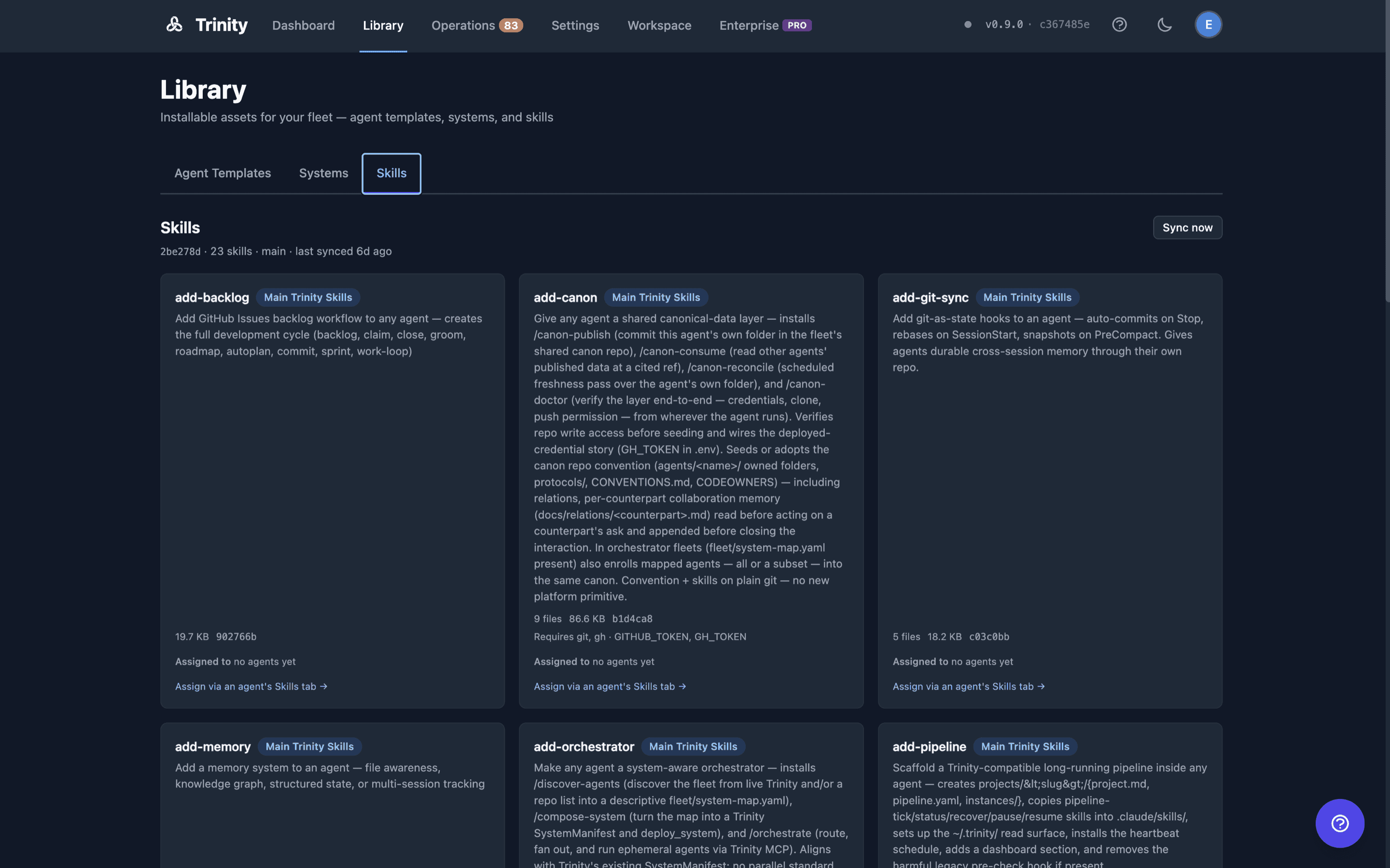
Library page → Skills tab (/library?tab=skills) | Start from a skill. See every skill, its contract, its source, the library's sync state, and which agents hold it — then assign it to one more agent or unassign it, without opening the agent. |
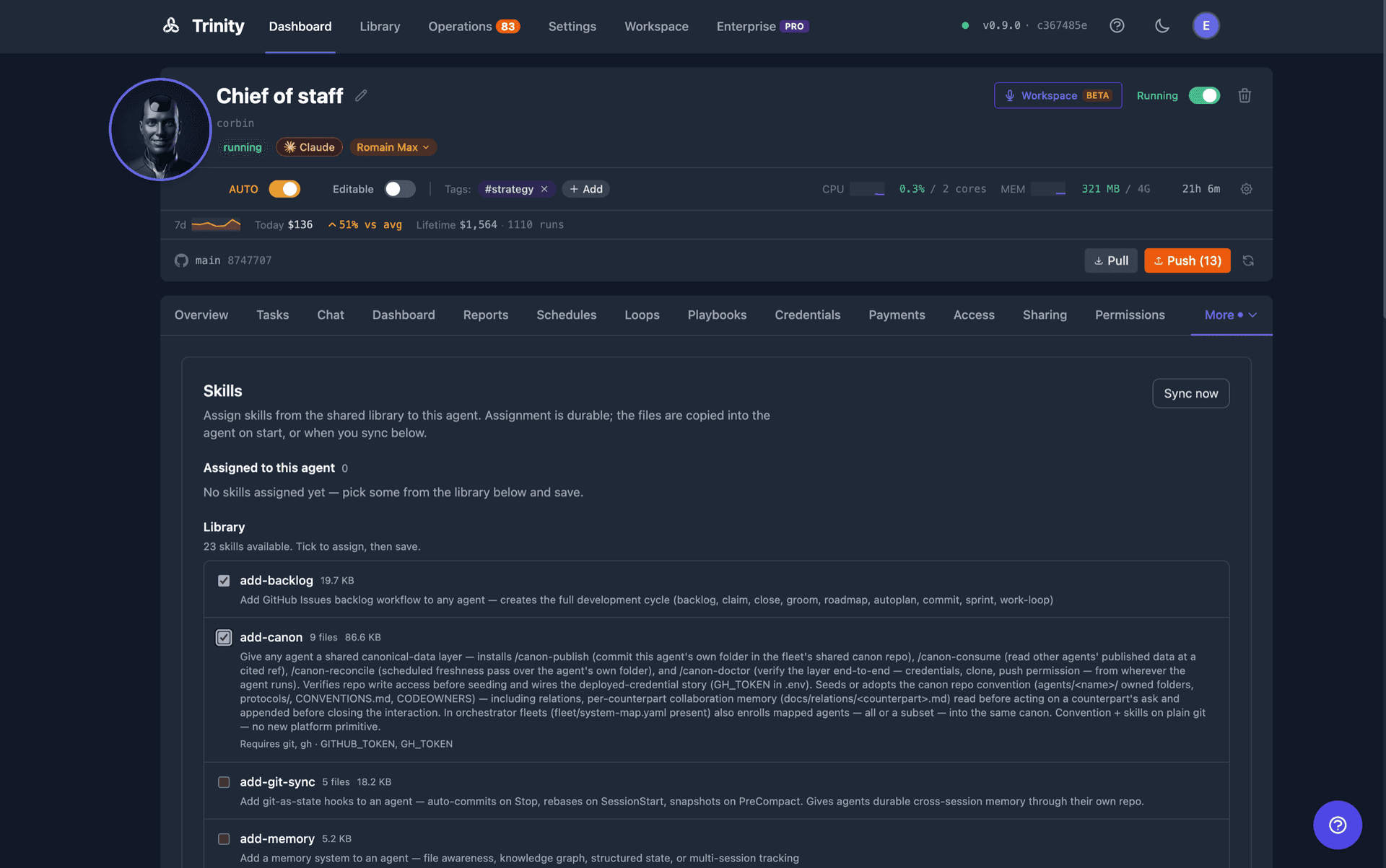
| Agent detail → Skills tab | Start from an agent. Tick the skills this agent should have, save, and see the per-skill outcome of the last delivery. |
Both surfaces write the same per-agent assignment, so there is one skill model whichever way you come at it.
From the agent's Skills tab
The tab shows two lists: Assigned to this agent (each skill's version short-SHA, description, and the outcome of its last delivery) and Library (everything available, with its declared dependencies). Tick or untick skills and click Save assignments. The save delivers straight away, and the note beside the button says what happened:
| Note | Meaning |
|---|---|
| Saved and delivered — available now. | Every added skill is in the running agent. |
| Saved — the agent is stopped, so it applies on next start. | The assignment is recorded; the files arrive on start. |
| Saved — still installing; the lists update when it lands. | A large package outlived the request's wait; delivery continues in the background. |
| Saved; some skills did not install (…). Sync now to retry. | Named skills failed; the rest landed. |
| Saved but not delivered: <why>. Sync now, or the agent picks it up on next start. | The agent was mid-sync, still starting, its container state could not be read, or the install failed. The assignment is kept either way. |
Sync now(running agents only) is the repair action: it re-copies every assigned skill unconditionally and is highlighted only when a delivery did not land. Per-skill outcomes are shown honestly — a skill that landed but is missing a declared binary or environment variable is flagged with a warning, not reported as a clean success.
From the Library
Each skill card on the Library's Skills tab carries an Assigned to N agents line with chips linking straight to that agent's Skills tab — the first four, then +N more. Under it:
The three states of the holder list are kept distinct rather than collapsed into a zero. If the assignment data hasn't loaded yet you see a dash; if it couldn't be read you get an explicit failure with a retry; only a real, successful read reports “no agents yet” (admin) or “none of your agents” (everyone else). You see only what you can access: an admin gets the whole fleet, everyone else gets their own and shared agents.
Below the library listing sits Assigned but no longer in the library — assignments whose skill has since been removed upstream. This matters because revocation works by cutting a new tag withoutthe offending skill, after which a page keyed on the library listing would answer “who still has it?” with silence. The package stays on each agent until it is unassigned — with the × on the chip here, or from that agent's Skills tab.
Lists follow the assignment
Every change to an agent's assignments — assign, unassign, save, a manual sync, a background delivery finishing, a fleet re-inject — refreshes the open screens that list its skills: the Playbooks tab, the / autocomplete in Chat, and the / popup in the Workspace. Nothing needs a reload.
Skill Injection
Each assigned skill's whole package is written to ~/.claude/skills/<name>/, and a Platform Skills section is written into the agent's CLAUDE.md listing what was injected and what is still missing. Injection runs when you assign (running agents), when the agent starts, on a manual Sync now, and — if enabled — as a fleet sweep after a library sync.
Injection is:
.gitignore and untracked, so the agent's git auto-sync never commits platform packages into your repository.On an older agent image that predates package support, a multi-file skill degrades to SKILL.md onlywith an honest warning — the skill still works.
Unassigning Removes the Package
Unassigning a skill — whether you remove one skill or drop names from a bulk save — deletes the injected package from the agent, using the same manifest the injection recorded. Only paths a previous injection wrote are removed; directories left empty are cleaned up; anything else in the directory survives. The skill's .gitignore line is stripped too.
The unassignment itself always succeeds. If the agent is stopped, busy, or unreachable, removal is reported as deferred rather than failing the unassign — and the agent reconciles on next start, removing any platform-managed skill that is no longer assigned.
A reconcile that would remove an unusually large number of skills from one agent refuses wholesale and raises an operator alert instead, so a database problem cannot silently strip a fleet.
Keeping the Library Current (Automation)
Both settings default OFF — a zero-config installation behaves exactly as it always did. Configure them in Settings → Agents → Skills Library → Automation:
| Setting | Effect |
|---|---|
| Scheduled auto-sync | Trinity pulls every enabled source on an interval (default 1 hour; 5 minutes to 24 hours). Changing the interval applies without a restart. |
| Re-inject across the fleet after a sync | When a sync finds the library actually moved, running agents receive the updated packages automatically. |
Key properties:
Sync failures are never silent, and a sync contended by another worker reports busy rather than claiming failure.
Skill Frontmatter and Dependency Checks
A skill's SKILL.md frontmatter can declare:
description: — shown in the library and in autocomplete.automation: — the skill's intended automation level.user_invocable: — whether the skill appears as a runnable playbook (default true).allowed-tools: — the tools the skill may use, as Claude Code reads it. Write it in Claude Code's comma-separated form (allowed-tools: Read, Bash, Bash(git:*)) or as a YAML list ([Read, Bash]); both give the same list, and a comma inside parentheses (Bash(npm run lint, npm test)) stays part of one entry. Trinity reports this list in the agent's skill listing but does not enforce it — a Trinity run is restricted by the schedule, loop, or task's own allowed tools.argument-hint: — the argument syntax shown in / autocomplete. The unquoted bracket idiom (argument-hint: [file]) is kept as written.requires: with packages, binaries, and env lists.At injection, Trinity runs a declaration-only dependency check and produces per-skill warnings (a missing binary, a missing environment variable) instead of failing. Declared package installs are surfaced but not performed. Environment checks report variable namesonly — values are never read.
A skill whose frontmatter fails to parse gets a named warning and a description falling back to its first paragraph. It is never silently dropped.
Inside the agent, the Playbooks tab, the / popup, and the chat empty state read each frontmatter field on its own. A field the agent cannot use — a list or mapping where text belongs, or an allowed-tools value that is a bare yes, a number, or has unbalanced parentheses — is dropped by itself, and the agent log warns once, naming the file and field. The skill keeps its description and every other field. Agents on an older base image instead lost the whole record over one such field, most often a comma-separated allowed-tools, and showed “No description available”. The fix ships in the agent base image, so an existing agent picks it up after the base image is rebuilt (or re-pulled) and the agent is started cold — see Upgrading → Base Image Upgrade.
Running Playbooks
Open agent detail → Playbooks tab.
See assigned, user-invocable skills with descriptions.
Click Run to send the skill as a task to the agent.
Or, in Chat, type / to autocomplete a playbook command.
Running Skills Without Assignment (Skill Runner)
Two MCP tools let an agent run a permitted self-contained skill without assigning it:
| Tool | Description |
|---|---|
| list_runnable_skills() | List the skills this agent is permitted to run (its permitted set, decided by an operator — not the whole library) |
| run_skill(skill_name, input?) | Run a permitted skill and return its result |
The runner uses a separate workspace — it cannot see the calling agent's files. Use it for self-contained skills (call an API, generate an artifact from the inputyou pass). A skill that must operate on the caller's own files goes through assignment and injection instead.
The Skill Runner is an entitled surface. In a community build, run_skill and list_runnable_skillsreturn a “disabled” result.
For Agents
MCP tools for skills and playbooks:
| Tool | Description |
|---|---|
| list_skills() | List library skills. Each entry carries its source name and any shadowed_by sources. |
| get_skill(name) | Skill details and contract |
| get_skills_library_status() | Library sync status, including the per-source array |
| assign_skill_to_agent(skill_name, agent_name) | Assign one skill and deliver it. The response's delivery block reports injected, pending_start, in_progress, or not_delivered with a reason |
| set_agent_skills(agent_name, skill_names) | Set the full skill list. Added names are delivered, dropped names are removed; delivery and removal report each half |
| sync_agent_skills(agent_name) | Force re-inject into a running agent — the manual retry after a not_delivered |
| get_agent_skills(agent_name) | List an agent's assigned skills |
REST endpoints — see Backend API Docs for full schemas.
| Endpoint | Method | Description |
|---|---|---|
| /api/skills/library | GET | Merged skill listing across sources |
| /api/skills/library/status | GET | Sync state + per-source array |
| /api/skills/library/sync | POST | Sync every enabled source (admin, human-only) |
| /api/skills/sources | GET/POST | List / register a source (admin, human-only) |
| /api/skills/sources/{id} | PUT/DELETE | Edit / remove a source (admin, human-only) |
| /api/skills/sources/{id}/sync | POST | Sync one source (admin, human-only) |
| /api/settings/skills-library | GET/PUT | Auto-sync and fleet re-inject configuration (admin) |
| /api/skills/assignments | GET | Which agents hold each skill, batched, plus assignable_agents — the agents the caller may assign to. Human-only; admins see the fleet, others their accessible agents (the response says which via scope) |
| /api/agents/{name}/skills | GET/PUT | Read / set an agent's assignments (owner). The PUT response carries delivery and removal |
| /api/agents/{name}/skills/{skill} | POST/DELETE | Assign (and deliver) / unassign one skill (owner). The POST response carries delivery |
| /api/agents/{name}/skills/inject | POST | Force re-inject into this agent (owner); 409 while another injection holds the agent |
Source management is REST-only and human-only— there is no MCP tool for it, and agent-scoped keys are rejected. Registering or syncing a source decides which repository your fleet executes code from, so it is an operator action regardless of the caller's role.
Limitations
allowed-tools frontmatter is informational in Trinity, not a restriction. Limit a run's tools on the schedule, loop, or task instead.skills_root layout supports a single flat directory, one level deep. Nested layouts require a future schema version, which current installations refuse (falling back to the probe) rather than misread.