GitHub Personal Access Token Setup
Configure a GitHub Personal Access Token (PAT) to enable repository creation, code sync, and issue management for your Trinity agents.
Concepts
When You Need a PAT
| Feature | Requires PAT |
|---|---|
| Create new GitHub repo for an agent | Yes |
| Push agent code to GitHub | Yes |
| Pull updates from private repos | Yes |
| Create/update GitHub Issues from agents | Yes |
| Clone from public templates | No |
| Pull from public repos (read-only) | No |
The token needs the right scopes for each row above. Trinity wires the managed token for both git and the gh CLI / REST API — but wiring only makes the token available; it can't grant scopes the token lacks. A git-contents-only PAT still 403s on Issues/PRs.
What the PAT Authenticates: Git and the gh CLI
When an agent has a GitHub repo and a resolved PAT (per-agent override or the platform PAT), Trinity:
origin remote URL carries no token (https://github.com/<org>/<repo>.git), andGITHUB_PAT and GH_TOKEN / GITHUB_TOKEN — the variables the gh CLI and GitHub REST API read.So both work automatically:
| Operation | Auto-authenticated by Trinity's token? |
|---|---|
git push / pull / clone (agent's own repo) | Yes — git asks Trinity's credential helper for the token on each operation |
gh issue, gh pr, gh api, gh repo … | Yes — GH_TOKEN/GITHUB_TOKEN are set, and gh is preinstalled in the base image |
GitHub REST API via curl / a github MCP server | Yes — $GITHUB_PAT (or $GITHUB_TOKEN) is in the environment |
Inside an agent with a valid PAT you can just run:
gh auth status          # → authenticated
gh issue list -R OWNER/REPO
gh api /user
curl -H "Authorization: Bearer $GITHUB_TOKEN" https://api.github.com/user
No gh auth login, no per-command GH_TOKEN="$GITHUB_PAT" … prefix.
Scopes still matter. A PAT scoped only for git contents can push code but will 403 on Issues/PRs. For issue management, make sure the token carries repo (classic) or Issues: Read and write(fine-grained) — see the scope tables below. Wiring makes the token available; it does not grant missing scopes.
Older agents: the gh binary ships in the agent base image — an agent created before this change picks it up on the next base-image rebuild + recreate. git keeps working regardless; the GH_TOKEN/GITHUB_TOKEN env vars are also injected on the next agent restart/recreate.
How git gets the token
Each time git fetches, pulls, or pushes, it asks a credential helper that ships in the agent image (git-credential-trinity, registered in the container's system git config) for the token. The token passes over the helper's standard input and output. It is not written into .git/config, and it does not show up in the container's process list or logs.
.env first, then the container environment. A token you rotate, or set on the agent's Git tab, reaches .env straight away, so the next fetch or push uses it without a restart.github.com, or TRINITY_GIT_BASE_URL on a self-hosted install, matched exactly. A remote on any other host gets no token from Trinity.git push authenticates through the helper. An agent with no token at all is pull-only: its push URL is deliberately disabled, so a push fails at once with an error that says to fork to own or add a GitHub token.GITHUB_PAT stays in the workspace .env and the environment. To limit what one agent can reach, give it its own repo-scoped token on its Git tab.Upgrading from a release that stored the token in the remote URL needs no manual step. Trinity cleans existing agents' remotes when the backend starts and on every agent start, and it removes a token from a URL only after a replacement resolves. Agents still on an older base image are covered too: the backend installs the helper into the running container, so no rebuild is required. Afterwards, rotate the platform token: backups and log history from before the upgrade can still contain it. Operator runbook: Git remote token scrub (migrations/GIT_REMOTE_TOKEN_SCRUB_2026-09.md in the Trinity repo).
Who Owns the Platform PAT
Trinity stores a single platform-wide PAT as the shared fallback. Agent creation resolves a token in three tiers: per-agent override → your personal token → platform global (see Your Personal GitHub Token below). In the standard setup, the Trinity admincreates the platform token in their own GitHub account — which means, for any agent that falls back to it:
Non-admins are no longer confined to the admin PAT's repo scope — anyone can add their own token, resolved ahead of the global fallback.
Your Personal GitHub Token (per-user)
You do not have to rely on the shared platform PAT. Any authenticated user — not just admins — can store their own GitHub token under Settings → MCP Keys → Personal GitHub Token (the tab every user can open). At agent creation Trinity resolves a token in three tiers:
per-agent override → your personal token → platform global
So a non-admin is no longer confined to the admin PAT's repo scope: an agent you create picks up your token first, reaching the repos your GitHub user can reach.
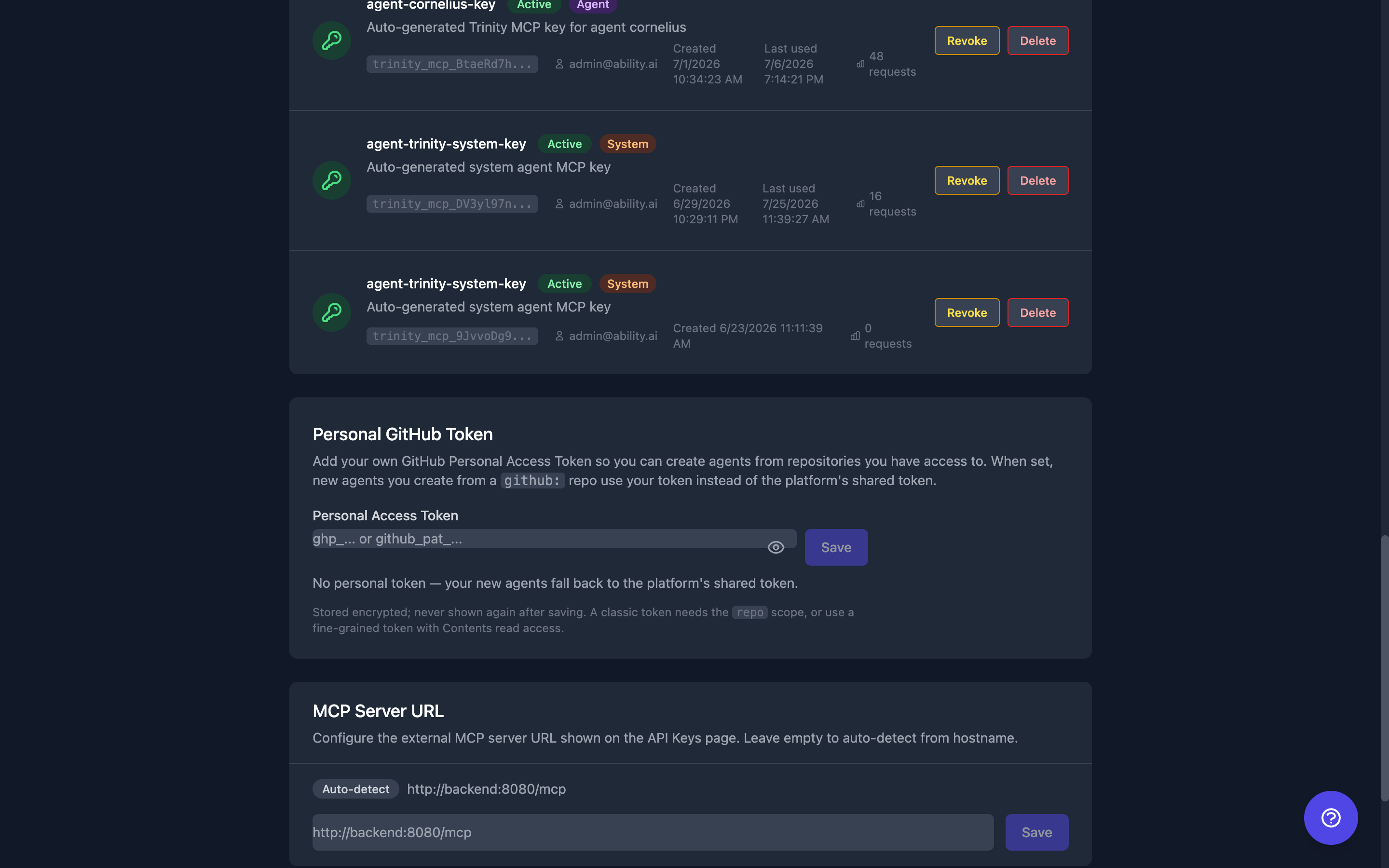
configured, has_global) — never the token string.How the resolved token is persisted:
Clearing your personal token reverts future agent creations to the platform global. Already-created agents are unaffected — they keep the copy they were given. Conversely, adding a personal token never force-recreates a running agent; it only changes what new agents resolve.
Endpoints (per-user)
| Endpoint | Method | Description |
|---|---|---|
| /api/users/me/github-pat | GET | Personal token status only — {configured, has_global}; never the token |
| /api/users/me/github-pat | PUT | Store your personal token (body {pat}); validated → 400 rejected / 503 GitHub unreachable; encrypted at rest |
| /api/users/me/github-pat | DELETE | Remove your personal token (future creations fall back to global) |
Full request/response schemas are in the backend's Swagger docs (http://localhost:8000/docs when running locally).
Choosing a Token Type
| If you want... | Pick | Tradeoff |
|---|---|---|
| Simplest setup; fine with agents inheriting access to every repo your account can reach | Classic PAT | Wider blast radius if the token leaks. New agents work instantly — no GitHub-side steps. |
| Agents scoped to a specific list of repos, nothing else | Fine-grained PAT | Smaller blast radius. Every time you add an agent on a new repo, you edit the token to include that repo. |
Classic is faster to operate. Fine-grained is safer. Pick the tradeoff that matches your organization's risk posture.
Option A: Classic Token (simplest, widest access)
A classic PAT with repo scope grants access to every repository your GitHub user can see— personal repos, plus any org repos your account has access to. Best when you're comfortable with that reach and want zero-maintenance setup.
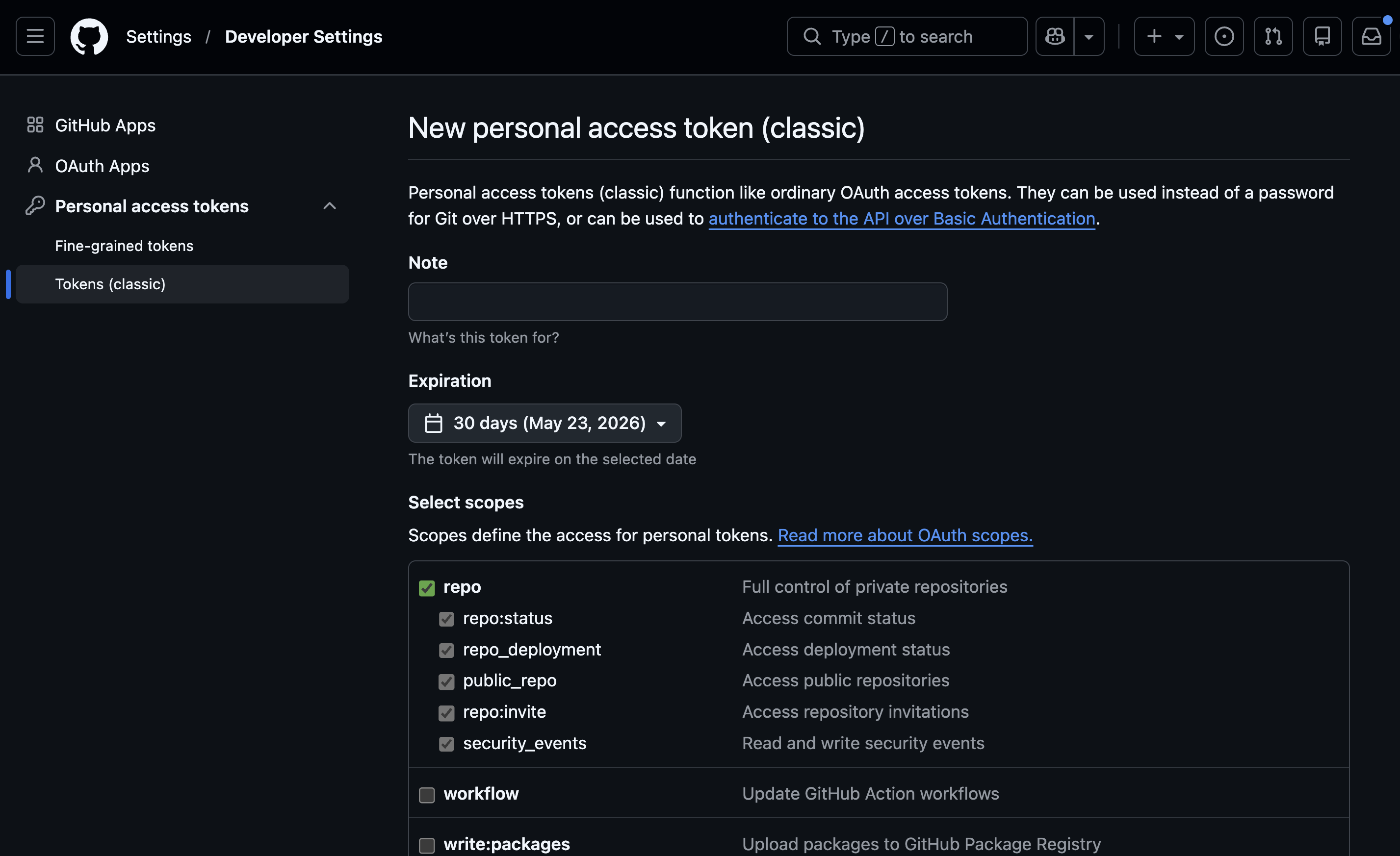
repo scope checked.Step 1: Create the token
Click Generate new token → Generate new token (classic)
Set a descriptive name: Trinity Platform
Set expiration (90 days recommended, or "No expiration" for persistent setups)
Select required scopes:
| Scope | Required | Purpose |
|---|---|---|
| repo | Yes | Full control of repositories |
| workflow | Optional | Trigger GitHub Actions |
| read:org | Optional | Read organization membership |
Click Generate token
Copy the token immediately — you cannot view it again
Step 2: Configure in Trinity
Go to Settings → Integrations in Trinity
Find the GitHub Personal Access Token (PAT) field under API Keys
Paste your token
Click Test to verify it works
Click Save
The test shows your GitHub username and confirms repo access. The first-run setup asks for the same token on its optional keys step — see Platform Keys.
Saving auto-propagates to running agents. When the platform PAT changes, Trinity pushes the new token into every running agent's .env file within seconds — no restart required. The save response lists which agents were updated, skipped, or failed. Agents with a per-agent PAT override, or agents that never configured GitHub, are skipped. Per-agent failures are reported but never block the save.
Option B: Fine-Grained Token (scoped, safer, more maintenance)
A fine-grained PAT is limited to a specific list of repositories and a specific set of permissions. Agents can only touch what you listed — not the admin's other repos. Best for production and for admins whose personal GitHub account also holds unrelated work you don't want agents near.
Step 1: Create the token
Click Generate new token
Set name and expiration
Under Repository access, choose "All repositories" or "Only select repositories"
Under Permissions, expand "Repository permissions" and set:
| Permission | Level | Purpose |
|---|---|---|
| Contents | Read and write | Push/pull code |
| Issues | Read and write | Create and manage issues |
| Metadata | Read-only | Required (auto-selected) |
| Pull requests | Read and write | Optional: create PRs |
| Workflows | Read and write | Optional: GitHub Actions |
Click Generate token
Copy the token immediately
Choosing Between Token Types
| Consideration | Classic Token | Fine-Grained Token |
|---|---|---|
| Setup complexity | Simple | More steps |
| Repository scope | All repos by default | Can limit to specific repos |
| Permission granularity | Broad scopes | Individual permissions |
| Token format | ghp_... | github_pat_... |
| Recommended for | Development, personal use | Production, shared teams |
Hosting Agents from External Contributors
A useful consequence of how classic PATs work: a classic PAT reaches every repo its owner can access, including repos that were shared with the owner as a collaborator. This unlocks a simple workflow for letting external agent developers deploy their agents on your Trinity instance without handing over tokens or transferring repos.
The pattern
- External developer has their agent code in their own GitHub repo.
- They invite the Trinity admin's GitHub user as a collaborator, with role:
- • Write — if the agent needs to push back (Working Branch mode, scheduled commits, etc.). This is the usual case.
- • Read — if the agent only pulls (Source mode / deploy-only).
- Admin accepts the invitation.
- Trinity's classic PAT now reaches the repo immediately — no token change, no restart. Deploy the agent from that repo like any other.
- When the engagement ends, the external developer removes the admin as a collaborator. Access disappears the same moment. The PAT is untouched.
Important caveats
Updating the Token Later
Most edits to an existing PAT happen in-place in GitHub — the token string stays the same, so you do not need to paste a new token into Trinity. The main exceptions are regenerating, rotating, or (for fine-grained tokens) changing permissions in ways that may require org re-approval.
Fine-grained PAT — editable in-place
- • Repository list — adding or removing repos. Common when you deploy a new agent that needs access to a repo not in the original list.
- • Expiration date — extend or shorten.
- • Name / description.
Fine-grained PAT — when to regenerate
- • Permission changes (e.g. adding
Issues: Read and write) — the UI may let you save permission changes in-place, but org PAT policies can require re-approval and some deployments see inconsistent behavior. Safest path: regenerate the token and paste the new one into Trinity Settings. If the token is on a personal account with no org policy, in-place editing usually works; you can try it first. - • Token lost / suspected compromise — always regenerate.
Classic PAT
- • Scopes are editable in-place (check/uncheck boxes and save).
- • The token string itself only changes if you click Regenerate.
After any change that produces a new token string, update it in Trinity via Settings → GitHub Personal Access Token → Test → Save. Trinity propagates the new token to every running agent that uses the platform PAT within seconds. It writes the token to the agent's workspace .env, which the agent's git credential helper reads first, and keeps the agent's remote URL free of any token. A rotation therefore takes effect on the agent's next fetch or push without a manual restart.
Agents that carry their ownper-agent token are deliberately untouched by a global rotation — update those on the agent's Git tab.
API
| Endpoint | Method | Description |
|---|---|---|
| /api/settings/api-keys | GET | Check PAT status |
| /api/settings/api-keys/github/test | POST | Test a PAT |
| /api/settings/api-keys/github | PUT | Save PAT |
MCP tool: initialize_github_sync(agent_name, repo_owner, repo_name, create_repo?, private?, description?) uses the configured PAT to create (by default, private) or connect a GitHub repository for the agent.
Troubleshooting
"Resource not accessible by personal access token"
Cause: Token lacks required permissions.
Fix (Classic): Regenerate with repo scope checked.
Fix (Fine-Grained):Add "Contents: Read and write" permission.
"SSO authorization required"
Cause:Organization uses SAML SSO and the token isn't authorized.
Fix: Go to github.com/settings/tokens, find your token, click Configure SSO, and authorize for the organization.
"Bad credentials" error
Cause: Token is expired, revoked, or mistyped.
Fix: Generate a new token and reconfigure in Trinity Settings.
Security Best Practices
Limitations
GITHUB_PAT.See Also
Trinity docs
- • GitHub Sync — Using git sync after PAT is configured
- • Creating Agents — Creating agents from GitHub templates
- • Platform Keys — The platform token alongside the Claude, email and Gemini keys
- • Git remote token scrub (
migrations/GIT_REMOTE_TOKEN_SCRUB_2026-09.mdin the Trinity repo) — Operator runbook: what upgrading does to existing agents' remotes
External references
- • gitcredentials — Official Git docs: how git asks a credential helper for a username and password
- • Managing your personal access tokens — Official GitHub docs: how PATs work, creation, deletion, security
- • About authentication to GitHub — Official: full picture of GitHub authentication methods and when to use each
- • Introducing fine-grained personal access tokens — GitHub Blog: why fine-grained PATs exist and what problems they solve