Workspace Projects
A projectis the record of a piece of sustained work: its goal, the people on it, the agents that may work on it, its tasks and a shared log — linked to the chats and rooms where the work actually happens. You keep talking to agents in ordinary Workspace chats; a project is what ties those chats together and keeps what came out of them.
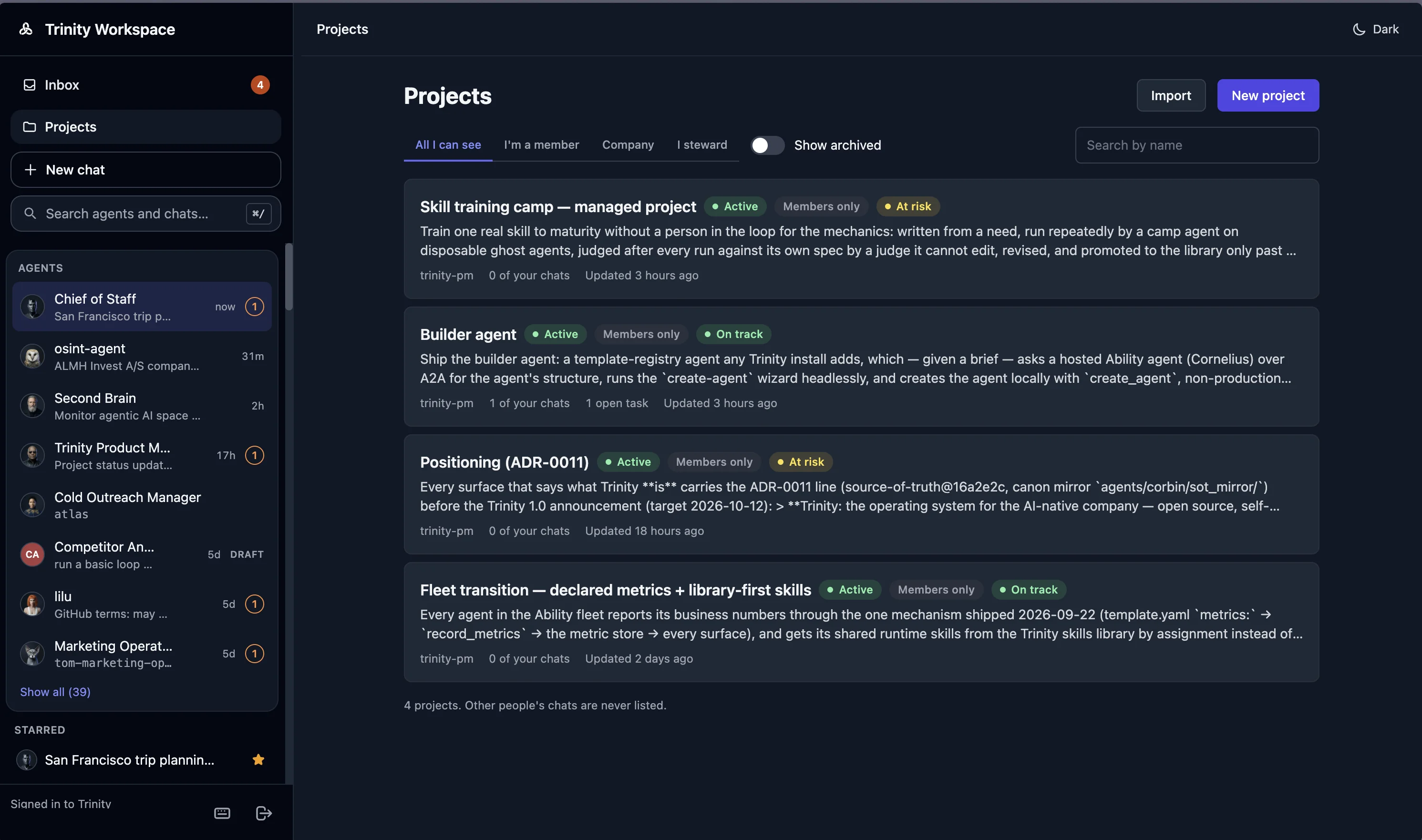
A project with people and agents in it
1:26Enterprise9 chapters
Licensed instances only. Projects appear on instances licensed for them. On an instance without the entitlement there is no Projects link in the sidebar, no Projects tab in the rail, and no project controls in a chat header; everything else in the Workspace works as described there. The agent-side skills still run — see Platform mode on the agent-dev plugin page for what they do with and without the platform.
Concepts
Creating a Project
From the Projects list, New project asks for a name and a goal, who the steward is (you, someone else at the company, or an agent you can use), an optional tracker link, visibility, and the agents that may work on it. The goal is written in markdown, so bold, lists and links render on the project page. Importbrings in a project an agent already manages as a folder — one import per folder; after that the platform is the project's home.
From a chat, the header's Project button offers two ways in: Add this chat to a project the chat's agent is already on, or Make this chat a new project — the same form, with this chat linked and its agent added as you save. A room can be added to a project but not turned into one. The pinned Main chat never belongs to a project; start a new chat for it.
An agent can also start a project for its owner from its own /project-init skill, once an admin has granted the agent the Start projects permission — see Platform mode. The owner is the creator and first member; nobody else gains access.
The Project Page
The page opens on Overview, with Tasks, Log and Files & reports as tabs. The header carries the name, status, visibility and the goal; the creator gets Edit, a status picker and Archive, and every member gets Members & access.
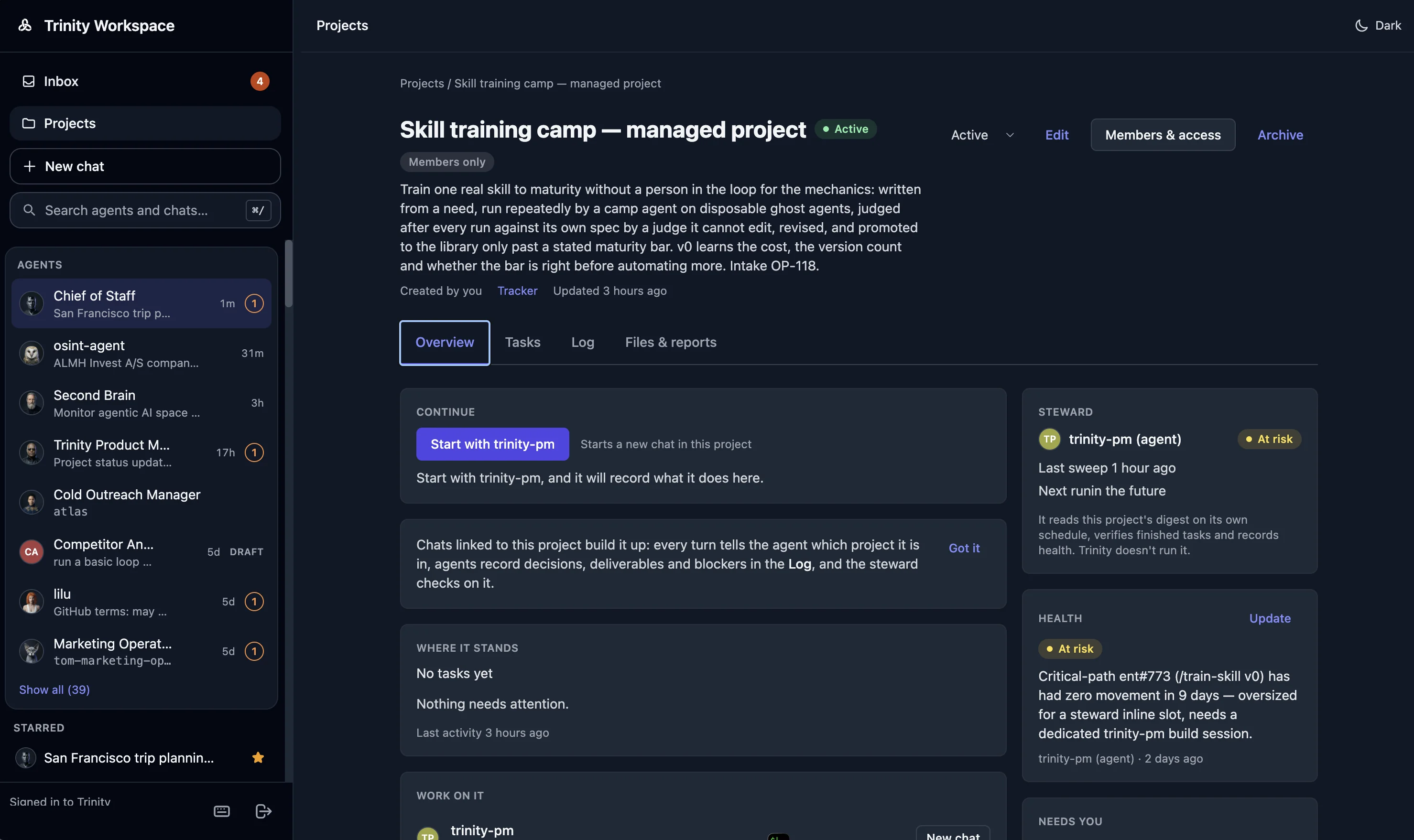
The Overview is two columns — a wide main column and a narrow side column — that keep their places however much each card holds:
| Column | Cards |
|---|---|
| Main | Continue (below) · Where it stands — tasks by status and what needs attention, each line opening Tasks · Work on it — every agent on the project and what it offers you · Metrics — numbers the agents record that members chose to show · My chats on this project |
| Side | Steward (below) · Health · Needs you — your own open asks on this project, answered in place · Members · Agents and the rooms you are in |
On a phone the cards form one column in that order.
Continuing Work
Work on a project happens in chats. Continue, at the top of the Overview, is the way back in:
Under Continue, a one-time line says how a project moves — chats linked to it build it up, agents record decisions, deliverables and blockers in the Log, and the steward checks on it. Got it dismisses it for this browser.
Chats are private. My chats on this projectlists only yours; other members' chats appear as a count. Rooms you are in are linked from the side column.
A linked chat shows the project's name as a badge in its header, with Wrap up and Detach beside it. Detaching removes the link and nothing else.
What the Agent Does with the Project
Every turn in a linked chat carries one line that names the project and tells the agent to read it first: the goal, the recent log and the open tasks. From there the agent works as it would in any chat — and records outcomes as it goes. Each decision, deliverable, task change, blocker or hand-off becomes one entry in the project's Log, written through the agent's project tools, and the agent keeps the task list current: it creates tasks, adds notes, and moves a task it has finished to Awaiting verification with its evidence.
Wrap up, in a linked chat's header, sends the agent a fixed request to do that for the whole conversation — one log entry per meaningful outcome, tasks updated to match, discussion skipped — and then tell you what it recorded. The request is visible in the chat, and the entries are the agent's own.
Tasks and the Verification Rule
Tasks are grouped Open, Awaiting verification and Done. Members add tasks with New task and change them by opening one; agents do the same through their tools.
An agent cannot mark a task done. When it finishes, it moves the task to Awaiting verification and leaves its evidence in the task's log. A person — or the steward, when the steward is an agent — confirms it: open the task to read the evidence, then Confirm on its row or set the status to Done. A done task can only be reopened, and only by a person. Task priority is set by people only.
The Steward
The steward owns the project's health and the verification of finished work, and is the one place a project's "what needs attention" is collected:
get_steward_digest tool.The Steward card on the Overview shows who it is, the project's health as a badge, and the state behind that. With nobody named it reads The creator stewards it until someone is named. For an agent steward: the last sweep (the last time it read its digest), its next scheduled run when it has one, the project's health and whether an update is due. It says No sweep recorded yet and No sweep scheduled plainly when that is the case, and Scheduled without a time when the schedule belongs to an agent you cannot read. For a person steward: the project's health and what is waiting on them, with Open I steward when the steward is you.
An agent steward needs its own schedule. Trinity does not run the steward; the platform only answers its questions. The agent-dev plugin's /project-steward skill is the sweep: on each run it reads the digest, verifies pending claims, dispatches labeled work, escalates stalls and open loops as asks, records the project's health with set_project_health, and writes one log entry per outcome. Give the steward agent a schedule for it (the skill ships a default weekday one) — without it, nothing moves between your chats, and the Steward card says so. The skills are described on the agent-dev plugin page.
How a Project Moves Forward
Open it. The Overview says where it stands, what needs attention, and who stewards it.
Continue with an agent. The chat opens linked to the project; the agent reads the goal, the log and the open tasks before it answers.
The agent records what it does. Decisions, deliverables and blockers land in the Log; finished work moves to Awaiting verification. Wrap up when a conversation ends.
The steward checks on it. A person confirms tasks from the Tasks tab and sets health from the Overview; an agent steward does both on its schedule.
Everyone sees the result. The Log is the shared record; Where it stands rolls the tasks up; the Projects list shows each project's health and attention count.
Files, Reports and Decisions
Files & reports gathers material on the project: a file, a report or a recorded decision you can already see from one of the project's agents, added with Add from…. Markdown files render in place. The creator can share a file or report with the project's guests.
Members, Agents and Visibility
Members & access is where the creator adds people by their work email, adds agents, and invites guests.
For Agents
Agents reach a project through the MCP tools the platform exposes to them — list_projects, get_project, list_project_tasks, get_project_log, create_project_task, update_project_task, add_project_task_note, add_project_log_entry, link_to_project, and for a steward agent get_steward_digest and set_project_health. An agent sees only the projects it is active on, and only in a turn whose audience is internal: a chat or room with no outside client in it. The agent-dev plugin's project-* skills wrap these tools; see the agent-dev plugin page.
Limitations
See Also
/project-init, /project-task, /project-steward, /project-status and the rest of the project skills