Workspace
A signed-in chat app where you and the people you share agents with hold ongoing conversations — separate from the operator admin UI, and the one surface in Trinity where an agent keeps its working memory from one message to the next.
Workspace lives at /workspace and ships in every build. The older /portal path redirects here, and the client-portal naming in API paths is retained history, not a licence boundary. There is one Workspace: the per-agent voice-and-canvas page that used to live at /agents/{name}/workspace is gone, and that address now redirects to /workspace?agent={name}.
Concepts
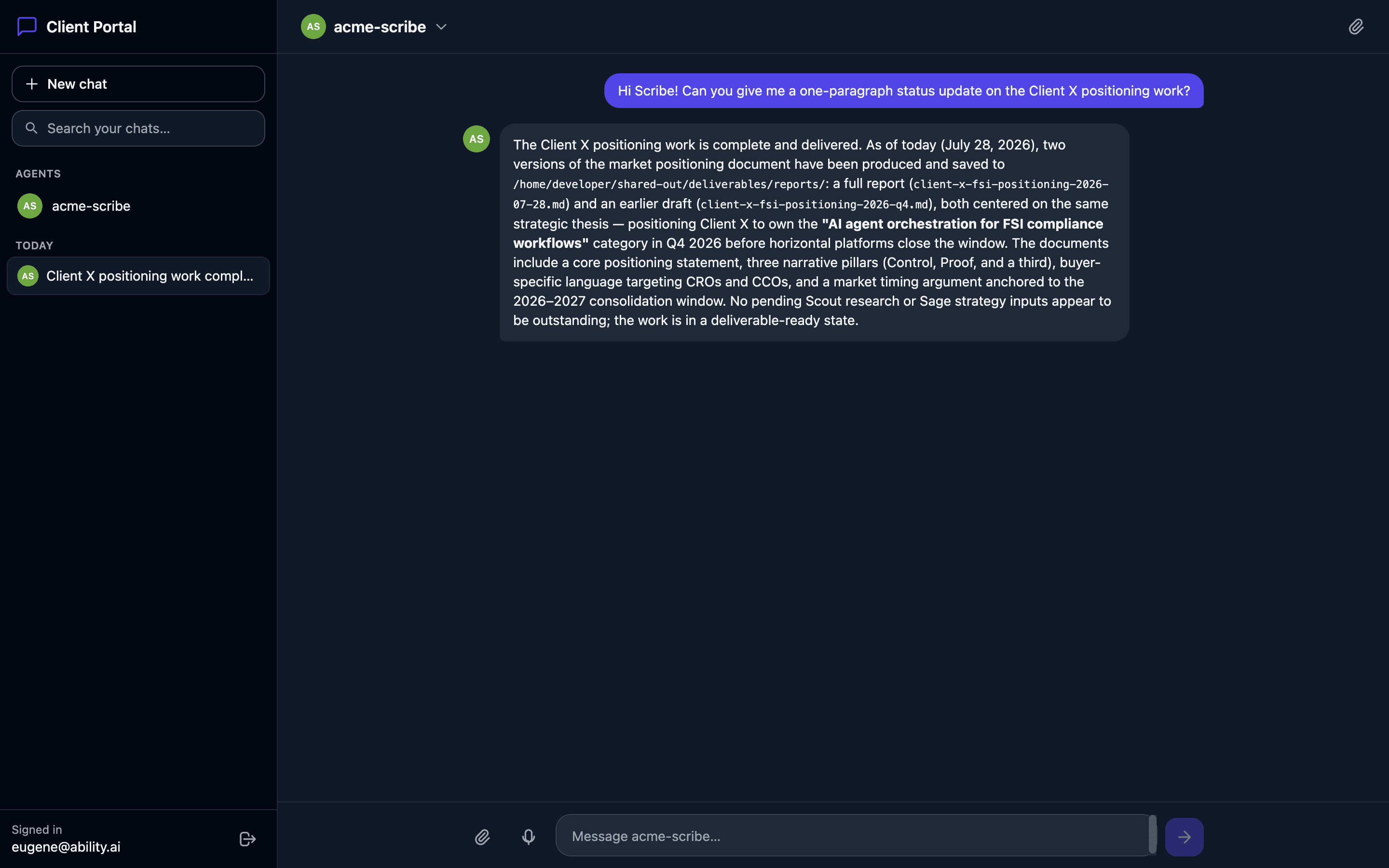
/workspace. Standalone: no operator navigation, no platform chrome. The top-left corner carries Trinity's mark and the name Trinity Workspace.The Workspace is also where voice lives. A voice call runs inside a Workspace chat, with the agent's canvas beside the orb. Start one from the call button in the composer, or from Talk on the agent's Agent Detail page — see Voice Chat.
Signing In and Out
If you are already signed in to Trinity, open Workspace from the nav — it opens in its own browser tab, your platform session is your Workspace session, and your roster includes both the agents you own and the ones shared with you.
An external client signs in with email instead:
Open /workspace (for example https://your-domain.com/workspace).
Enter the email an operator shared agents with. Workspace emails a 6-digit code.
Enter the code. No password, and no platform account is created.
Codes expire after a few minutes. Resend code becomes available after a short cooldown, and ← different emaillets you switch before verifying. Signing in with an email that has no agents shared with it still works — you land on an empty roster.
A client session slides: it renews while you use the Workspace, ends after the idle window, and never outlives the cap (defaults: 7 idle days, 30 days total). When it times out, the sign-in form says so — Your session timed out — and signing in again returns you to where you were. An administrator sees the policy under Settings → Retention → Workspace sessions; changing it needs an entitlement.
The button at the bottom of the sidebar signs out. For a platform user it is labelled Sign out of Trinity, because your Workspace session is your platform session and ending one ends the other. A client's expired session never turns into the operator's: on a browser that also holds an operator login, the form offers Continue as user@example.com as an explicit click rather than switching identity on its own.
The main app and every Workspace tab in the same browser share one platform sign-in, and open tabs follow it. Sign out and back in on one tab, and a Workspace tab left open from the old session picks up the new one instead of ending it. Sign out on one tab, and the other tabs drop the session too, without a background tab jumping to the sign-in page. A client signed in with an email code is not sent to the operator sign-in page just because the same browser also holds an expired operator login.
The Layout
Three columns on a desktop screen: the sidebar on the left, the conversation in the middle, and a side panel on the right (the rail, or the agent's canvas during a voice call). The seam beside the sidebar, and the one beside the rail while it is open, are drag handles — drag to resize, double-click to reset. The conversation takes whatever is left, and the panel's maximum follows the viewport, so a width set on a large screen is clamped on a smaller one. On a phone the sidebar becomes a drawer behind the Menu button, and the rail becomes a strip above the composer that opens a bottom sheet.
Theme. The right end of every chat and room header carries the theme switch. It names what is on screen — Light, Dark, or System · dark / System · light when the choice follows your operating system — and on a phone it shows only the icon. Click it and pick Light, Dark or System (arrow keys move between them; Esc closes the menu without touching a running turn or call). It is the same setting as the theme control in the main app, remembered in this browser, and switching keeps your place, your draft and your thread. External clients get it too.
The Sidebar
Top to bottom:
Chats as Tabs, and Main
Every chat you have with the active agent is a tab above the thread. Main is always first; the rest follow most recent first, and the ones that don't fit collect under N more. Press New chat and a provisional New chat tab appears at once; the chat itself is created when you send the first message.
Main is named by its role and cannot be renamed. Reset, in the header on Main only, archives the current Main and starts the agent cold — no confirmation, because nothing is lost: the archived chat stays in your list as an ordinary chat (named and dated if it had no title), a line in the new Main names it, and it becomes the newest tab. Reset is refused while a reply is in flight, and resetting a Main you have never used does nothing.
Every other chat can be renamed in place — from the pencil beside its title in the header, or on its sidebar row. Enter or clicking away saves, Esc abandons. A title is one line of up to 100 characters. Otherwise Trinity names a chat for you from your first message, and takes one more pass on the second exchange if the first was only a greeting. A name you typed always stands.
Starting a Chat
/workspace?agent=<name> opens your most recent chat with that agent, and ?new=1 forces a fresh one. Linking to an agent you can't reach says so plainly rather than quietly opening a different one.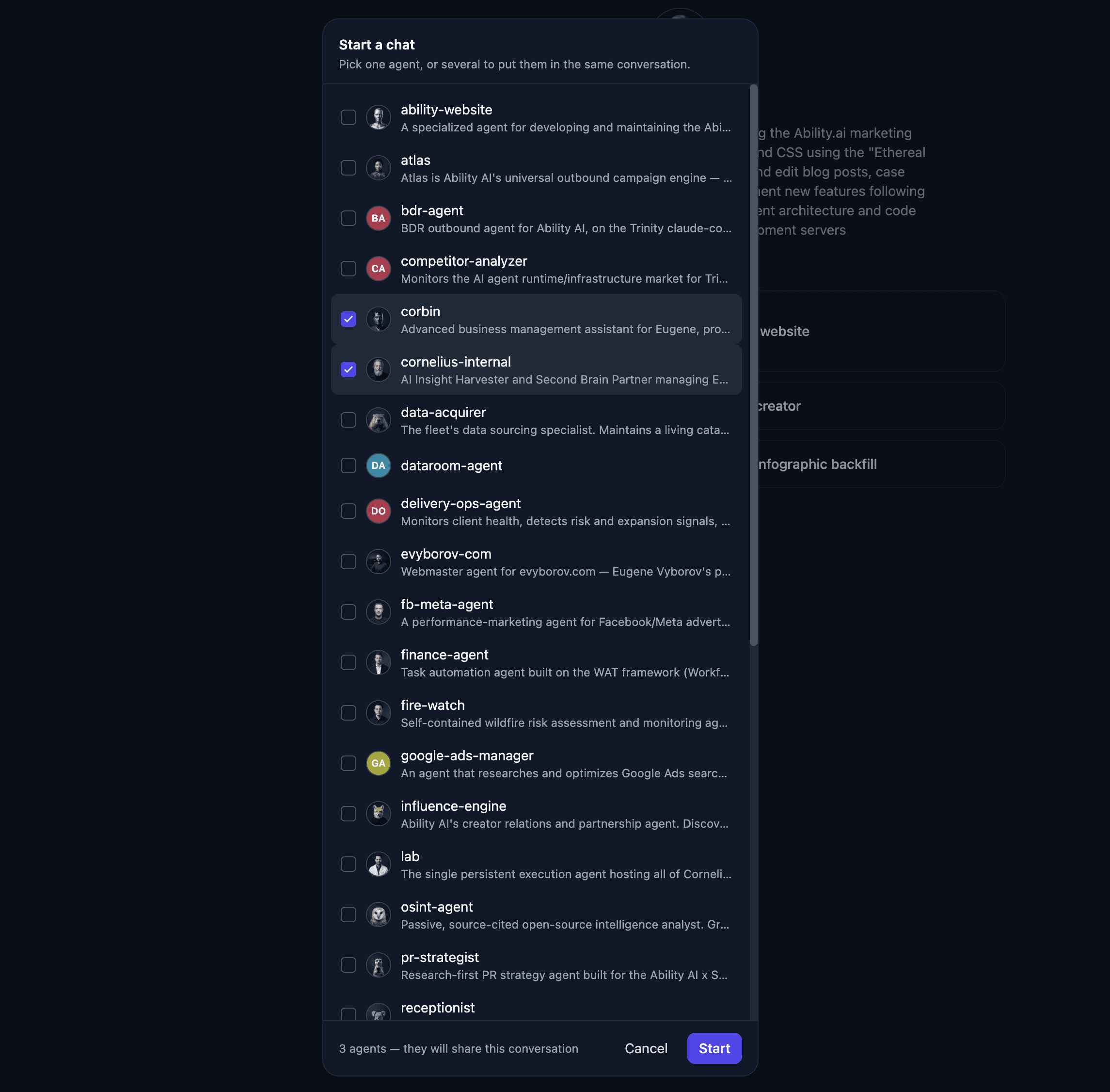
The Composer
One box: the message field on top, the controls in a row inside it. Enter sends; Shift+Enter adds a line.
/ and @ — type / at the start of a word for the agent's playbooks, or @ for another agent. ↓ then Enter (or Tab for the top row) inserts the pick; Esc dismisses the list. Enter alone always sends. A / pick splices the playbook's starter prompt into the field without sending.An agent that is stopped or unreachable is labelled above the field before you type; the message still sends, and the server's refusal is the answer.
While the Agent Works
Replies stream as they happen. Under your message a live card shows the agent's status, the elapsed time and one line saying what the agent is doing right now, with Stop and Open in Work — the same card the rail's Work tab lists afterwards. When you send, the chat scrolls down to the card, unless you had scrolled up to read something.
The activity line reads the same way everywhere: Reading .../src/app.py, Running pytest -q, Searching for "pattern", Fetching example.com, Using github, Delegating to researcher, Writing a reply, or Thinkingbetween steps. A new line slides up over the old one and stays long enough to read; a burst of quick steps shows only the latest. On a quiet stretch the last line stays, and the line clears when the run ends. Your own turn's line comes from its live stream. Every other live run — a delegated job, a scheduled run, a room turn — takes its line from the agent's regular heartbeat, which a platform user sees on the Work tab's cards and on a room's cards. A heartbeat line older than 30 seconds is dropped rather than shown as current, and a card with nothing to report leaves the line empty rather than guessing.
Stop, or Escwith nothing else open, cancels the in-flight turn and puts your words back in the composer (in front of anything you typed while waiting). A cancelled turn shows as cancelled, not as an error. Esc does nothing when no turn is running, and yields to whatever is open on top — the typeahead, the agent picker, dictation, a file preview.
Turns on one chat are serialized to protect the agent's memory, so a second message while one is running is refused with This conversation is already handling a message — wait, or start another chat for parallel work. If a send fails you get the real reason (busy, timed out, too large, too many messages, the agent's usage limit) instead of a bare failure, and Retryis offered only when nothing reached the agent — a turn the agent already ran is not silently billed twice.
Closing the tab doesn't stop anything: the turn keeps running on the server and the reply is waiting when you come back.
Reading Replies
(3) Trinity — Workspace — so a reply lands even when the Workspace is behind another tab. Opening the chat clears it. Unread counts replies you haven't read; an agent's questions are counted separately.Conversations Keep Their Memory
A Workspace chat resumes: each turn reattaches to the same underlying session, so the agent keeps its tool results, mid-task state and reasoning between messages — not merely the text of what was said. Existing chats run one cold turn and resume from then on. A spoken call in the same chat is folded in: the agent's next typed turn knows what was said. For what carries over, compaction and the per-turn limits, see Continuous Conversations.
The Rail
The rail sits beside the conversation, collapsed to a strip of icons by default; click one to open it, Collapseto close it. Its state — open or collapsed, and which tab — is remembered across chats and reloads. A dot on a tab means something happened since you last looked: a pulsing dot for work or a loop in progress, a plain dot for a canvas or file updated since you last opened that tab.
| Tab | What it holds | Who sees it |
|---|---|---|
| Work | The agent's executions from this chat and its history — see Executions | Platform users |
| Loops | Run and watch loops on the agent from here — see Agent Loops | Platform users |
| Canvas | The agent's canvases (below) — see Agent Canvas. While there is none, Ask for a canvas pre-fills a request | Everyone; a client sees only canvases the agent published to its roster |
| Files | Files you sent and files the agent shared | Everyone |
| Info | The agent's context (below) | Everyone, in a 1:1 chat |
Files. Drop a file on the tab, or click to send one. In a room, Send to defaults to Everyone in this chat (N agents) — one copy per agent, the same as dropping the file on the room itself — and still lists each agent for a single recipient. The receipt names who got it (Sent “shot.png” to analyst and sidekick.). A file counts as sent only when every recipient got it; otherwise the error line names the file and the agents it missed. The list is grouped Files you sent / Files from {agent}. Click a name to preview it — images, Markdown and text up to 256 KB; ← and → step through the previewable files, Esc closes — or Download to save it. The bin icon deletes a file you sent, or removes a shared file from your list without touching the share. An agent's owner, signed in as a platform user, additionally gets Delete for everyone.
Canvas. One canvas shows at a time; pick another from the chips above it, where a pinned canvas carries 📌 and comes first. Once an agent has more than six, Search canvases… filters them by title or id. The header states two facts and draws no conclusion from them — Updated 2h ago · agent last ran 40m ago. PDF prints the open canvas through the browser's own print dialog. An agent's owner (or an admin), signed in as a platform user, also gets Manage: each row shows its age, a pin toggle and Delete, and a checkbox per row feeds Delete selected with one confirmation naming the count; everyone else has a read-only panel. Sharing a canvas at a link is done from the agent's Canvas tab on Agent Detail, not from the rail — see Agent Canvas. The canvas you have open travels with each message you send from that chat, so add a column to this names the right one. It is context, not permission: the agent still reaches only the canvases it could already reach, and a canvas deleted mid-conversation resolves to nothing.
The Agent's Page Is the Conversation
Clicking an agent no longer opens a report about it. Its numbers sit in a band under the header of every chat with it — tasks in the last 7 days, the share completed, the share that succeeded first try, a Helpful / Not helpful tally where people have rated it, and a small activity chart. Everything else is the rail's Info tab:
| Section | Shows |
|---|---|
| Header | The agent's name and description, with health and availability as two separate facts |
| Your chats | The full list, unread counts included — Main shows as Current conversation, archived chats in grey |
| What it can do | Capability cards; clicking one pre-fills the composer |
| Reports | Structured reports the agent has published; expand one to read it — see Agent Reports |
It reports; it does not configure. There are no schedules, skills, logs, costs or model details here. A question the agent raised appears above the composer of the chat it belongs to, and answering it there tells you whether the agent is picking the work up — see Approvals. Everything is read from stored data, so a stopped agent still renders. The old address /workspace/a/{agent} still works and lands in the chat.
Dictation
The microphone in the composer (Speak your message) turns speech into text in the message field. Nothing sends until you press Enter. Clients and platform users both get it, and it uses one of two engines:
When neither engine can work, the composer shows no microphone at all rather than one that fails on every press. ElevenLabs grants permissions per endpoint, so a key that speaks replies aloud may still lack Speech to Text. That turns platform transcription off; the browser's engine still works where there is one.
A failed transcription gets a line above the message field that says why: the key lacks the speech-to-text permission, the key was rejected, the account is out of credits, too many voice messages in a short time, the recording could not be read, or the provider failed. You can always type instead.
For admins. Settings → General → Voice (ElevenLabs) shows, beside the key's configured badge, whether the key can transcribe:
| Badge | Means |
|---|---|
| can transcribe | Platform dictation is available |
| cannot transcribe — reason | ElevenLabs refused the key for speech-to-text. Grant the key the Speech to Text permission at ElevenLabs, then save it again |
| transcription not verified | ElevenLabs could not be reached to check. The microphone stays available until the check completes |
Trinity checks each key once and repeats the check every few hours, and at once when you save the key again. A transcription the provider refuses (HTTP 401 or 403) also marks the key, so the next page load stops offering platform transcription. Under the badge, Last voice-input failurenames the most recent failed transcription: the cause, the provider's HTTP status and status word, and the time. It stays for 24 hours, or until you save the key again. The key itself is never shown.
Voice Mode
The call button in the composer starts a real-time voice call inside the chat you are in. The orb takes the conversation column, the agent's canvas takes the right column, and the header, tabs and composer stay visible but inert until you end the call (the theme switch keeps working) (End call, the orb's End button, or Esc). Switching chats and ⌘J wait until the call ends. The spoken turns land in the chat as one collapsed Voice call · N min block. Everything about the call — who can start one, what the agent can do during it, the time limit — is in Voice Chat.
Bringing in Another Agent
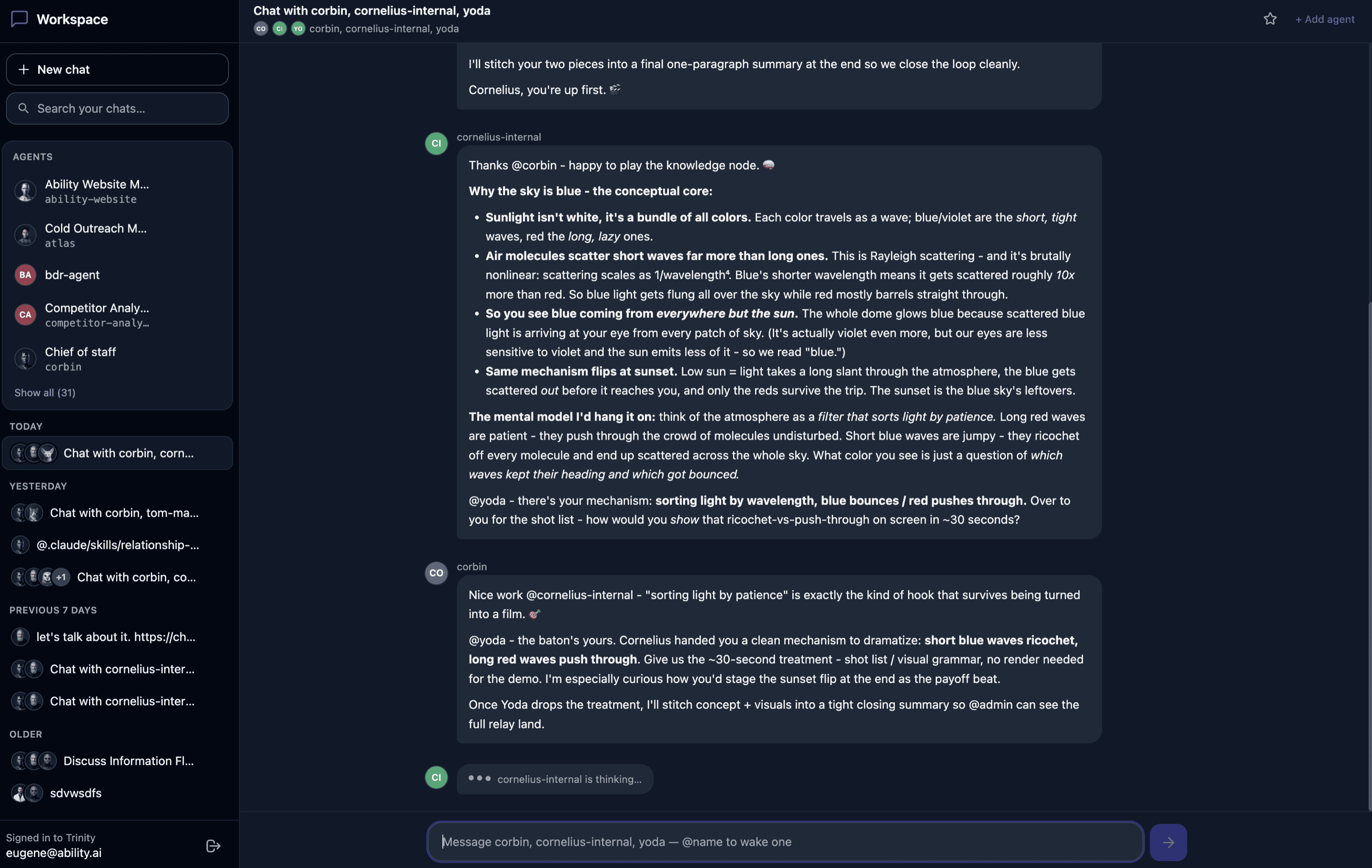
Mention another agent from a 1:1 — type @ and pick it — and Workspace opens a room containing both and posts your message there; the original 1:1 is left as it was.
Files you attached in that 1:1 and have not yet sent with a message go along: the composer's attachment chips, and files sent from the rail's Files tab in the last 15 minutes. Workspace waits for uploads still in progress, then delivers each file to the agents that do not have it yet, before posting your message, so the mentioned agent can see what you asked about. A line under the room's composer then says what happened — Sent with your message: shot.png — also delivered to sidekick., shot.png didn't reach sidekick — attach it again here to retry., or that a file was not carried over because it never finished uploading — until you dismiss it or send your next message. If the room cannot be opened, your text comes back to the 1:1 composer with its attachment chips.
Inside a room, + Add agent recruits another, and only a person can do that. Rooms carry participant avatars, a star and a budget warning as the conversation approaches its cap. For a platform user, each agent working on the room's message gets its own live card with Stop. A room's cards, files, names and rules are covered in Shared Sessions (Rooms). Against an older backend without rooms, the picker is single-select and an @name stays ordinary text.
Keyboard Shortcuts
| Keys | Where | Does |
|---|---|---|
| ⌘J / Ctrl+J | Anywhere in the Workspace | New chat with the agent in front of you (the picker when there is none) |
| Enter / Shift+Enter | Composer | Send / new line |
| ↓ ↑, Enter, Tab, Esc | Composer, with the / or @ list open | Move, insert the selected row, insert the top row, dismiss |
| Esc | A turn is running, nothing else open | Stop the turn and restore your words |
| Esc | Room composer, with exactly one turn you can stop and no list or picker open | Stop that turn (with two or more, Esc does nothing — use the card's Stop) |
| Esc | Theme menu open | Close the menu |
| Esc | During a voice call | End the call |
| Esc, ←, → | File preview | Close, previous file, next file |
| Enter / Esc | Renaming a chat | Save / abandon |
What an Owner Configures
Workspace surfaces the agents already shared with a person's email — there is no separate access list. To give a client agents, share each one with their email using the normal agent sharing and access control model; remove the share to revoke access.
Capability cards come from the agent's exposed playbooks where an operator has configured them, and otherwise from the use_cases in its template — so what a client sees you can shape without touching Workspace itself. The model an external client's turns run on is the one set for the agent's public channels on its Sharing tab, falling back to the platform default.
For Agents
Workspace is a client-facing shell over the platform's existing agent behavior, not a new agent capability, and no MCP tool targets it — an agent reaches the people in it through its replies, its reports, its questions and its canvas. It is served by /api/enterprise/client-portal/*(the prefix is historical), authenticated by either a Workspace session token or a platform JWT, with every per-agent route scoped to the caller's roster. Agent-scoped MCP keys are refused.
| Endpoint | Method | Description |
|---|---|---|
| /my-agents | GET | The caller's roster, each agent with its label, description, availability, model default, capability cards and can_manage_canvases (the only capability channel a Workspace principal has — absent reads as false); instance-level model_options and realtime_voice |
| /briefings?agents=a,b | GET | The capability hints for some or all rostered agents, loaded off the roster's critical path |
| /sessions | GET | Every chat the caller has, across all agents, in one call |
| /agents/{name}/sessions | GET / POST | This agent's chats (the read mints Main if missing) / start an empty chat |
| /agents/{name}/sessions/main/reset | POST | Archive Main and mint a fresh one; refused while a turn is in flight |
| /agents/{name}/sessions/{id} | PATCH | Rename a chat — {title}, one line, ≤100 characters |
| /agents/{name}/history?session_id=&limit= | GET | A chat's messages, the in-flight marker and the last turn's outcome |
| /agents/{name}/chat | POST | Send a turn and wait for the reply — the synchronous integration surface; accepts session_id, new_thread, model and open_canvas_id (the canvas on screen, passed as context; an id the caller cannot see resolves to nothing) |
| /agents/{name}/chat/stream | POST | Begin a turn, returning an execution id to watch; same body |
| /agents/{name}/executions/{id}/stream | GET | Live activity for one of your own turns (SSE) |
| /agents/{name}/executions/{id}/terminate | POST | Stop one of your own turns |
| /agents/{name}/documents | GET / POST | Files the agent shared with you / send the agent a file (25 MB) |
| /agents/{name}/documents/{file_id} | DELETE | ?scope=me removes a shared file from your list; ?scope=everyone revokes it (owner, platform session) |
| /agents/{name}/uploads | GET | Files you sent; /uploads/{filename} GET downloads one and DELETE removes it |
| /agents/{name}/page | GET | The band and Info payload in one call |
| /agents/{name}/reports, /reports/{id} | GET | Report metadata and one report's payload (rows_offset/rows_limit page a table) |
| /agents/{name}/canvas, /canvas/{id} | GET | The agent's canvases, narrowed to the roster audience for a client |
| /agents/{name}/canvas/{id} | DELETE | Remove a canvas (owner or admin, platform session) |
| /agents/{name}/canvas/bulk-delete | POST | Remove several — {canvas_ids}; reports the ids that existed |
| /agents/{name}/canvas/{id}/pin | PUT | Pin or unpin — {pinned} (owner or admin) |
| /agents/{name}/ratings | POST | Rate a message or a deliverable |
| /agents/{name}/voice/start | POST | Start a voice call bound to a chat (platform users) |
| /agents/{name}/stt | POST | Transcribe a recorded clip for dictation — returns {text}. 404 when dictation is unavailable; a provider error returns a sentence naming the cause (503 key, permission or credits; 429 rate limit; 422 unreadable recording; 502 provider failure) |
| /chat-state | GET | Star and unread state for every chat |
| /chat-state/{kind}/{id}/star | PUT / DELETE | Star or unstar a chat |
| /chat-state/{kind}/{id}/read | POST | Advance the read cursor |
| /search?q= | GET | Search the caller's chats |
Asks and the Work tab have their own routes under the same prefix — see Approvals and Executions.
Full request/response schemas are in the backend's Swagger docs (http://localhost:8000/docs when running locally).
Limitations
@mention escalation is unavailable and Workspace says so rather than failing obscurely./ playbooks are not offered in a room. @ is.