Trinity
What's New/v0.8.0

What's New in Trinity v0.8.0

Released 2026-07-08

Watch the release tour — a walkthrough of everything below.

Trinity's largest release yet. Agents can now speak — replies arrive as real voice notes on Telegram, Slack, and WhatsApp — and second-brain agents get the Brain Orb, a living 3D map of everything the agent knows, with voice conversation and capture-to-graph writes. Fleet operators get a new Grid dashboard and a redesigned sharing model, and the enterprise tier gains its identity layer: two-factor authentication, single sign-on, and per-agent operator access control.

Improvements

Agents speak — voice replies across channels

Flip one toggle and your agent answers with a spoken voice note instead of (or alongside) text — on Telegram, Slack, and WhatsApp. Pick the voice per agent; delivery falls back to text automatically if synthesis fails. Configure it under the agent's Sharing settings (requires a platform ElevenLabs key). The Gemini Live voice picker also gained a new voice, Gacrux, for real-time voice chat and phone calls.

See Voice Replies.

The Brain Orb — watch your agent think

Second-brain agents now render their own mind: a 3D knowledge graph you can search, navigate, and talk to — the voice tile connects your browser straight to Gemini Live. Capture a note or link mid-conversation and watch it appear on the graph; voice-session transcripts are saved and processed automatically after the call ends. Fresh Trinity installs auto-seed a ready-to-use Cornelius agent so the orb works out-of-the-box, and the new fork-to-own flow copies the agent template into your own GitHub repo at creation, so your knowledge base lives in a repository you control.
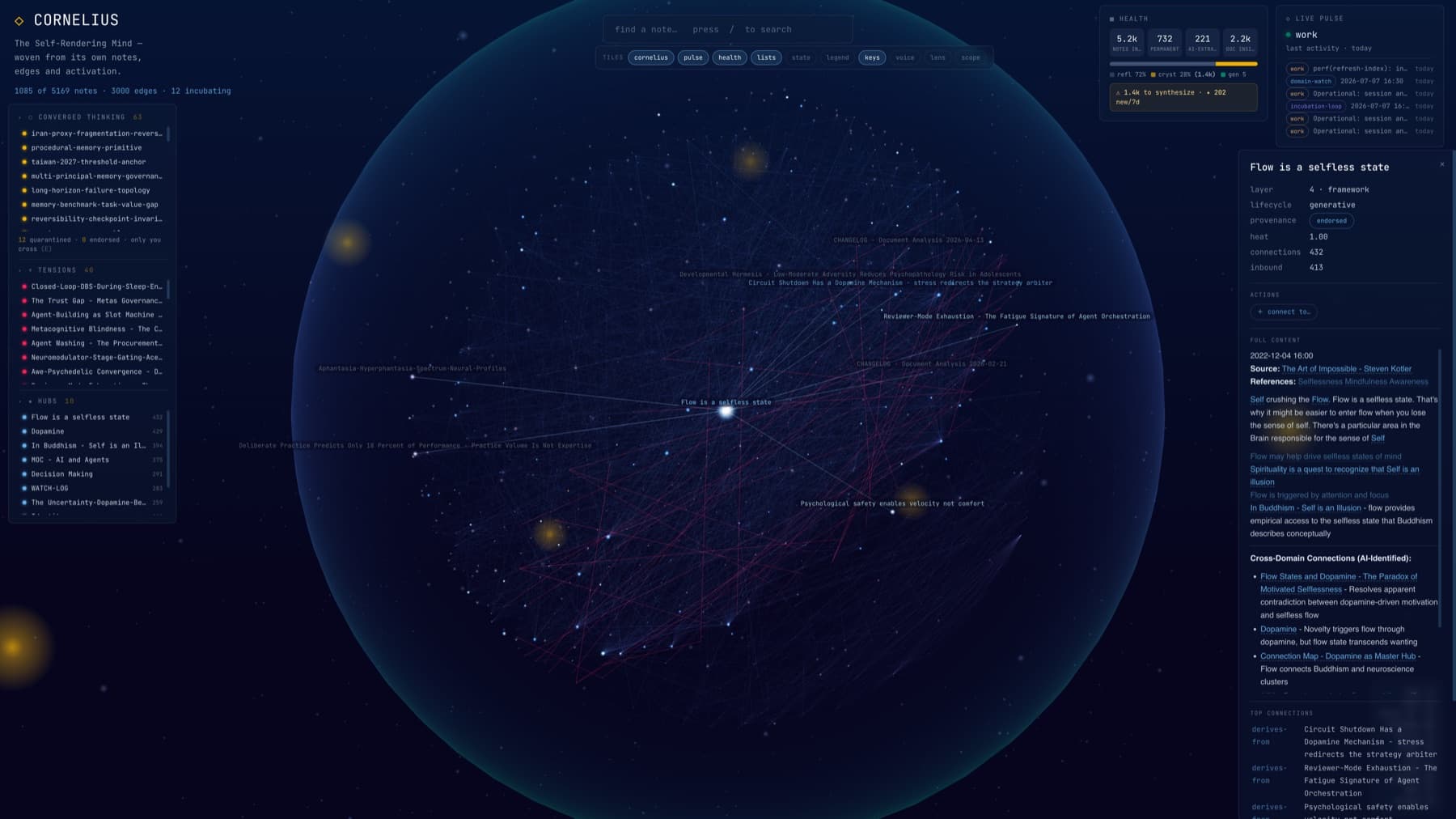
Brain Orb — a 3D knowledge graph rendered by the agent itself, with a note detail panel, health tiles, and a live activity pulse
The Brain Orb — a 3D knowledge graph rendered by the agent itself, with a note detail panel, health tiles, and a live activity pulse.

Cornelius & the Brain Orb — a second-brain agent rendering and talking through its own knowledge graph.

Grid dashboard — the whole fleet at a glance

A third fleet view alongside Graph and Timeline: a magnetic tile canvas where every agent is a card with live activity sparklines, success rate, task counts, cost, and run/autonomy toggles. Drag to arrange, and your layout sticks.
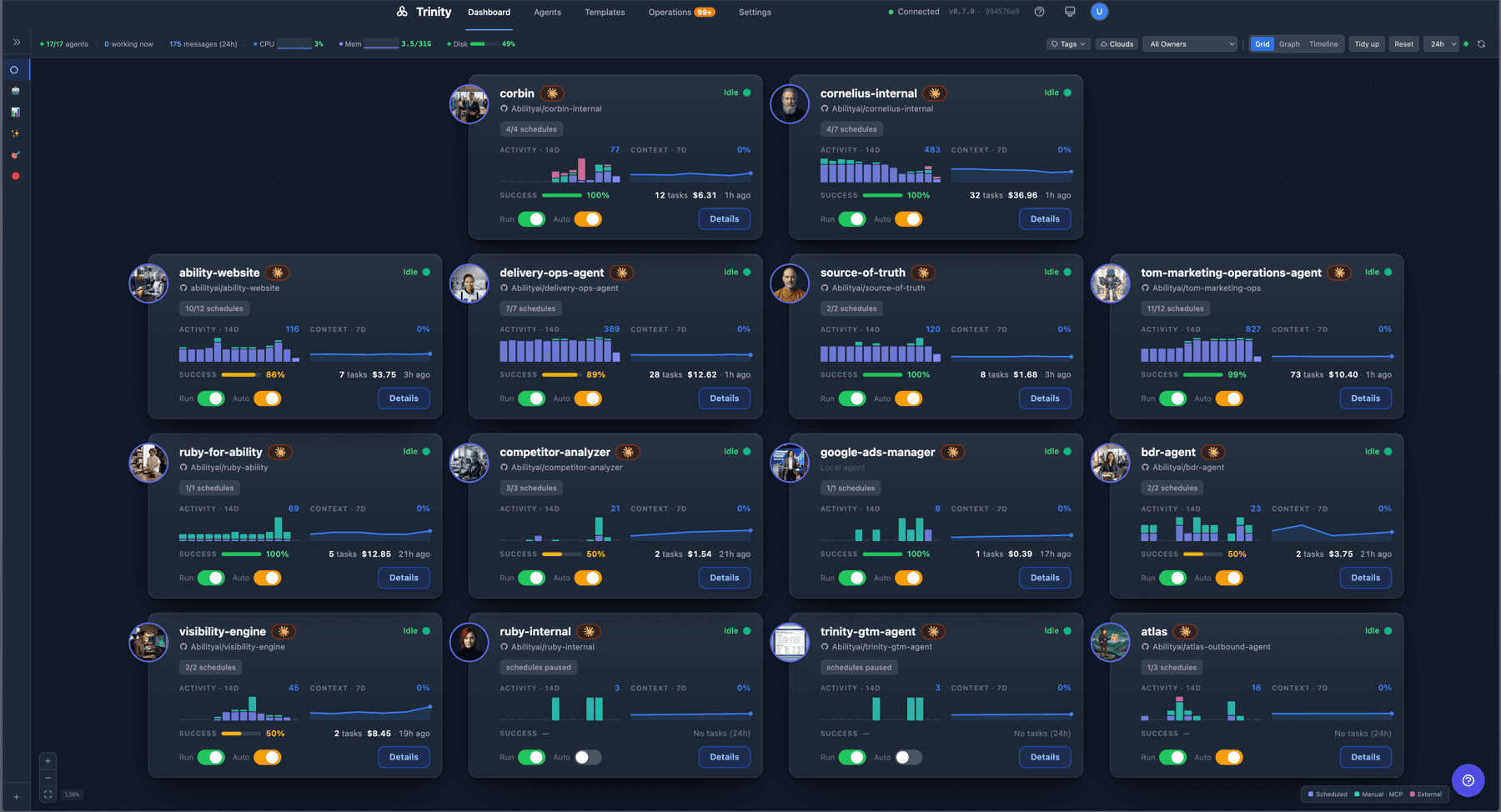
Grid dashboard — draggable agent tiles with live activity, success rate, cost, and run/auto toggles per agent
Grid dashboard — draggable agent tiles with live activity, success rate, cost, and per-agent Run/Auto toggles.

The agent page, unified

The agent page consolidates into one command center. Chat and Session merge into a single Chat tab with conversation continuity on by default (toggle off for stateless mode). New tabs appear where the agent supports them: Brain (the orb), Reports (structured results the agent publishes), Access (which operators can reach this agent, active vs pending), and a Sharing tab reframed around external clients — the people who reach your agent through channels — with per-channel setup dialogs and a client roster showing who's been talking to it.
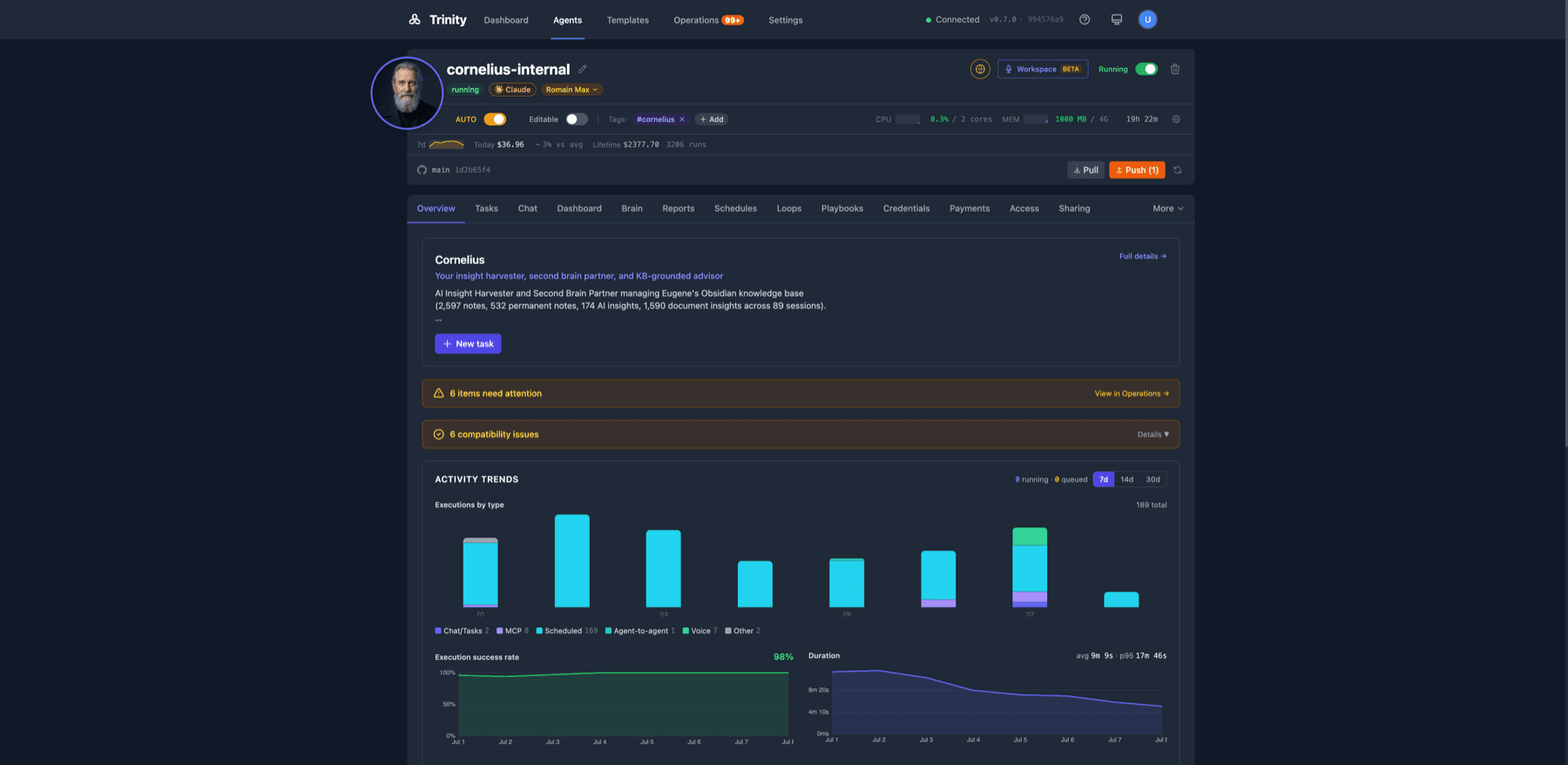
Agent Detail — Overview tab with activity trends, needs-attention items, and the full tab strip: Chat, Brain, Reports, Access, Sharing
Agent Detail — the Overview tab with activity trends and needs-attention items, above the full tab strip: Chat, Brain, Reports, Access, Sharing.

Operations — every run accounted for

The Operations area now shows every execution across the fleet with standardized cost display throughout the UI — including runs triggered by voice sessions and channel messages, not just schedules. Admins can turn fleet-health monitoring on or off from Settings, and the choice survives restarts.
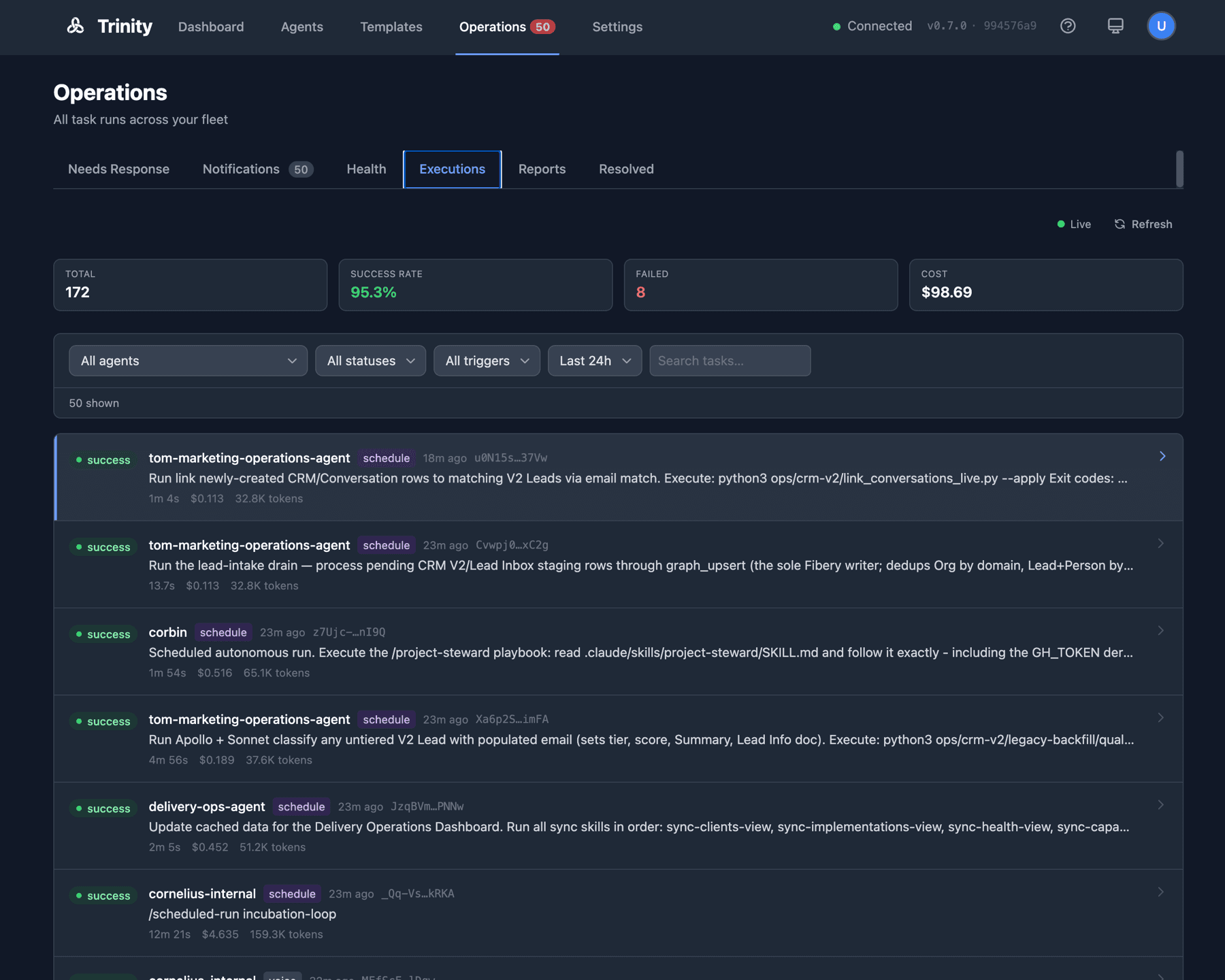
Operations → Executions — fleet-wide run list with total, success rate, and cost cards; entries include schedule- and voice-triggered runs
Operations → Executions — a fleet-wide run list with Total, Success rate, Failed, and Cost cards; entries now include schedule-, voice-, and channel-triggered runs.

More improvements

Loop guardrails — sequential agent loops accept a hard cost budget and a wall-clock deadline, and stop automatically when the agent starts repeating itself (doom-loop detection).
Webhook signing — protect schedule webhooks with optional HMAC signatures so a leaked URL alone can't trigger work, managed from a full webhook panel on the Schedules tab.
Agents as MCP tools — expose any agent as a dedicated tool in Claude Code or any MCP client with one toggle; the tool appears without a restart.
Public-conversation controls — set a different model and custom instructions that apply only to public links and channel chats, without affecting your own sessions.
Broader credential support — inject service-account keys, PEM certificates, SSH keys, and cloud CLI configs, not just environment files.
Credential key rotation — rotate the platform's credential encryption key online, with no downtime.
Fleet capacity ceiling — admins set a platform-wide cap on per-agent parallel tasks; owners pick within it.
Direct git operations — agent git status, sync, log, and pull are available as fast deterministic tools, no chat round-trip.
Pipeline visibility — agents that run multi-stage pipelines can publish their progress for inspection over MCP.
In-app documentation link — every instance links to the hosted docs site.

Fixes

Large fleets no longer saturate the backend — a CPU-churn issue with ~30 agents (connection storms and polling) is resolved.
Schedules can't silently stall — a bug where an enabled schedule showed “Next: 1 day ago” and quietly stopped firing is root-fixed, with a watchdog to catch any recurrence.
Busy agents aren't marked broken — health probes during long, CPU-heavy work no longer trip the circuit breaker, and fleet monitoring no longer double-checks agents when running multiple server workers.
Slack behaves like a person — the bot posts under the agent's name and avatar, sees who's speaking and in which channel, can message channels proactively, and keeps separate conversations per thread instead of per channel.
Webhooks under load — valid webhook URLs intermittently returned “not found” under concurrent traffic; repeated triggers were silently swallowed for 24 hours; webhooks of deleted agents kept firing. All fixed.
Files tab previews work again for text and media files.
Chats always save — an async chat that finished in the background could complete without ever appearing in history; long-running session turns no longer show a false “failed to send.”
Local development on Docker Desktop — log collection no longer pegs the Docker VM's CPU.
UI polish — Trinity favicon and per-page browser titles, loading skeletons instead of frozen screens, chat width no longer jumps between tabs, task lists fill the viewport.

Security & Hardening

Logging out now revokes the session — a stolen token dies with the logout instead of remaining valid for its full lifetime.
Agent and user names can no longer be probed — API responses are uniform whether or not a resource exists.
Two dozen dependency vulnerabilities remediated across the platform.
Code-scanning hardening — stricter URL validation, sanitized Brain Orb rendering, and tightened file-path containment in the agent server.
Public webhooks gained rate limits and request-size caps.

Enterprise

Available on the enterprise tier:

Two-factor authentication (TOTP) — mandatory for admin accounts, optional for everyone else.
Single sign-on (SAML/OIDC) for enterprise identity providers.
Fleet permissions matrix — one Settings grid controlling which agents may call which.
MCP connector — expose selected agent playbooks as tools for end-user consumption, with a Sharing-tab picker.
Client Portal (first slice) — configurable exposure for an external-client web surface, including private/VPN deployments.

Ecosystem — Abilities toolkit

The abilities plugin marketplace moved alongside this release:

Orchestrator installer (agent-dev, new) — one command turns any agent into a system-aware orchestrator: discover Trinity-compatible agents across repos, compose them into a deployable system manifest, then route and fan out work across the fleet.
Report publishing built into new agents (create-agent) — agents generated by the wizards ship ready to publish structured reports to the new Reports surface.
Safer syncing (trinity) — pulling changes now stashes local edits instead of discarding them.
Long-running-task guidance — playbook templates and onboarding now teach the correct shape for jobs longer than ~10 minutes: decouple to system schedulers with a completion marker.
/plugin marketplace add abilityai/abilities

Upgrade Notes

Enterprise admins: two-factor authentication is mandatory once the module is entitled — you'll be prompted to enroll an authenticator app at next login.
First-time setup changed: the setup token is gone; the wizard requires an admin email. Keep a brand-new instance behind a VPN or tunnel until setup completes.
Re-login after upgrading (sessions rotate on backend restart) and reconnect MCP clients.
Carried from v0.7.0: PostgreSQL is the recommended production backend; SQLite support ends September 1, 2026.