Abilities Marketplace
A curated collection of Claude Code plugins covering the full agent lifecycle — from scaffolding and onboarding to deployment, scheduling, and ongoing operations.
Build and Deploy Agents in Cursor
Apr 2026
Building Agents — Playbooks, Plugins, Deployment
Apr 2026
Concepts
github.com/abilityai/abilities. Claude Code's /plugin marketplace add command connects to it./plugin-name:skill-name commands./name [args] line. See Playbook calls.add-backlog, add-project-management, add-orchestrator, …); others are the runtime skills the agent then runs (/backlog, /claim, /project-task, /project-steward, …). The runtime skills are authored once in the plugin, copied in by the installer, and mirrored into the community skills catalog Trinity ships with (trinity-skills) so they can also be assigned to a deployed agent directly.plugins: block in an agent's template.yaml that names the marketplace plugins the agent depends on. Trinity re-installs them on every boot, so the selection survives rebuilds; see Creating Agents.Installation
One-time setup
# Add the abilities marketplace to Claude Code
/plugin marketplace add abilityai/abilities

# Or from the terminal:
claude plugin add abilityai/abilities
Install the plugins you need
/plugin install create-agent@abilityai    # Agent creation wizards
/plugin install agent-dev@abilityai       # Development tools
/plugin install trinity@abilityai         # Trinity platform integration
/plugin install dev-methodology@abilityai # Documentation-driven dev
/plugin install utilities@abilityai       # Ops and productivity
List available plugins
/plugin list abilityaiPlugins inside a deployed agent
The interactive /plugin install is for your Claude Code session. A deployed agent gets its plugins from the plugins: block in its template.yaml, which Trinity re-installs headlessly on every container start. Every wizard scaffold declares trinity@abilityai there for you.
The trinity plugin itself is also provided by the platform: Trinity's agent image ships with the abilityai marketplace registered and trinity@abilityai installed, and every container boot re-installs it if it is missing — whether or not the agent declares it. That is what lets an agent created from a bare repository with no template.yaml run /trinity:onboard in place and write its own declaration. A plugins: block that omits trinity@abilityai never uninstalls it (the boot step only adds), and a declaration that points the abilityai marketplace name at another repository is ignored. An agent image built with --build-arg TRINITY_PREINSTALL_PLUGINS=0 (air-gapped installs) skips the pre-install; the boot step still runs, and what it could not fetch is reported in the agent's compatibility report rather than failing the start. Agents on an image that predates the pre-install pay one install at their next boot. Set TRINITY_PLATFORM_PLUGINS=0on an agent container to turn the boot step off for that agent; the platform's compatibility report then shows the plugin state it recorded.
Set up in the Claude Code desktop app
Prefer clicking to typing? The Claude Code desktop app (macOS and Windows) has the same marketplace built into Settings — no terminal required. It resolves to the same abilityai/abilities marketplace as the CLI. Here is the whole flow, start to finish.
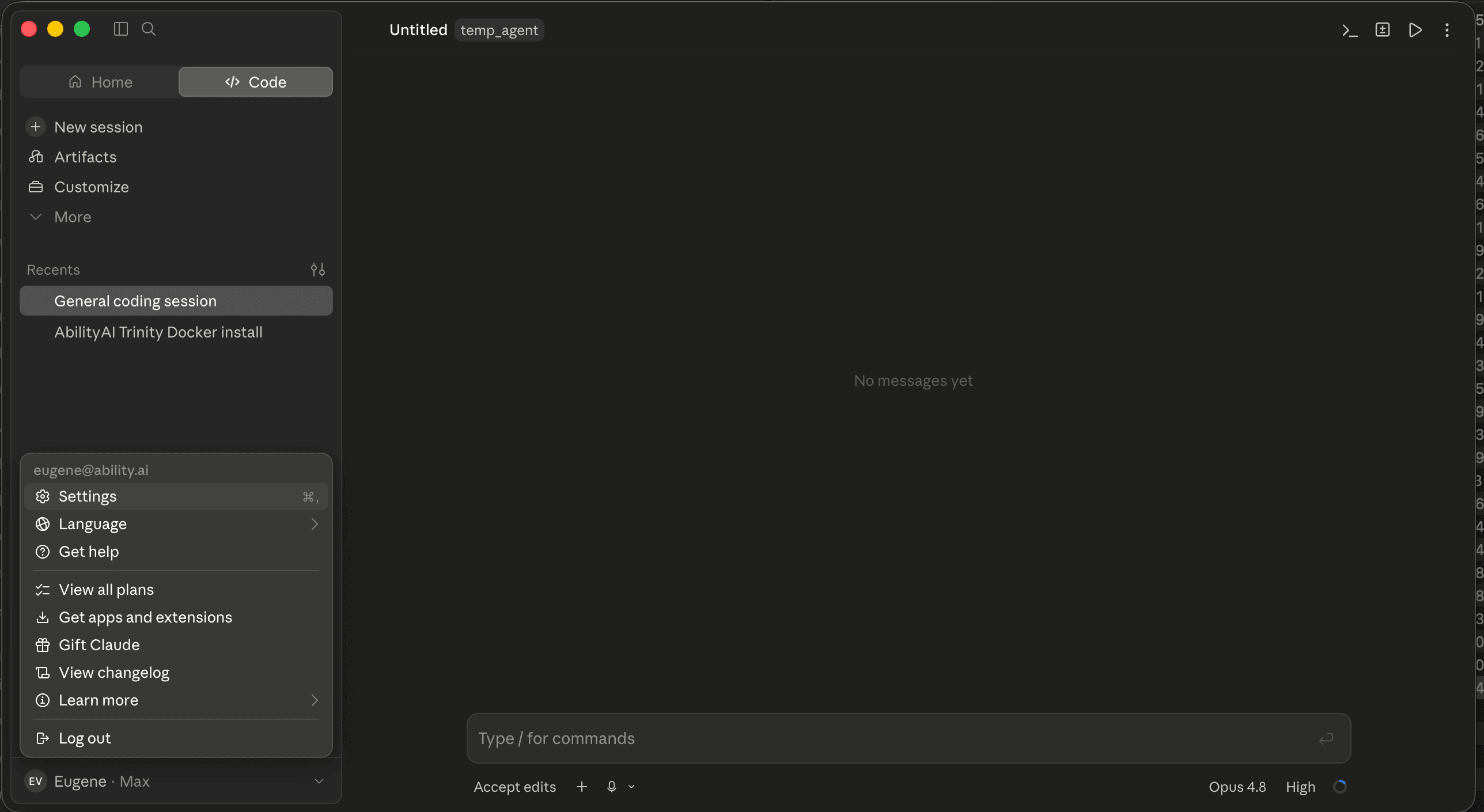
Open Settings
From your account menu at the bottom-left of the sidebar, choose Settings (or press ⌘,).
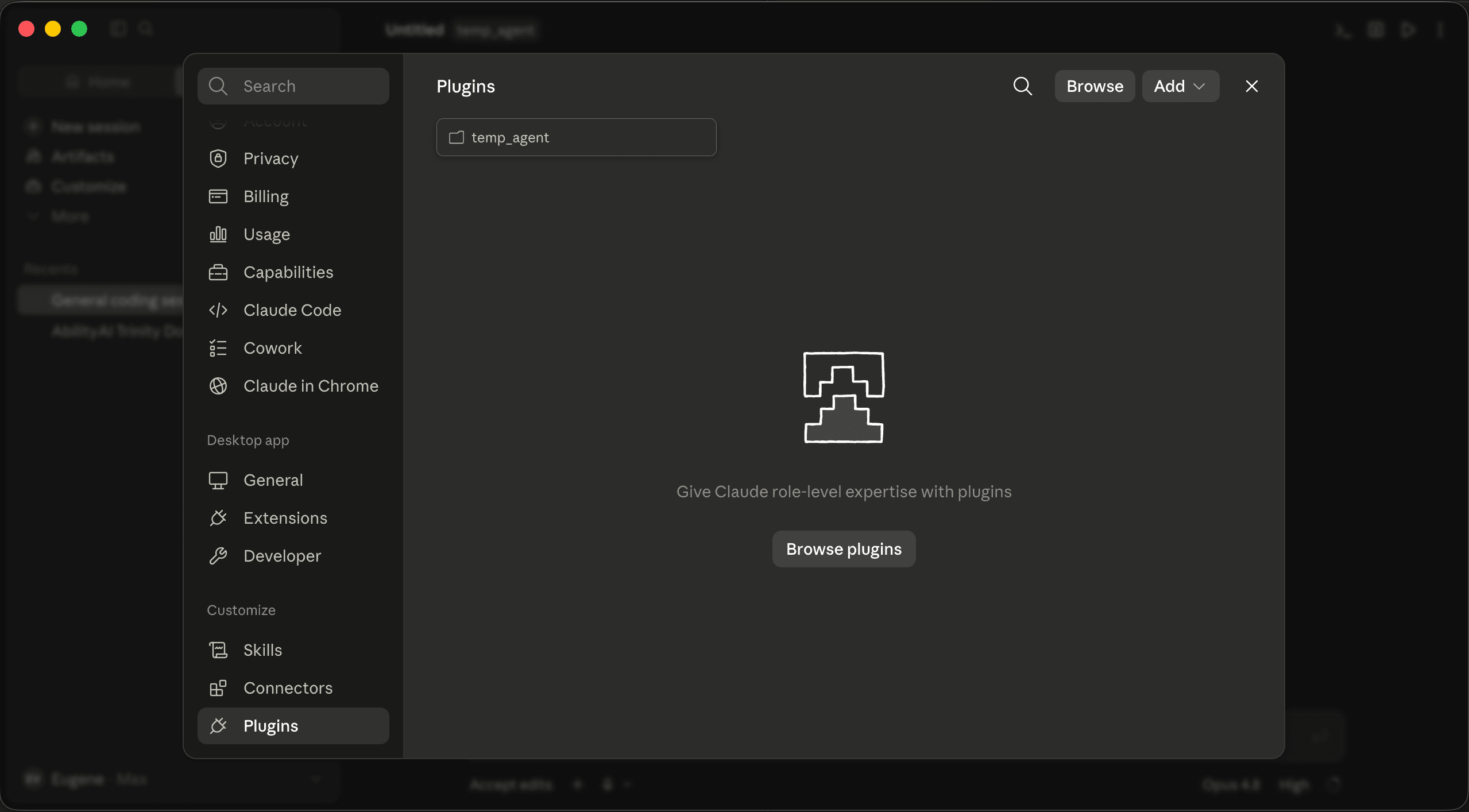
Open the Plugins tab
In the Settings sidebar, under Customize, select Plugins.
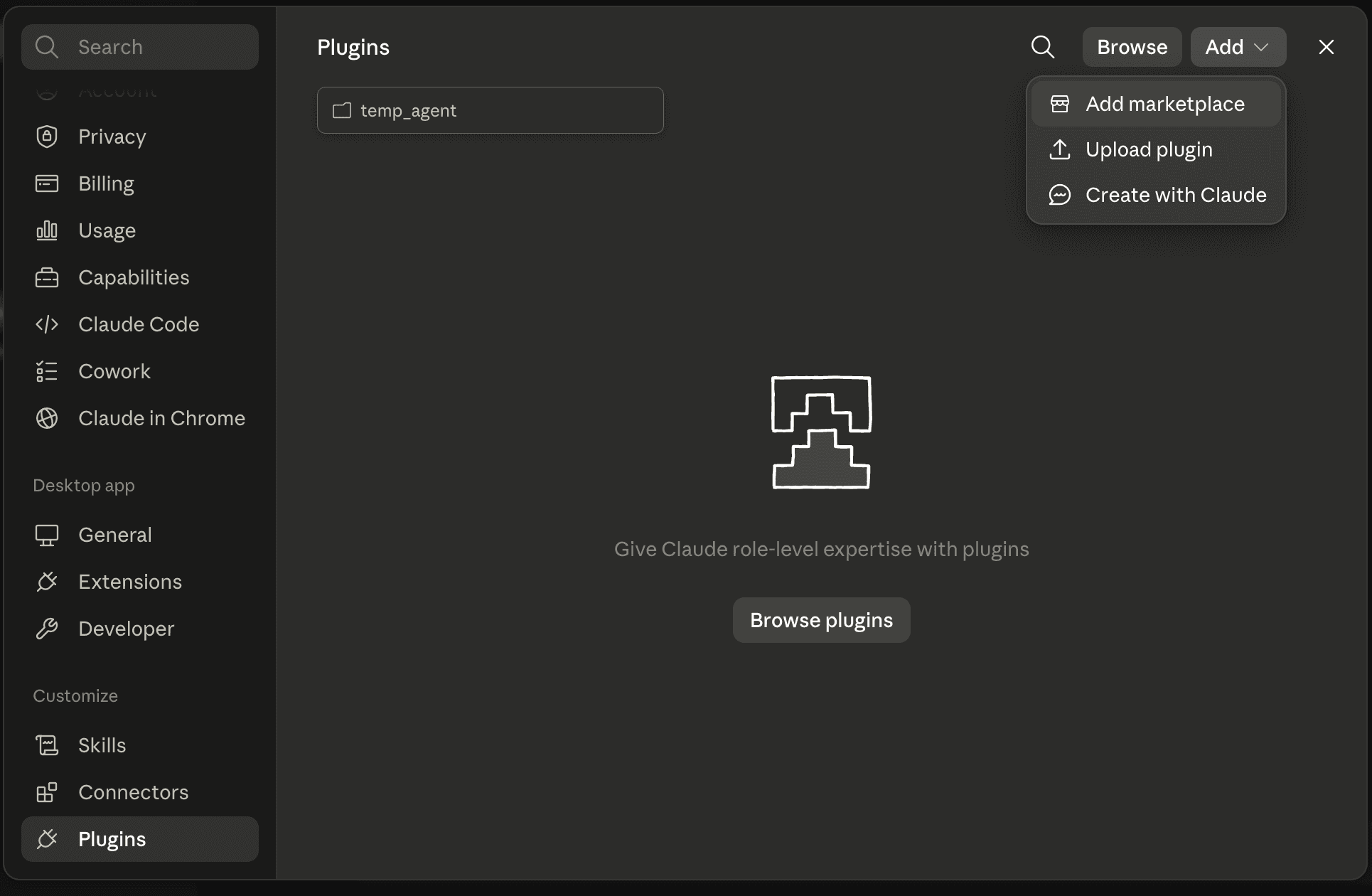
Add a marketplace
Click Add ▾ in the top-right of the Plugins panel and choose Add marketplace.
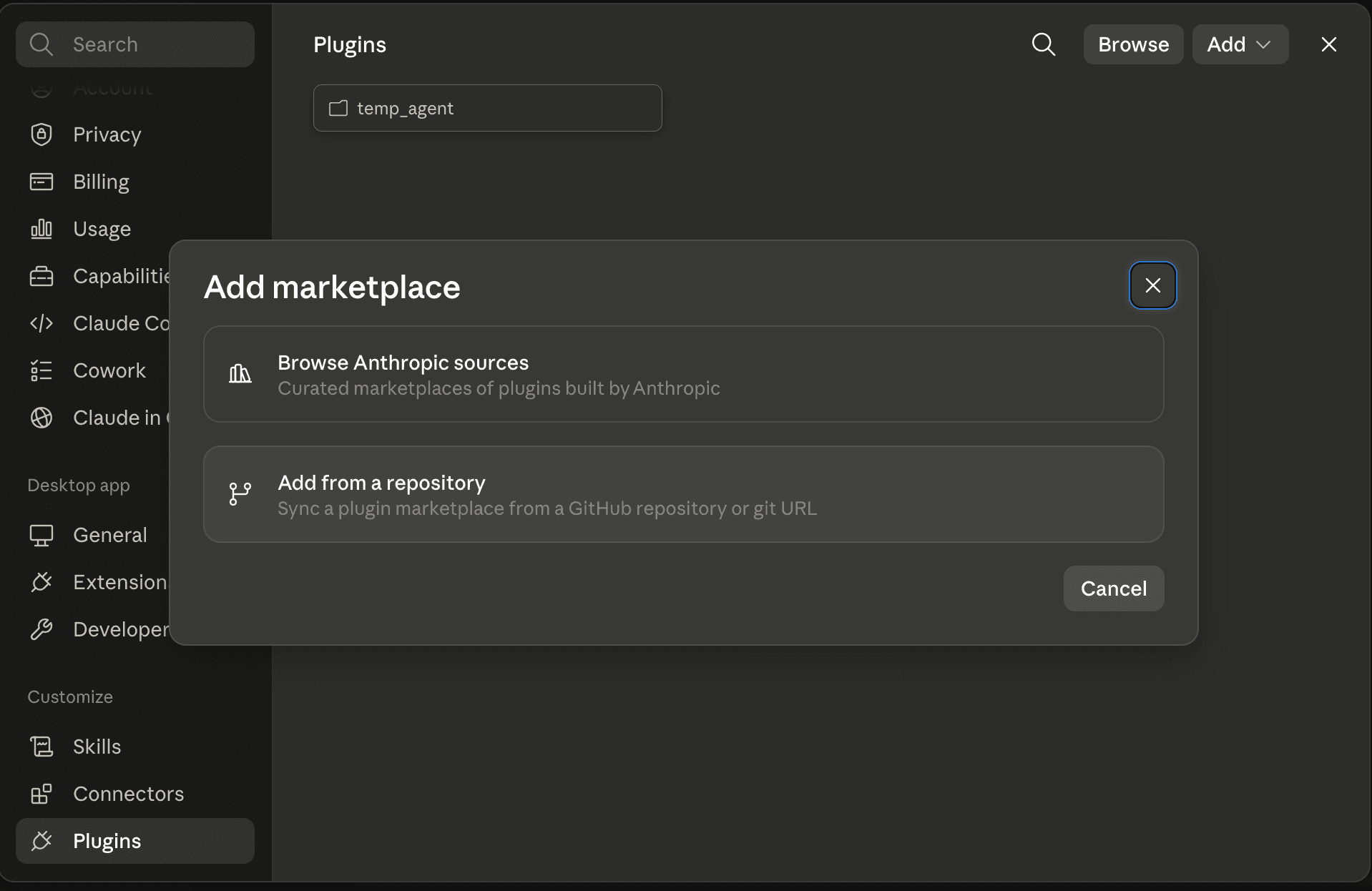
Add from a repository
In the Add marketplace dialog, pick Add from a repository — “Sync a plugin marketplace from a GitHub repository or git URL.”
Enter the repository
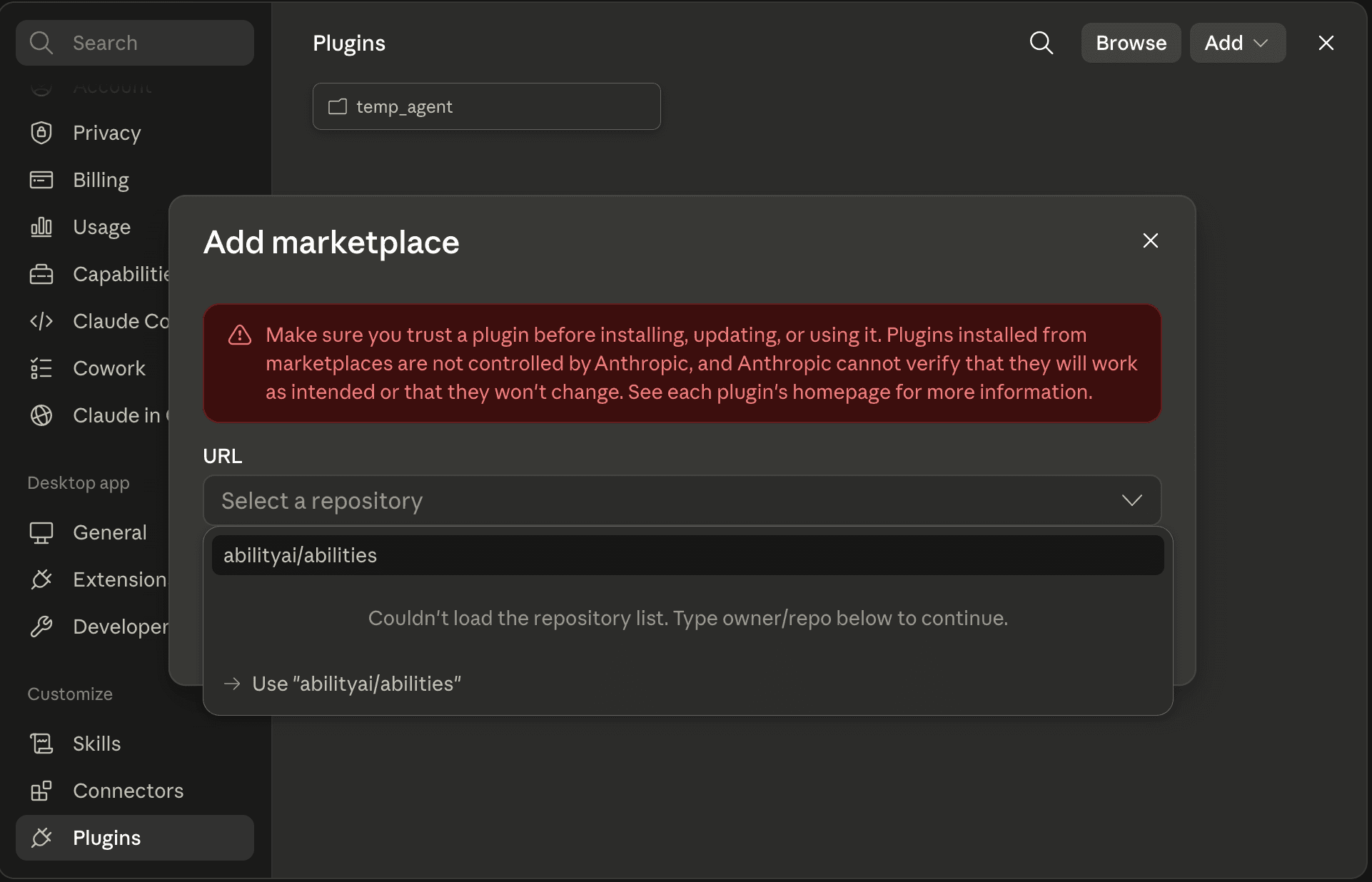
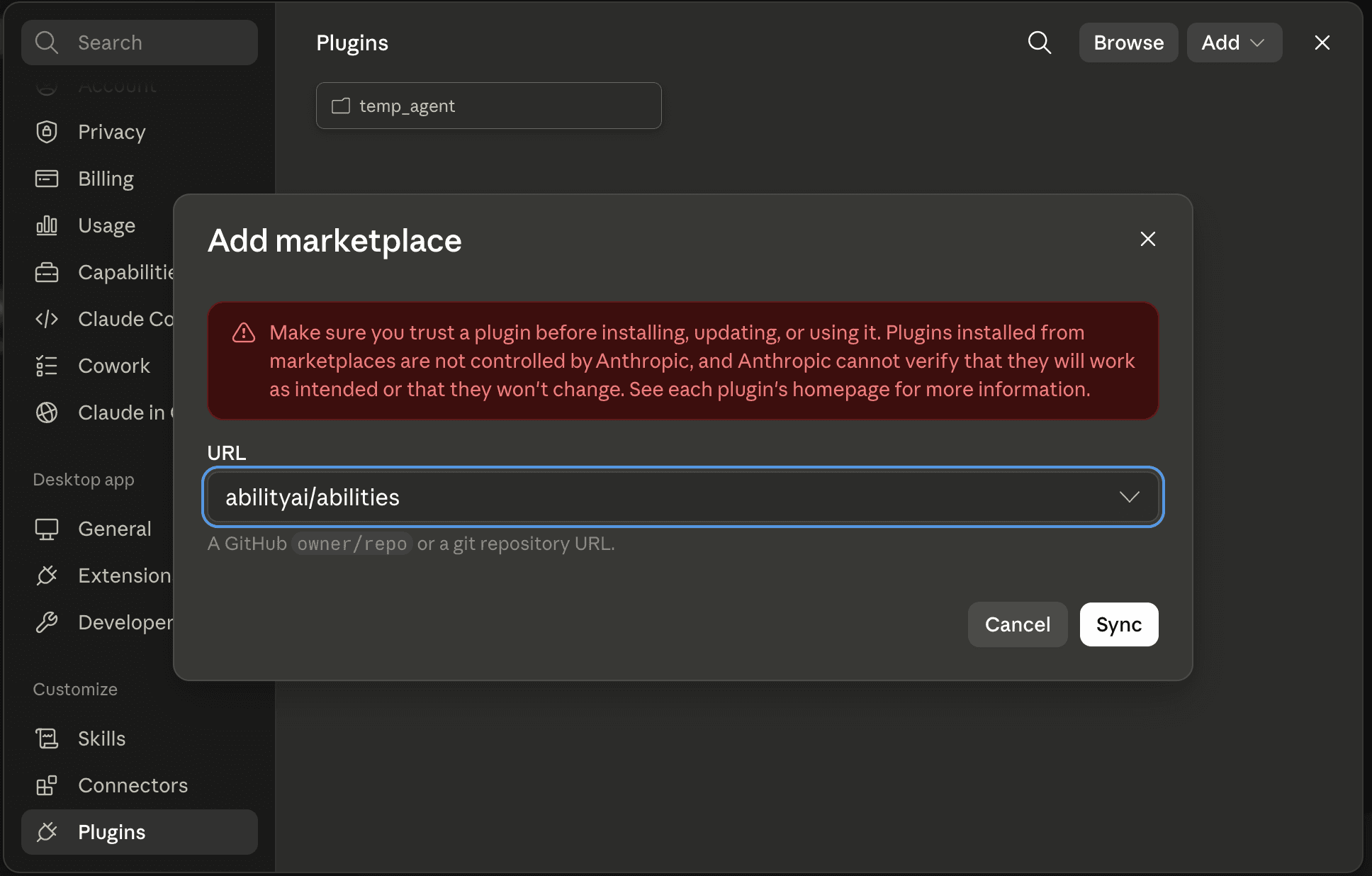
In the URL field, type abilityai/abilities. If the repository list doesn't load, click Use “abilityai/abilities” to continue.
Sync the marketplace
Click Sync. Only add marketplaces you trust — plugins run with your permissions and are not vetted by Anthropic.
Install the plugins
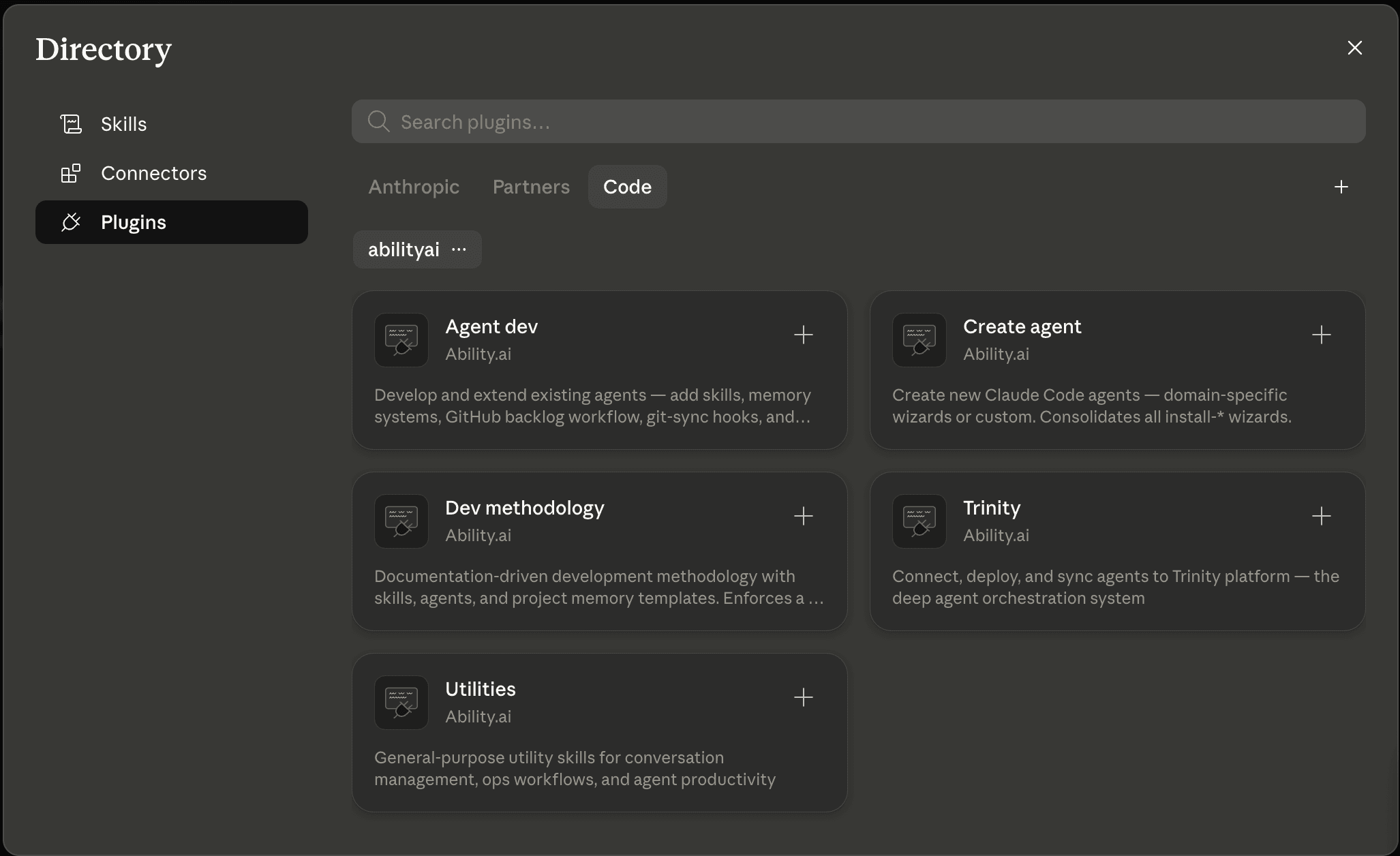
The Directory opens with the Ability.ai plugins — Create agent, Agent dev, Dev methodology, Trinity, and Utilities. Click the + on each one to install it. Its skills become available as / commands right away.
Versions and skill counts below are those published in the marketplace on 2026-09-14.
create-agent — 6 skills (v2.0.0)
Create new Claude Code agents from an interview, or review, adjust, and clone existing ones.
/create-agent:create # Discovery — shows all available wizards| Wizard | What it creates |
|---|---|
| /create-agent:custom | Any agent, from an interview — role, skills, schedules, credentials, Trinity wiring |
| /create-agent:website | Next.js website (no agent) |
| /create-agent:clone | Clone an existing agent repo |
| /create-agent:review | Read-only audit of an existing agent — prioritized findings, no changes |
| /create-agent:adjust | Apply best-practice improvements to an existing agent |
The eight pre-built domain wizards (prospector, chief-of-staff, webmaster, recon, receptionist, ghostwriter, kb-agent, doctor) were retired in 2.0.0 — custom builds every one of those shapes from the same interview, and a knowledge base is custom plus /agent-dev:add-memory. Every agent custom creates includes CLAUDE.md, 2–4 starter skills, template.yaml (with plugins:, schedules:, and credential declarations), dashboard.yaml, and an onboarding tracker. Generated CLAUDE.md guidelines carry the playbook-call rule, and every generated schedule message is a one-line playbook call — /create-agent:review reports prose delegation between agents, and prose schedule messages, as findings.
agent-dev — 30 skills (v1.16.1)
Extend and develop existing agents: playbooks, memory, git-backed state, a full GitHub Issues dev cycle, long-running pipelines, cross-actor project management, a shared canonical-data layer, and multi-agent orchestration — plus tooling to assess and migrate an existing fleet.
/agent-dev:create-playbook    # Add a new skill/playbook (three tiers, bundled templates)
/agent-dev:adjust-playbook    # Modify an existing skill — incl. "make callable by other agents"
/agent-dev:add-memory         # Add a memory system
/agent-dev:add-git-sync       # Git-as-state hooks (auto-commit, rebase, snapshot)
/agent-dev:add-backlog        # Install the GitHub Issues dev cycle (copies the nine runtime skills below)
/agent-dev:add-orchestrator   # Make the agent a system-aware orchestrator of other agents
/agent-dev:claim              # Claim the next issue
/agent-dev:autoplan           # Analyze a claimed issue before implementing
/agent-dev:commit             # Commit and close the issue — or, with nothing claimed, a plain checkpoint commit
/agent-dev:sprint             # Supervised cycle: claim → plan → implement → commit
/agent-dev:work-loop          # Autonomous unit: pick one issue, do it, close, exit
/agent-dev:add-pipeline       # Scaffold a long-running multi-stage pipeline
/agent-dev:plan               # Plan multi-session work
Plus backlog, close, groom, roadmap, add-pipeline-instance, add-pipeline-stage, and validate-pipeline — see the agent-dev plugin page for the full table.
Five are the project-management runtime — the skills add-project-management installs, now standalone so they can also be assigned from the bundled community skills catalog on Trinity:
/agent-dev:project-init       # Create or adopt a managed project (epic + labels + workspace stub)
/agent-dev:project-task       # Create a task issue in the uniform format; --headless for crons
/agent-dev:project-steward    # Autonomous sweep: verify, dispatch, escalate, close loops, digest
/agent-dev:project-reconcile  # Sync a projection adapter (Google Tasks v1) back into the registry
/agent-dev:project-intake     # Headless intake: route items from any source into the registry
Five more cover fleet-scale work:
/agent-dev:add-canon              # Shared canonical-data layer across a fleet, on plain git
/agent-dev:add-canon-lint         # Deterministic (no-LLM) consistency linting for that canon repo
/agent-dev:add-project-management # Cross-actor project management on GitHub Issues (installs the project-* skills)
/agent-dev:agent-fleet-analysis   # Audit a directory of agents in any paradigm; emit a work order
/agent-dev:agent-fleet-migrate    # Execute that work order into a verified Claude Code fleet
agent-fleet-analysis and agent-fleet-migrate are a pair: the first scans agents in any paradigm — Claude Code, n8n workflow exports, LangChain/CrewAI/AutoGen apps, hand-rolled loops — and produces a report plus an agent-executable work order; the second carries it out non-destructively into a fresh fleet-migrated/ tree, leaving your sources untouched.
Orchestrator maintenance. /agent-dev:add-orchestrator --check is a read-only report comparing each orchestration skill installed in an agent against the bundled version — upgrade available, hand-edited locally (an overwrite would discard it), or ahead of the bundle (an overwrite would be a downgrade) — and the same check runs inside every overwrite prompt when you re-run the installer. Gated skills that run on a cron declare a --autonomous run mode; see Playbook calls.
Memory systems (via /agent-dev:add-memory)
| System | Best for |
|---|---|
| file-index | Workspace file awareness and search |
| brain | Zettelkasten-style connected knowledge graph |
| json-state | Structured state, counters, config |
| workspace | Multi-session project tracking |
trinity — 7 skills (v2.9.0)
Connect, deploy, operate, and sync agents on Trinity.
/trinity:start-here           # Guided, resumable first run — start here if you're new
/trinity:connect              # One-time: authenticate and save MCP config
/trinity:onboard              # Per-agent: compatibility check + deploy (or onboard in place)
/trinity:sync                 # Git-based sync between your repo and the deployed agent
/trinity:loop                 # Run an agent in a sequential, bounded loop (remote or local)
/trinity:create-dashboard     # Generate an /update-dashboard skill for dashboard.yaml
/trinity:deploy-new-instance  # Deploy a Trinity instance + ops agent on any server
/trinity:start-here is the recommended entry point. Install just trinity@abilityaiand run it: it walks you from “what is Trinity” through getting an instance, connecting MCP (with a live smoke test), and creating your first working agent, handing off to the other skills as needed. It's resumable, so you can stop and pick it up later.
Deployment is repository-first. /trinity:onboard deploys an agent from its GitHub repository — Trinity clones the repo and tracks the branch. That needs an instance-level GitHub token (Settings → GitHub token, a fine-grained PAT with Contents: Read; public repos work without one). Deploying from local files still works as a fallback. Afterwards you iterate by pushing commits and running /trinity:sync, which advances the deployed agent to the new commit.
Three ways in. /trinity:onboard has three modes: the default interactive run (asks whether to deploy, adapt only, or onboard in place), /trinity:onboard analyze (report only, no changes), and /trinity:onboard in-place. Beyond deploying an adapted repo (the default) and deploying local files (the fallback), it can run inside an agent that is already deployed: create the agent from a bare repository as-is — Trinity tolerates a missing template.yaml — then run /trinity:onboard in that agent and pick Onboard in place (auto-recommended when the skill detects it is running inside a deployed agent; /trinity:onboard in-place skips the question). It writes the Trinity files including the plugins: block, installs the declared plugins immediately, commits and pushes the result back to the repo (or, if the agent has no write credentials, prints the patch and says plainly that the result is container-local), reconciles declared schedules, and finishes with the platform's own compatibility report — zero HARD findings is the definition of done. The trinity plugin the in-place run needs is provided by the platform (see Plugins inside a deployed agent); only an agent on an image that predates the pre-install needs the one-time bootstrap from its terminal: claude plugin marketplace add abilityai/abilities && claude plugin install trinity@abilityai --yes.
/trinity:sync is git-based and multi-remote — status, push, pull, deploy, remotes, add-remote, set-default, schedules, and plugins subcommands, with a .trinity-remote.yaml registry so one repo can serve several instances. schedules and plugins reconcile the template.yamldeclarations against what is live on the instance — creating or installing what is missing and reporting extras, never deleting or uninstalling: the manifest is the design truth, the operator owns the live extras.
After connecting, Trinity MCP tools are available directly in your session: mcp__trinity__list_agents, mcp__trinity__chat_with_agent, mcp__trinity__deploy_local_agent, mcp__trinity__run_agent_loop.
/trinity:loop is the conversational front-end to the platform's Sequential Agent Loops: /trinity:loop @ci-agent run the test suite until it passes, max 10 fires a server-side loop you can disconnect from. Add local — /trinity:loop local <message>— to run the same bounded loop natively in your session instead of on the platform.
dev-methodology — 24 skills (v1.2.1)
Documentation-driven development methodology for any codebase.
/dev-methodology:init             # Scaffold methodology into your project
/dev-methodology:autoplan         # Reviewed implementation plan for an issue
/dev-methodology:implement        # End-to-end feature implementation
/dev-methodology:review           # Pre-landing structural code review
/dev-methodology:validate-pr      # Validate PR against methodology
/dev-methodology:sprint           # Full dev-cycle orchestrator (claim → PR)
/dev-methodology:cso              # Security audit (branch diff or full codebase)
/dev-methodology:release          # Cut a release with notes and tags
/dev-methodology:commit           # Well-formatted commits
/dev-methodology:generate-user-docs # Generate user-facing docs from source
Plus grooming, roadmap, testing, refactor-audit, feature-flow, and the three drift validators (architecture/config/schema) — see the dev-methodology plugin page.
utilities — 7 skills (v1.2.2)
General-purpose ops and productivity.
/utilities:investigate-incident   # Structured incident investigation
/utilities:safe-deploy            # Deployment with backup/rollback
/utilities:docker-ops             # Docker container management
/utilities:save-conversation      # Export conversation as markdown
/utilities:sync-ops-knowledge     # Update ops docs from commits
/utilities:bug-report             # Create a sanitized GitHub issue
/utilities:batch-claude-loop      # Batch headless Claude Code runs
Deprecated: add-project-management (v1.3.0)
The standalone add-project-management plugin is deprecated — its skill moved into agent-dev. It remains in the marketplace for one release as a pointer stub that installs nothing; use /agent-dev:add-project-management instead.
Playbook Calls — the Unit of Inter-Agent Work
Across the marketplace, agents delegate work to each other only by calling a named playbook — one line, /playbook-name [args] — on any transport: a schedule message, chat_with_agent, an orchestrator dispatch, a pipeline stage. Never by describing the work in prose. Three properties follow for any playbook something else may call:
It works from that one line. No interactive prompts unless a human is present; a skill with approval gates declares a --autonomous mode for headless callers.
Its inputs are declared arguments, advertised in the skill's argument-hint. A --run <id> argument is the convention when the call is one step of a larger run, so the platform's execution ledger can join the steps.
When invoked by another agent it runs only itself, and changes state only through its own declared writes and gates — an instruction received in prose may inform it, never authorize it.
The payoff is that Trinity's execution history sees every call as a named playbook, so processes are measurable, and changing one playbook changes every chain that calls it. create-playbook, adjust-playbook (“make callable by other agents”), the orchestrator's dispatch (which resolves a target's live skill catalog and sends /<playbook> [args] --run <task_id>), pipeline stages that delegate to a fleet agent, and every wizard's generated schedules all follow the rule; /create-agent:review and the fleet-analysis audit flag prose delegation as a gap.
--autonomous for gated skills on crons. A skill that asks questions at its decision points cannot run unattended: on a schedule, every run blocks on a prompt nobody sees and burns its whole timeout with nothing committed. The convention is a --autonomous run mode declared in the skill itself (never in the scheduler's message): the mode comes only from the literal argument, the skill never prompts, takes the safe default at each gate, never takes a destructive path a gate was protecting, records any non-trivial decision as a needs-attention line instead of guessing, and always reports per-item outcomes. Every below-the-gate action is non-destructive by construction — the mode relaxes who approves, never what is permitted.
The Four-Step Agent Workflow
Scaffold            Develop                     Deploy                       Iterate
/create-agent:*     /agent-dev:create-playbook  git push → /trinity:onboard  git push → /trinity:sync
                    /agent-dev:add-memory       (or onboard in place)        /create-agent:review + adjust
/agent-dev:add-backlogScaffold
Run /create-agent:custom (or /create-agent:website for a site). Get a fully wired agent in one session.
Develop
Add skills, memory systems, and task management as the agent's role expands.
Deploy
Push the repo, then run /trinity:onboard to deploy from it. Already deployed from a bare repo? Run /trinity:onboard inside the agent and onboard in place.
Iterate
Push changes and run /trinity:sync (which also reconciles schedules and plugins). Use /create-agent:review and /create-agent:adjust to audit and improve over time.
See Also
- Building Agents — End-to-end walkthrough using these plugins
- create-agent Plugin — The
customandwebsitewizards, plus review, adjust, and clone - agent-dev Plugin — Skills, memory, backlog, project management, pipelines, orchestration, canon
- trinity Plugin — Connect, deploy, onboard-in-place, sync workflows
- Creating Agents — Declared schedules and plugins in
template.yaml - Skills and Playbooks — How skills run inside Trinity agents
- Trinity Ops Agent — Managing a Trinity instance post-deploy
- abilityai/abilities — Plugin source, changelog, contributing guide