Trinity
Updated Nov 17, 2026main@87e21ff
What's New/v1.0.5

What's New in Trinity v1.0.5

Released 2026-11-17  ·  361 merged changes since v1.0.0

v1.0.0 gave every agent a seat on the team. v1.0.5 makes that seat workable day to day. Projects become a place where people and agents run work. Agents wake up when the answer or the result they were waiting for arrives. An agent's memory can be searched. A new install is closed to the network until an admin opens it. Most of the release is fixes: more than 140 across Workspace, asks, scheduling and upgrades.

Still on SQLite? It keeps working in 1.0.5 with two lines in .env, and we recommend moving to PostgreSQL. See Upgrade Notes before you upgrade.

Improvements

Projects you can run work from

A project is now more than a record of work. People and agents plan it, start runs from it and see what happened.
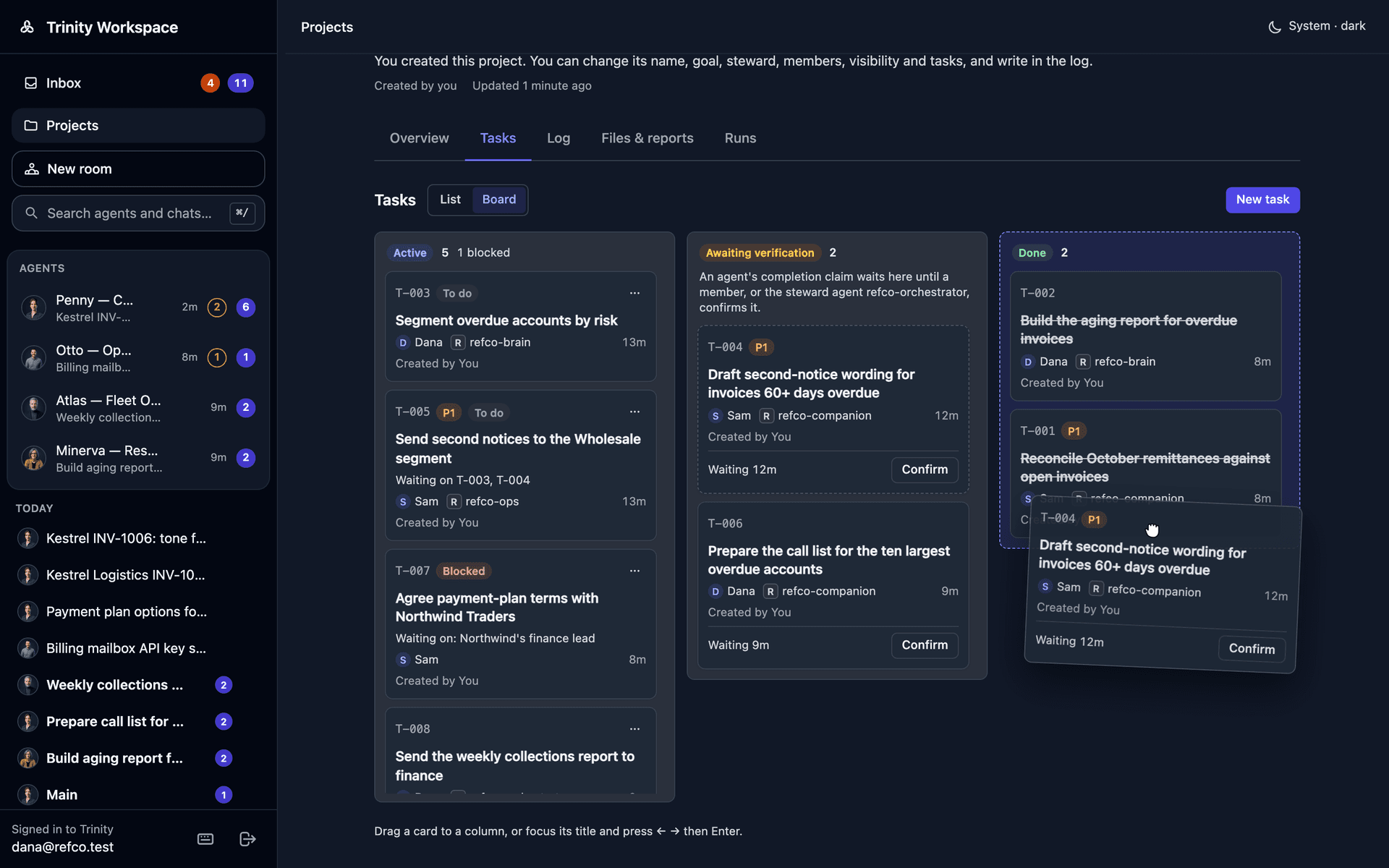
A project's board: tasks in Active, Awaiting verification and Done columns, with one card being dragged to Done
•A board view. Tasks sit in one column per status, and you drag a task to move it.
•Tasks with shape. A task can have subtasks, wait on another task, start as not started, and belong to a person as well as an agent. Its title, objective and definition of done are editable, and its owner can be changed.
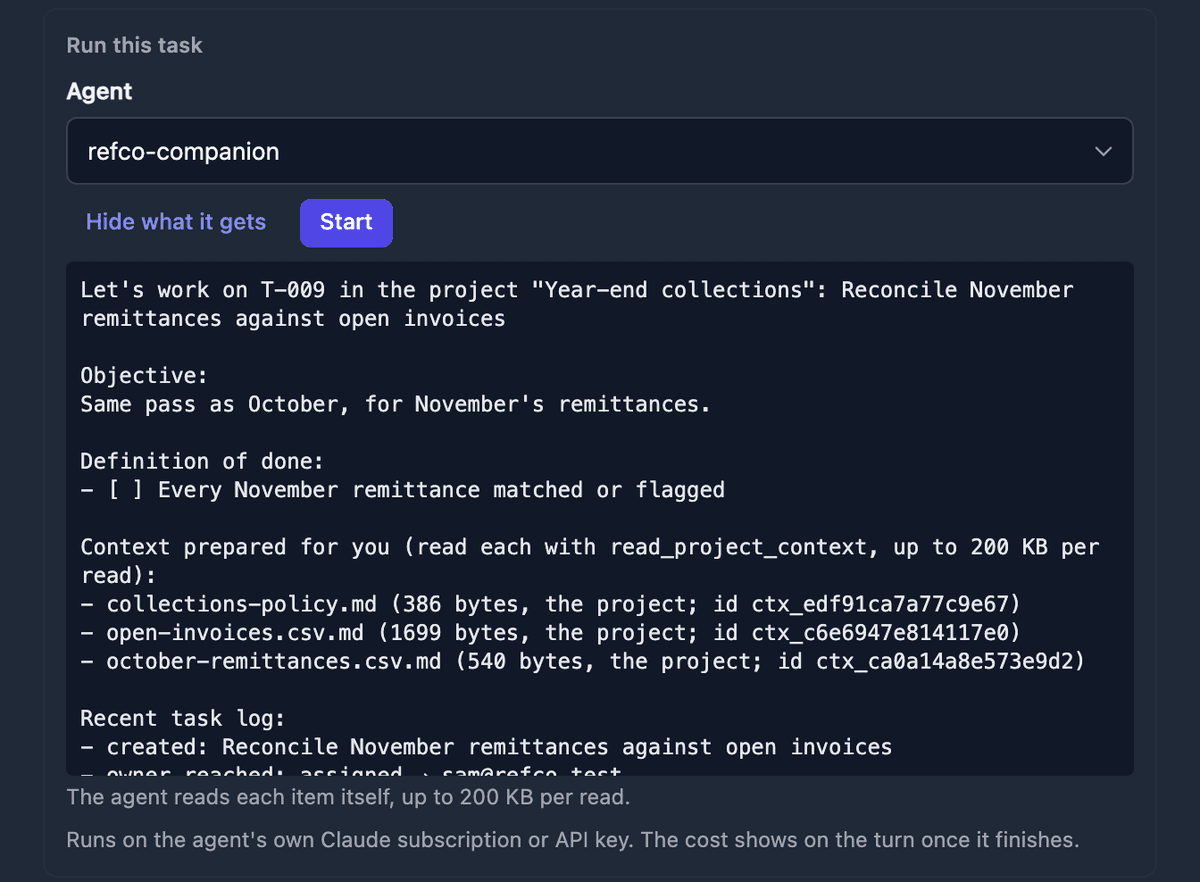
•Start a run from the task. Pick the agent, preview what it will be given, and Start opens the task's chat.
•Context for agents. Write or upload a brief on a project or a task and mark what agents should read.
Run this task: the agent picker, Start, and the preview of what the agent will be given — the objective, definition of done, prepared context and recent task log
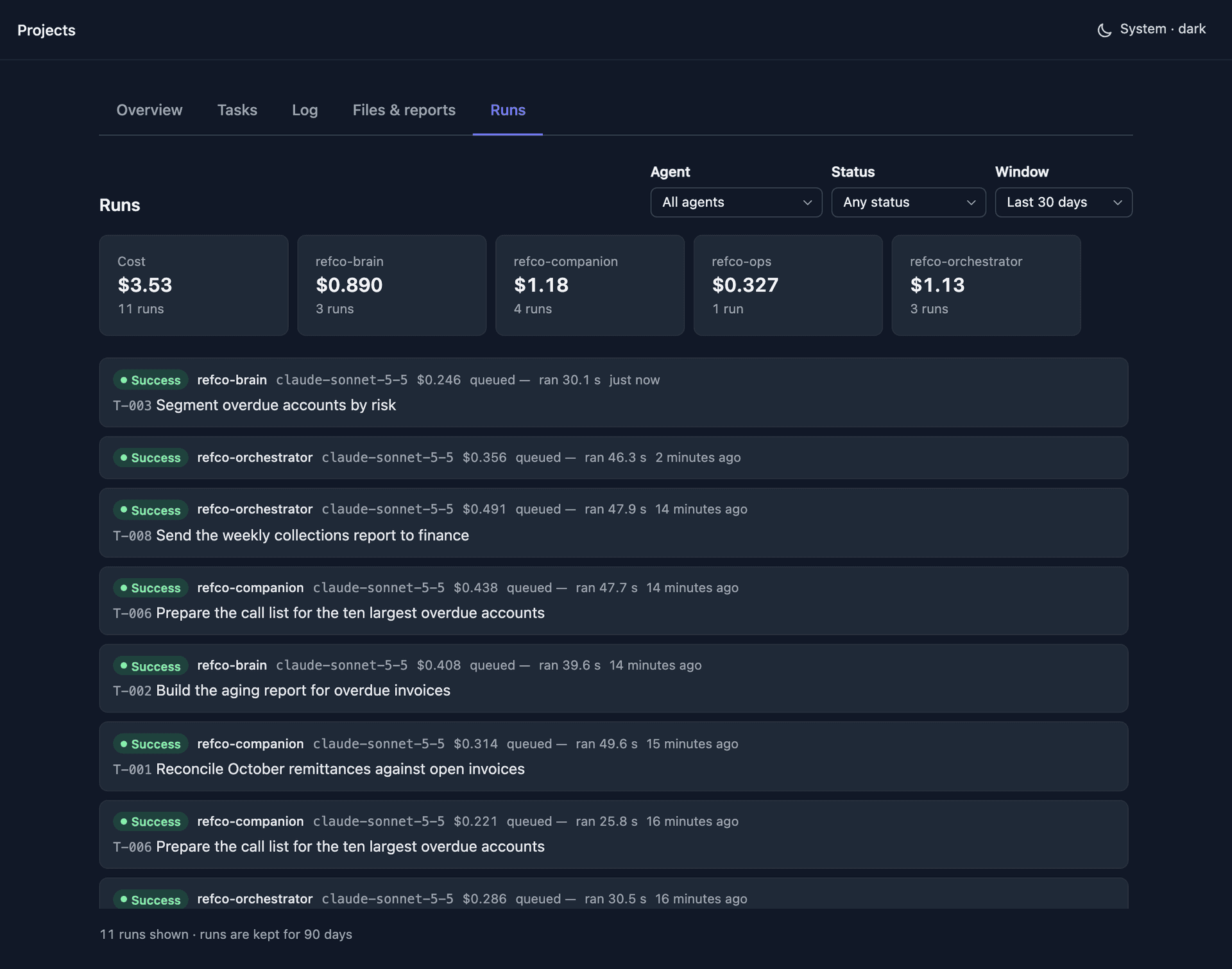
•A Runs tab. A project lists the runs behind it across its agents, with cost and time spent queued.
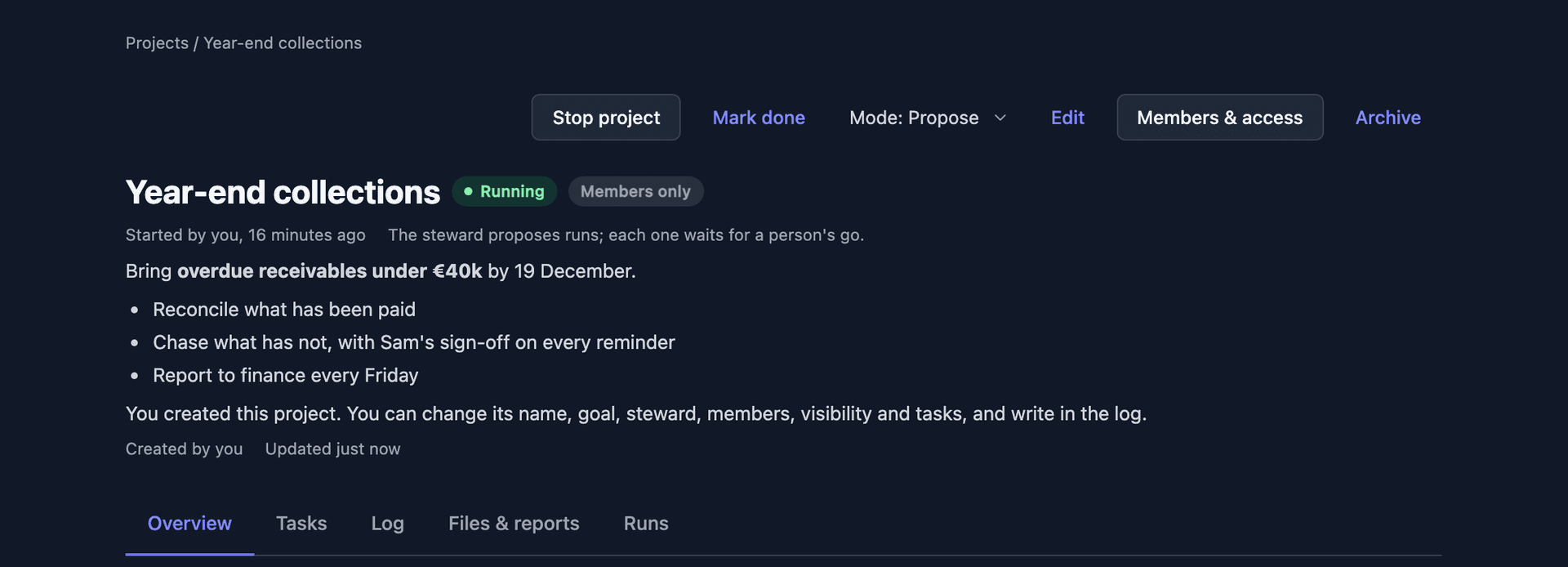
•A steward from the start. Pick a steward agent when you create the project. It proposes members and task owners, and you approve the proposal once in the Inbox.
•Project mode. Choose Track, Propose or Auto to decide whether the steward may start work on its own. Start and Stop are on the project.
A running project in Propose mode: Stop project, the mode picker, and a line saying the steward proposes runs and each one waits for a person's go
The Runs tab: cost per agent across the project, then each run with its task, model, cost, time queued and duration
•Bring in existing work. Turn a GitHub epic into a project, and point a task at the issue or pull request where its work happens.
•Clear about access. A project page says what your role is and why a control is missing, with Ask to join. The Steward card says who cannot use the steward agent, with Ask for access and Give access.

See Workspace Projects.

Agents that wake when something happens
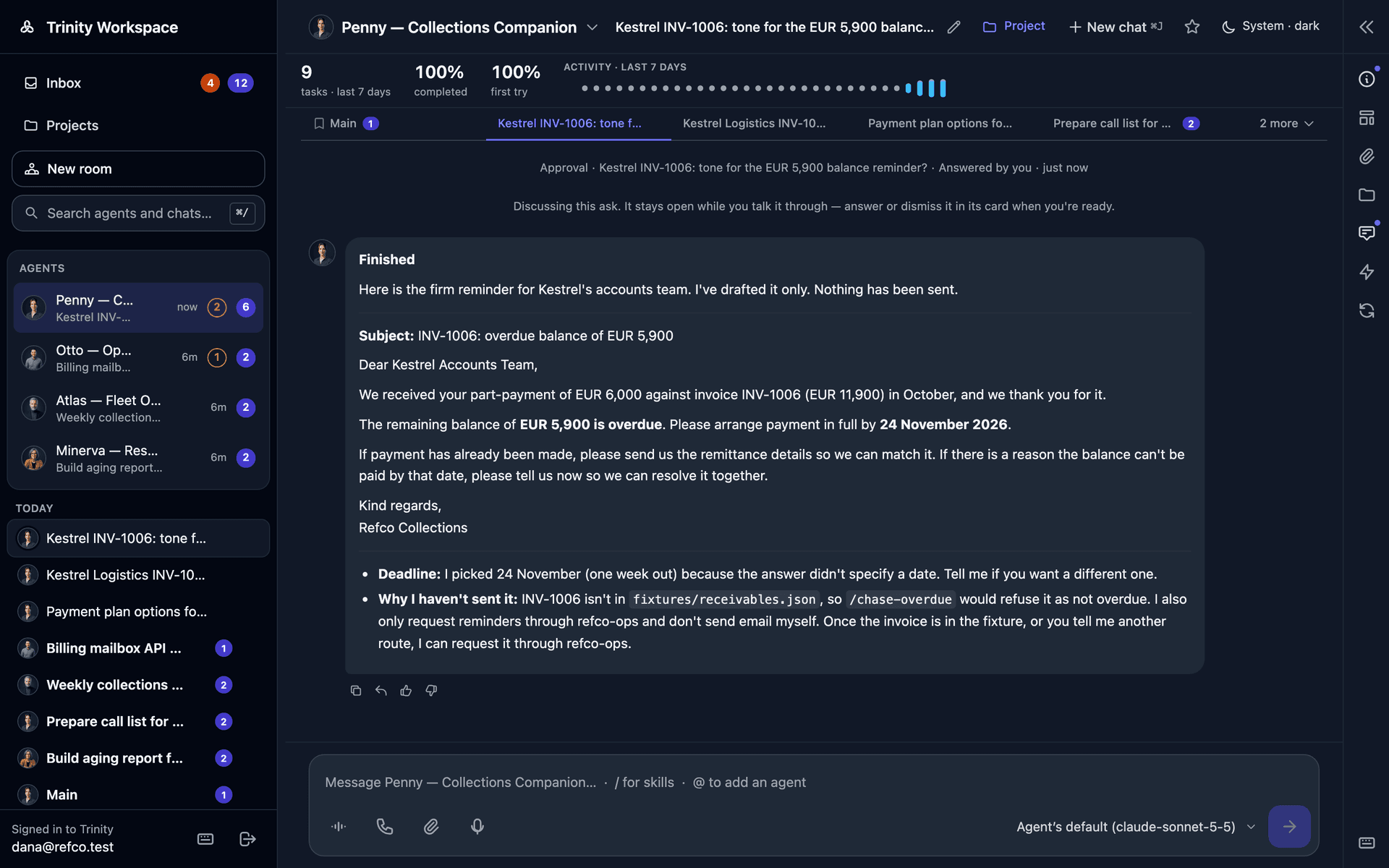
•An answered ask wakes the agent. When a person answers an agent's question, the agent picks the work back up. If the agent was stopped at the time, the wake is delivered on its next start.
•A finished delegation wakes the caller. When an agent hands work to another agent, it is woken when that work ends or needs a decision.
•Same model throughout. Turns the platform starts — wakes, reminders, answers — run on the model the agent is configured for.
After the approval is answered, the agent picks the work back up in the same thread and finishes the draft

Both are on by default. See Approvals.

Asks reach someone who can answer
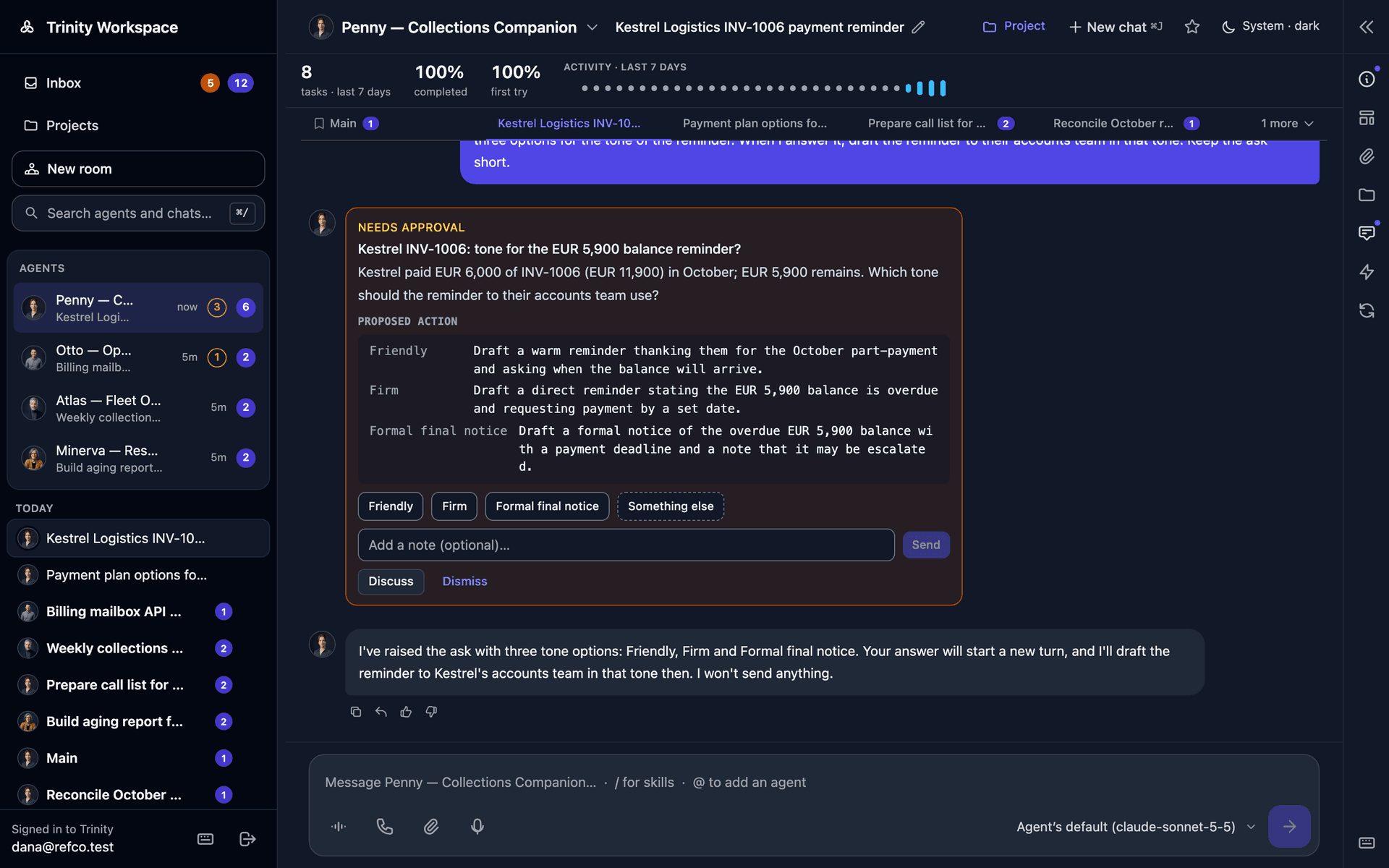
•An ask goes only to a person who can open the agent. Where nobody can, the agent is told by name instead of the ask waiting forever.
•An ask raised in a room comes back to that room.
•An agent working on a project can address the project's people.
•Changing an agent's primary contact moves its pending asks and approvals to the new person.
•An ask shows in the conversation it belongs to as well as in the Inbox.
An ask in the chat it was raised in: the question, the proposed options, a note field, Discuss and Dismiss

Retrieval memory keeps what was said and done across turns and brings the relevant parts back into the agent's prompt. It is off by default; an admin turns it on under Settings → General.
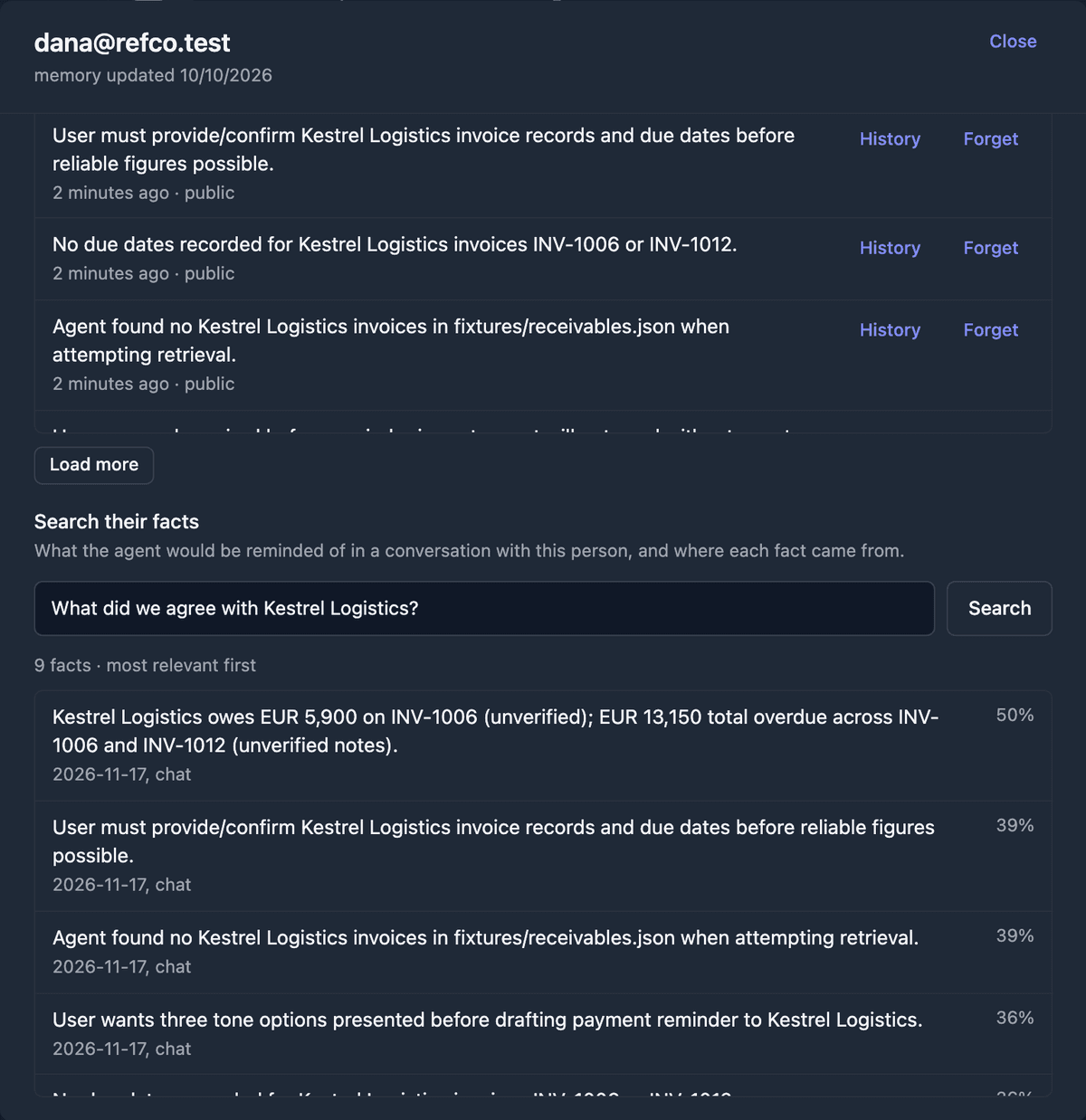
•Search. The owner searches an agent's memory from the Memory panel, and the agent searches its own over MCP.
•Person memory. In the agent's Settings, the owner sees what an agent remembers about a person, the history of changes, and can undo one.
•Guarded writes. What an agent writes about a person is checked before it is stored.
What an agent remembers about a person, with History and Forget on each fact, and a search that ranks the facts the agent would be reminded of

See Agent Memory.

Voice: a Direct call

In Workspace voice, a Direct call sends every spoken turn to the agent and plays the agent's own reply. Stop the agent mid-reply by voice or by hand. Agents can also send a voice note to a person by role or email, so a scheduled run can speak. See Voice Chat and Voice Replies.
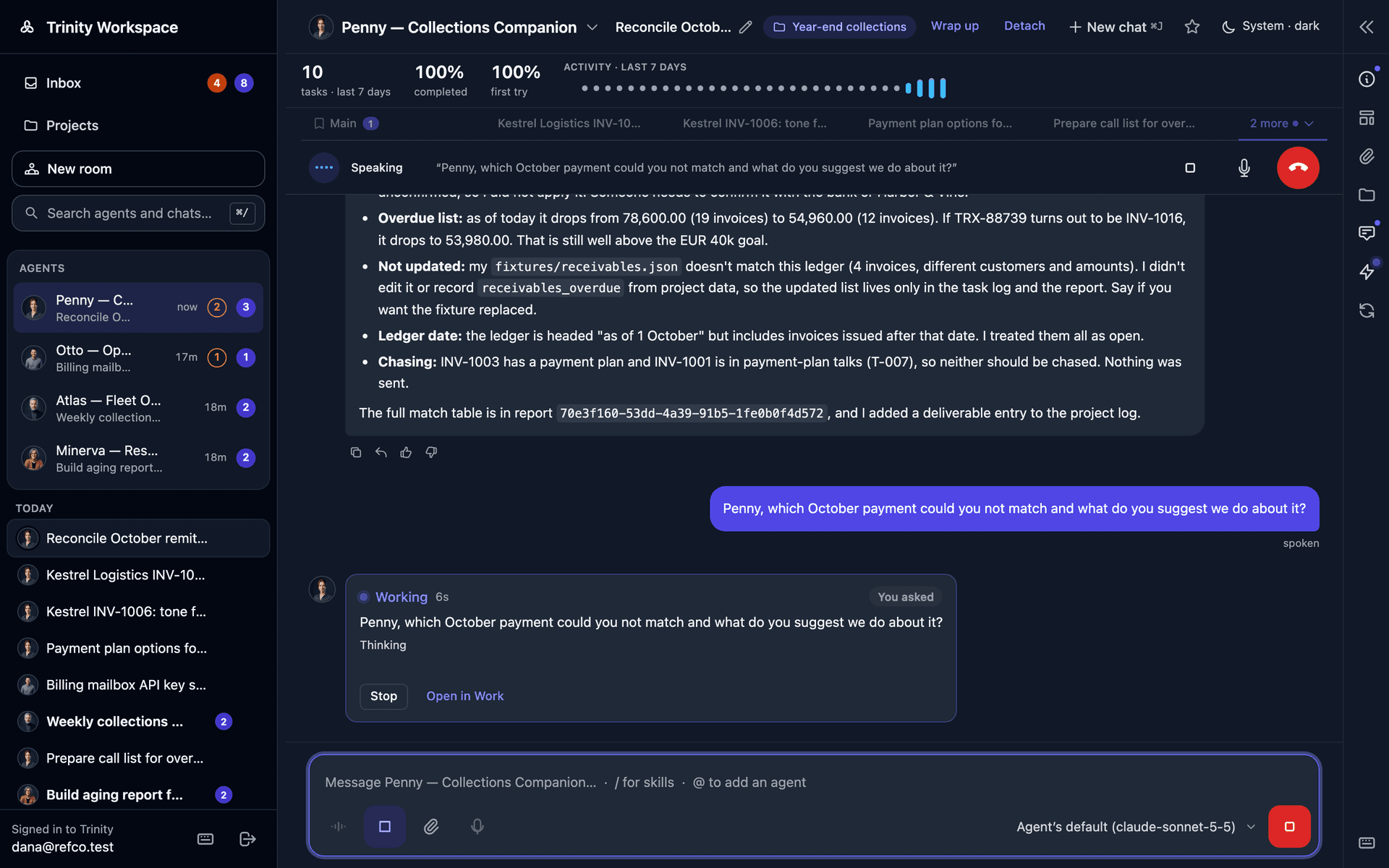
A Direct call in the Workspace: the spoken question appears in the thread and the agent starts working on it, with stop, mute and hang-up controls above

Systems that reconcile

Applying a system manifest to a running instance now updates what is there instead of creating copies with _2 on the end. A manifest can state the whole target: skill assignments, admin grants, who approves what, roles and catalog-only members. apply_system is available over MCP, and system export and re-apply round-trip cleanly.

Funding an agent with a card

From an agent's Payments tab, an operator enrolls a card and sets a mandate for what the agent may spend outside Trinity. See Nevermined Payments.

One command to upgrade

trinity update (or scripts/deploy/update.sh) checks the install before touching it, upgrades, confirms the published address answers and rolls back if it does not. After an upgrade, one alert names the running agents that are still on the old base image. See Upgrading and the new Capacity Planning guide.
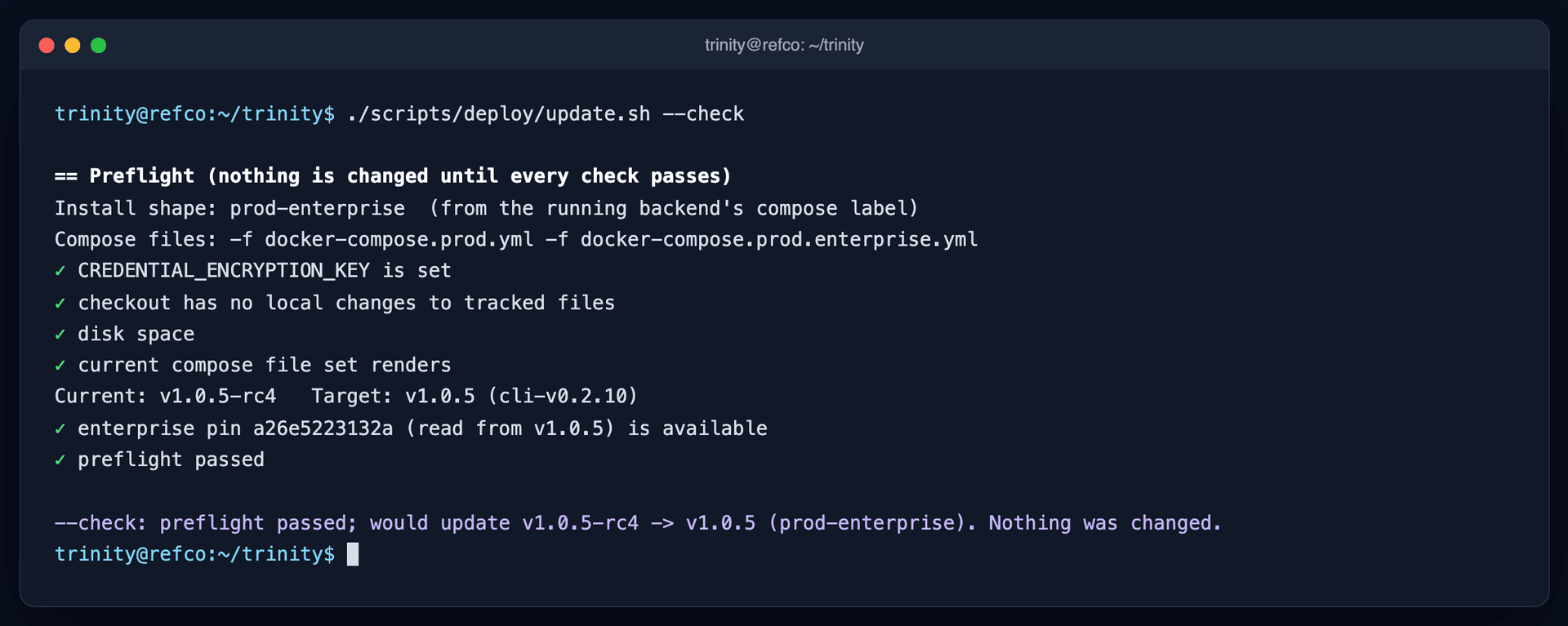
The pre-flight check: nothing is changed until every check passes, and --check reports what the update would do

More improvements

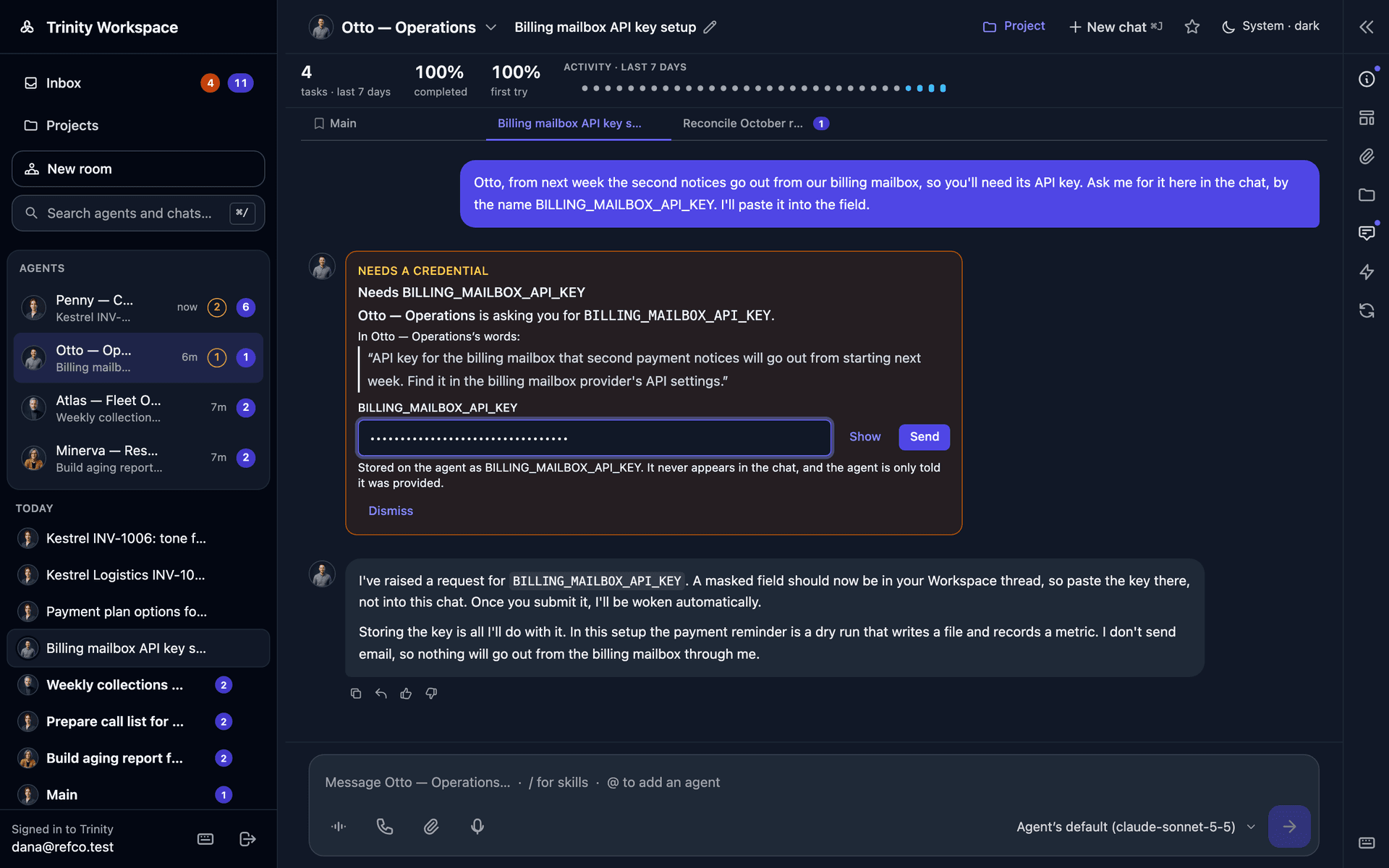
•Hand over a credential in the chat. An agent asks for a credential by name; you type it into a masked field and it is stored for the agent without appearing in the thread.
An agent asks for a credential by name; the value goes into a masked field and never appears in the chat
•Change the admin password in the app, and it is kept across restarts.
•Skills tab. Find a skill, see what Save would change before you save, Select all / Deselect all, and deprecated skills are marked everywhere they appear.
•Tool-access profiles. One choice per agent sets read-only mode and the tools it cannot use.
•Access tab. Suggestions from registered accounts when you add a person, an invitation you can send again, and access requests from a channel that name who asked. Block, revoke or approve a single channel user from the roster.
•The agent's Sharing tab is now Channels , and Credentials has its own pane in Settings.
•Declare an agent's metrics from the UI. The form writes the template's metrics block.
•People picker. Members, guests, stewards, task owners and assignments pick a person instead of typing an email.
•Rooms. Seat a second person as a participant, and room messages count as unread in the Inbox.
•Terms of use per instance. A default ships with Trinity, an admin can edit it, and each person sees it once.
•Telegram albums arrive as one turn instead of one per photo.
•PDF uploads , off by default: set ALLOW_PDF_UPLOADS=true to deliver PDFs to agents.
•Higher turn limit. The default goes from 50 to 200.
•Templates. github:owner/repo@tag pins an agent to a tag, a template's bundled avatar is shown, and Create Agent prefills the name from the repository.
•Agent files on the platform. Agents list, read, write and remove platform files over MCP.
•An admin's MCP key can act for an agent on the ask, project, report and metrics tools.
•Agent-to-agent across instances signs in with agent identity when an admin enables it.

Fixes

•Workspace — A completion report or an approval outcome appears in an open thread without a reload. The landing layout, agent header, Inbox rows and project dialogs hold still while they load. A chat with a new reply is no longer hidden under "N more". A platform account signing in at the Workspace page gets its own projects and agents, with one emailed code.
•Sign-in — An expired session or a deep link returns you to where you were going. The connection indicator is correct after signing in. Invite emails link to the right address.
•Asks and approvals — A pending approval can be answered after the agent's primary contact changes. An ask is no longer filed for someone who cannot open the agent.
•Delegation — A repeated delegation from a later turn runs again instead of replaying the first result, and the report goes to the right conversation. A fast-finishing delegate no longer loses its wake. Long wake chains do not stop after a few rounds.
•Scheduling — The scheduler no longer spins at the autumn clock change. An agent with two schedules runs the right task. A retry follows the same rules as the original run and stops retrying a turn-limit failure.
•Tasks and executions — A task sent to an idle agent starts at once instead of waiting for another slot. A stopped run is recorded as stopped. The timeline shows runs on agents that pull their work.
•Subscriptions — A prompt that is too long, or a turn-limit failure, is no longer treated as a credential failure. Scheduled runs are counted in subscription spend.
•Git sync — A manual Pull keeps a tag-pinned agent on its tag. Repository maintenance runs for agents that push themselves, and a status poll no longer leaves a stale lock.
•Systems — Export keeps permissions and folders, systems with bare member names are listed, and apply and deploy results say what happened.
•Channels — A failed turn no longer posts the raw platform error into the chat. Slack install returns to the right address. A Public URL with a trailing dot is refused.
•Agent runtimes — Gemini chat runs have a time limit and stop cleanly. Codex accepts long prompts. Agents can write their own .env.example.
•MCP — Clients reconnect after a redeploy. A failed tool call is audited as failed.
•Install and upgrade — The DigitalOcean 1-Click refuses plans below the 4 GB / 2 vCPU minimum. start.sh --hosted keeps site blocks you added to the Caddyfile. Dotted-IP hosts work over plain HTTP on a private network.
•Interface — Long lists scroll inside their panel and can be searched. Relative times read "1 minute ago". The Access tab and agent page fit at phone width.

Security & Hardening

•External MCP access is off on a new install. An admin turns it on under Settings → MCP Keys. Existing installs stay as they are.
•Agent SSH ports are published on the host only , not on every interface.
•People an agent is shared with for chat no longer read other people's runs or stop the agent.
•A suspended account is refused at every sign-in door and loses its open connections.
•One privacy switch. With DO_NOT_TRACK=1 the instance makes no request to a vendor-operated host: telemetry sharing, the bug report form, the Ask tab and the ask_trinity tool are all off.
•Agent runtimes send less to their vendors. Gemini usage statistics and Claude Code's non-essential traffic are off by default.
•Sign-in limits on hosted installs count per client address , so wrong passwords from one place no longer lock everyone out. Channel /login emails are rate limited.
•Skill grants between agents are enforced inside the agent , so a skill cannot be reached by asking for it in prose.
•Files. A symlink in an agent's home no longer passes the path checks.
•An agent's .env cannot redirect its model traffic to another host.
•Voice. Text sent to speech is scrubbed of credentials, and the voice connection no longer carries the sign-in token in its address.
•Audit. Stopping a run, resetting a circuit breaker and using a self-change grant each leave an audit row.
•Machine credentials. A bounded key for four operational writes works with enforced two-factor sign-in.
•Base image. Agents move to Node.js 24.

Upgrade Notes

•PostgreSQL is the default, and moving off SQLite is recommended. New installs run a bundled PostgreSQL. SQLite has not been removed: to keep an existing install on it, set DATABASE_URL= (empty) and TRINITY_ALLOW_SQLITE=1 in .env before you upgrade. Without those two lines an install with data in trinity.db stops at startup and prints the command that copies it to PostgreSQL. To move, follow SQLite to PostgreSQL.
•POSTGRES_PASSWORD is required by every compose file. start.sh generates it.
•Use trinity update. See Upgrading.
•Rebuild the agent base image and recreate agents. Agents on the old image keep working without the agent-side fixes in this release. An alert lists which ones.
•Agent SSH moves to 127.0.0.1 when an agent is created or recreated. To reach it from another machine, set AGENT_SSH_BIND_ADDRESS to a VPN interface address, or 0.0.0.0 for the old behaviour.
•An existing install keeps its MCP port open on every interface. Set MCP_BIND_ADDRESS=127.0.0.1 to close it; clients off the host then use the web address's /mcp.
•Set FRONTEND_URL whenever PUBLIC_CHAT_URL is set. Invite emails take their sign-in link from it and carry no link without it.
•Production and hosted installs add a network on 172.30.0.0/24. If that range is used on the host, set TRINITY_PROXY_PREFIX. If your own proxy sits in front of Trinity, list it in TRUSTED_PROXIES.
•DO_NOT_TRACK now covers more. If it is set, the help widget's report and Ask tabs and the ask_trinity tool are off as well.
•Voice model. The default moves to models/gemini-3.8-live. If you set VOICE_MODEL to the previous preview model, change it; that model stops working on 2026-11-17.
•Wakes are on by default , capped at 120 an hour per agent with CALLER_WAKE_MAX_PER_HOUR.
•People see the terms of use once on their next sign-in. Edit the text first if the default does not suit you.
•Skills catalog. A default source you have not re-pointed follows the version bundled with the release.
•Re-login after upgrading. Keyed MCP clients now survive an MCP server restart.

Known Limitations

•SQLite is still supported behind a setting and will be removed in a later release. Moving to PostgreSQL is recommended.
•Retrieval memory ships switched off.
•Direct calls. Stopping the agent mid-reply works by voice or by hand; smoother interruption is still in progress.
•Funding an agent with a card covers enrolling a card and setting a mandate. A combined Integrations pane follows.
•Signed agent identity between instances stays off until an admin turns it on.
•Pull dispatch is an opt-in pilot per agent. Push remains the default.

See Also