Agent Reports
Structured results an agent publishes for you to read — leads found, emails sent, a weekly summary, a KPI snapshot — so you learn what an agent accomplished without scrolling its chat history. A report can be addressed to one person, and then it also reaches them in the Workspace as a deliverable.
Concepts
Report — A titled, typed payload an agent publishes. It has a report_type (namespaced, e.g. recon.weekly_summary), a title, an optional period, and a JSON payload.
Display hint — How the payload should be rendered: table, kpi, markdown, timeline, or json.
Report series — Reports sharing a report_type. Agents can read back their own previous reports to continue a series rather than duplicate it.
Audience — The one Workspace user a report is addressed to (audience_email). A report with no audience is operator-only. A report with one is a deliverable: it appears in that person's Workspace, and nowhere else in the Workspace.
Rating — One-click feedback on a deliverable: Useful or Not what I needed, with an optional comment. Ratings are written by the reader, never by the agent.
Reading Reports
Three surfaces:
| Where | Scope |
|---|---|
| Agent detail → Reports tab | One agent's reports |
| Operations → Reports | The whole fleet, with KPI tiles |
| Workspace — the rail's Info tab → Reports, and Delivered here cards at the end of a chat | Deliverables addressed to you, by that agent |
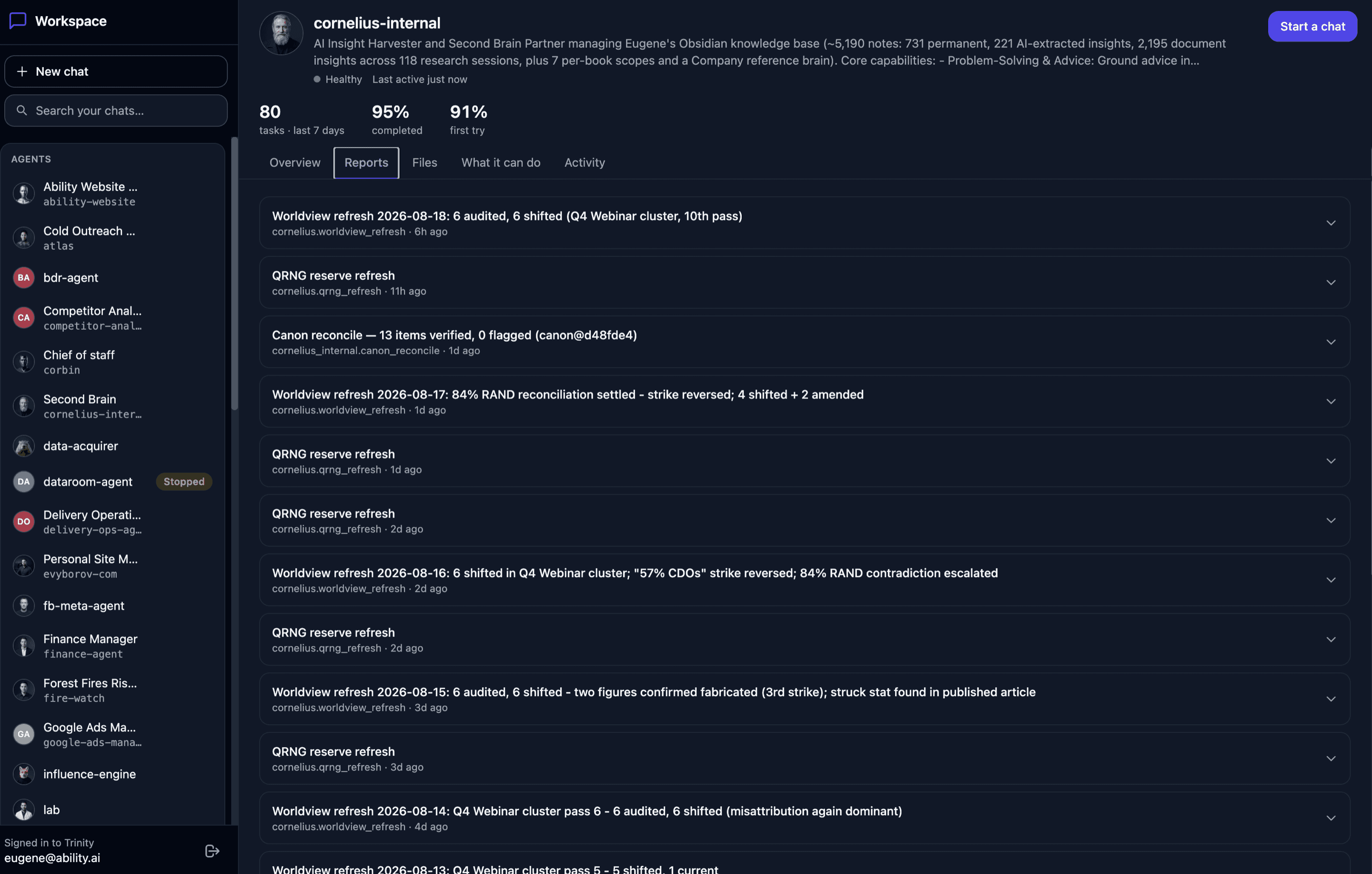
The two operator surfaces support the same filters: report type, time window, and free-text search over titles and types. The fleet view additionally matches on agent name. Who a report was addressed to is available to operators on the REST list and detail responses (addressed_to); the operator panels do not display it yet.
Lists show metadata only — the payload loads when you expand a card, so a page of large reports stays fast.
Reports render according to their display hint:
| Hint | Rendered as |
|---|---|
| table | A sortable table. Large tables are paged, so opening a multi-megabyte report transfers only the rows you're looking at. |
| kpi | A row of labelled value tiles |
| markdown | Formatted prose (sanitized) |
| timeline | A chronological event list |
| json | A pretty-printed JSON viewer |
A payload whose shape doesn't match its hint degrades to the JSON viewer on the operator surfaces. In the Workspace it degrades to a bounded, humanised summary instead — a client never sees a raw payload dump.
Deliverables in the Workspace
When an agent addresses a report to a person, that person finds it in two places:
Info → Reports — every deliverable this agent addressed to them, newest first. Expand one to read it.
Delivered here, at the end of the chat that produced it — when the report was published from a turn in that chat. A report published outside a chat (a scheduled run, for example) lists under Info only and has no card.
Unaddressed reports never appear in the Workspace. An agent that has not yet adopted audience_emailshows an empty Reports section to its clients — the operator surfaces are unchanged.
The chat cards refresh after a turn ends, not on a timer: a turn is the only thing that can produce a deliverable in a chat.
Rating a Deliverable
Each deliverable card carries Useful / Not what I needed. Agent messages carry the equivalent Helpful / Not helpful thumbs — those are described with the Workspace.
One click records the rating. Not what I needed also opens a comment box (What were you looking for instead? (optional)) — the rating is already saved by then, so closing the box loses nothing.
One rating per person per deliverable. Clicking the other option corrects it; clicking the one you already gave does nothing — there is no un-rate.
After a comment is sent you see one of two acknowledgements, and both are true: Thanks — passed on to the agent. when the agent has a capture-feedback skill (the words are handed to it in a background turn of its own, never posted into your chat), or Thanks — recorded for the team. when it does not.
A negative rating also raises a heads-up in the operator queue — A Workspace client rated a response as not useful, with the comment if there was one — so the person running the instance hears about it. One such item per person per deliverable per day. See Approvals.
What the rated agent learns.Tallies only. An agent can read that it was rated up or down, but never the words and never who rated it — a comment is untrusted text from someone who is, by construction, annoyed, and handing it to the thing being criticised is a prompt-injection path. Operators of the agent read comments in full.
Exporting
Any report can be exported from its card on the operator surfaces:
Excel (.xlsx) — best for tables and KPI sets.
PDF — best for sharing a summary.
A shape that doesn't map cleanly degrades to a sensible sheet or embedded JSON rather than failing. If the export libraries are missing from your image (an older build), the endpoint says so explicitly rather than breaking the page.
Publishing (What Your Agent Does)
Agents publish with the reportMCP tool. Trinity's platform prompt tells every agent that this tool exists, when to reach for it, what payload shape each display hint expects, and when to address a report — so reporting is a fleet-wide default rather than something each template has to opt into.
An agent can only publish as itself: an agent-scoped key reporting under a sibling agent's name is rejected.
Addressing a report. Pass audience_email when the work was done for a person the agent is shared with. The address is checked against the agent's own roster: someone the agent is not shared with is refused with a named error, and an unreadable roster refuses rather than publishes. To place the card in the chat the work came from, the agent also passes its current execution_id; Trinity confirms the execution belongs to that agent and resolves the chat itself — the agent never names a conversation, so it cannot post into one it was not part of.
Retention
Reports are pruned past agent_reports_retention_days (default 90; 0 disables). Configure it under Settings → Retention.
MCP Tools
| Tool | Description |
|---|---|
| report(report_type, title, payload, display_hint?, audience_email?, execution_id?, period_start?, period_end?) | Publish a report. Self-only. audience_email addresses it to a Workspace user; execution_id places the card in the chat that turn belongs to. |
| list_reports(agent_name?, report_type?, hours?, search?) | Metadata for reports you can see |
| get_report(report_id) | Full payload |
Read access for an agent key is narrowed to itself plus the agents it is explicitly permitted to reach. A report you may not read returns "not found" rather than a distinguishable permission error. Who a report was addressed to is withheld from every non-human caller — agent and connector keys never see addressed_to, on the tools or on the REST routes.
REST Endpoints
| Endpoint | Method | Description |
|---|---|---|
| /api/agents/{name}/reports | GET/POST | List / publish for one agent (audience_email, execution_id on publish) |
| /api/agents/{name}/reports/{id} | DELETE | Delete a report |
| /api/reports | GET | Fleet list (filters: report_type, hours, search, agent) |
| /api/reports/stats | GET | Fleet KPI tiles |
| /api/reports/{id} | GET | Full payload |
| /api/reports/{id}/rows | GET | Window a table payload (offset, limit, true total) |
| /api/reports/{id}/export | GET | ?format=xlsx or ?format=pdf |
| /api/agents/{name}/evaluations | GET | The agent's ratings alongside its other evaluations; each Workspace rating is filed under workspace:<email>. A machine caller gets comment_withheld: true and no rater identity |
The Workspace reads deliverables and records ratings through its own client-scoped routes (/api/enterprise/client-portal/agents/{name}/reports, /reports/{id}, /ratings) — listed with the Workspace.
See Backend API Docs for full schemas.
Limitations
See Also
- Executions — the run-level record behind a report
- Workspace — where a deliverable reaches the person it was for
- Approvals — the operator queue a negative rating reports into
- Dashboard — fleet overview
- MCP Server — the
reporttool - Dynamic Dashboards — agent-defined dashboard panels